



Executive Summary
Content Management Systems (CMSes) are defined as software applications that allow users to build, manage, and publish web-facing content without having to directly interact with code. Examples include WordPress, Drupal, and Squarespace. Although some CMSes are more self-contained, most require backend software. PHP, one of the most popular server-side programming languages, is used to host a variety of web interfaces including WordPress. Despite PHP updates being freely available, a large number of websites are not maintaining the latest patches and attackers are targeting these sites.
- Within the population of publicly reachable WordPress instances observed in Censys, over 70% were running outdated PHP versions.
- Only 14% of publicly visible WordPress sites were on the latest patch of WordPress.
- Threat Actor Case Study: MR.GREEN Defacement Campaign (see below)
Introduction
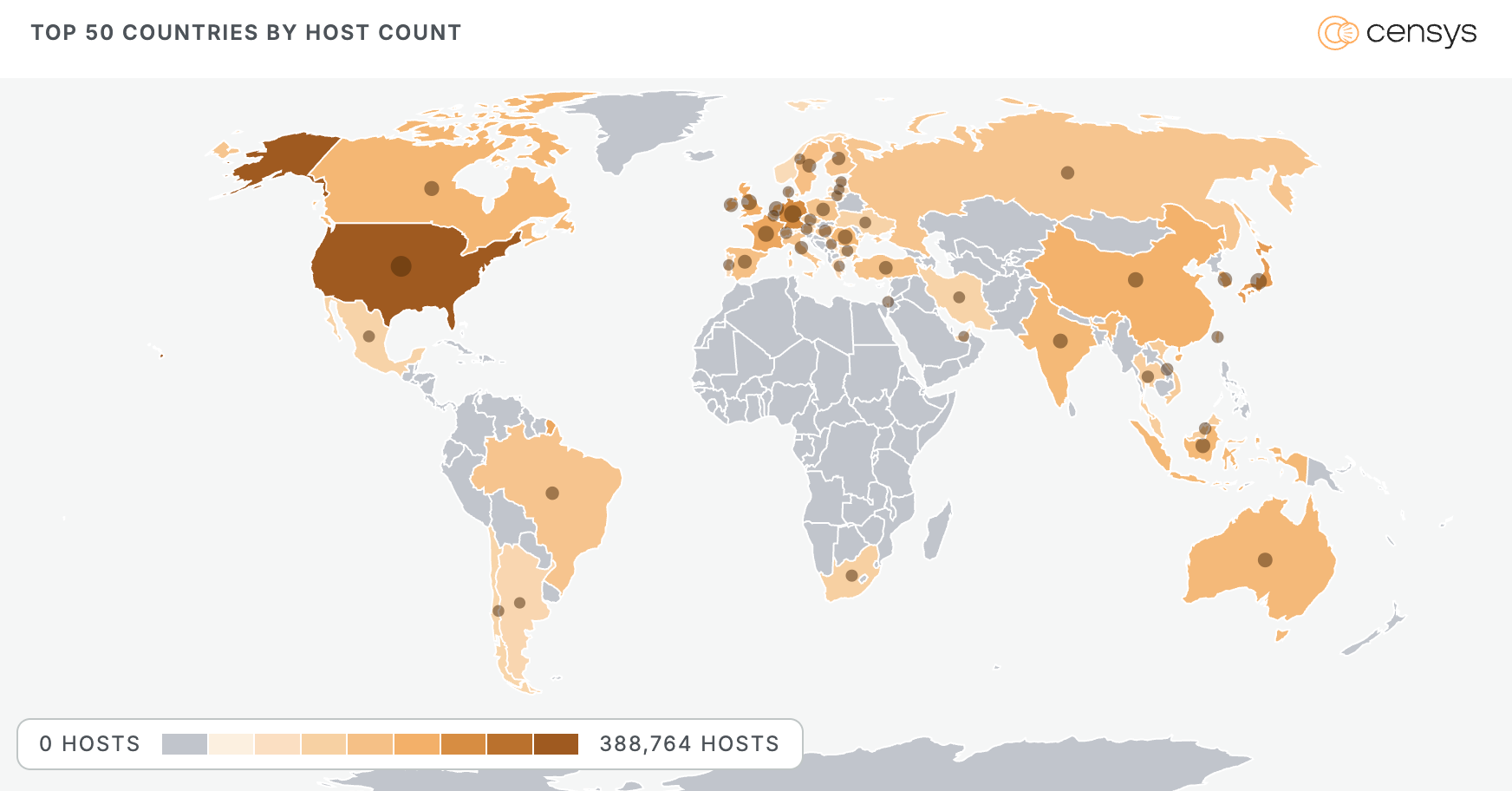
CMSes have made it possible for businesses to spin up a web presence without hiring a dedicated developer. For many small businesses, these products have become a “plug and play” solution. WordPress is among the most popular CMS options, claiming to power over 40% of the web. As of June 2026, over 59 million publicly visible web entities across 1 million distinct IP addresses are running WordPress.
PHP and Its Ties to WordPress
In 2003, WordPress launched with its core programming built around PHP and MySQL. To this day, PHP serves as the standard backend for WordPress. Furthermore, WordPress encourages all WordPress plugins and themes to follow suit. Outside of WordPress, PHP historically has been one of the most popular web-serving backends with availability to MacOS, Windows, and Linux distributions. As a result, much of the web’s infrastructure is running on PHP.
The State of WordPress and PHP Versions Today
The vast majority of public-facing sites do not expose both their WordPress and PHP versions. This is likely due to differences in configuration and security practices.
Within the population of over 316,500 WordPress PHP sites that do have visible version headers, only approximately 44,000 (14%) of them were on the latest version of WordPress (WordPress 7.0). However, if we include WordPress 6.9, which is no longer supported as of March 20th, 2026, then the total population of sites with actively maintained versions would be around 99,000 (31%).
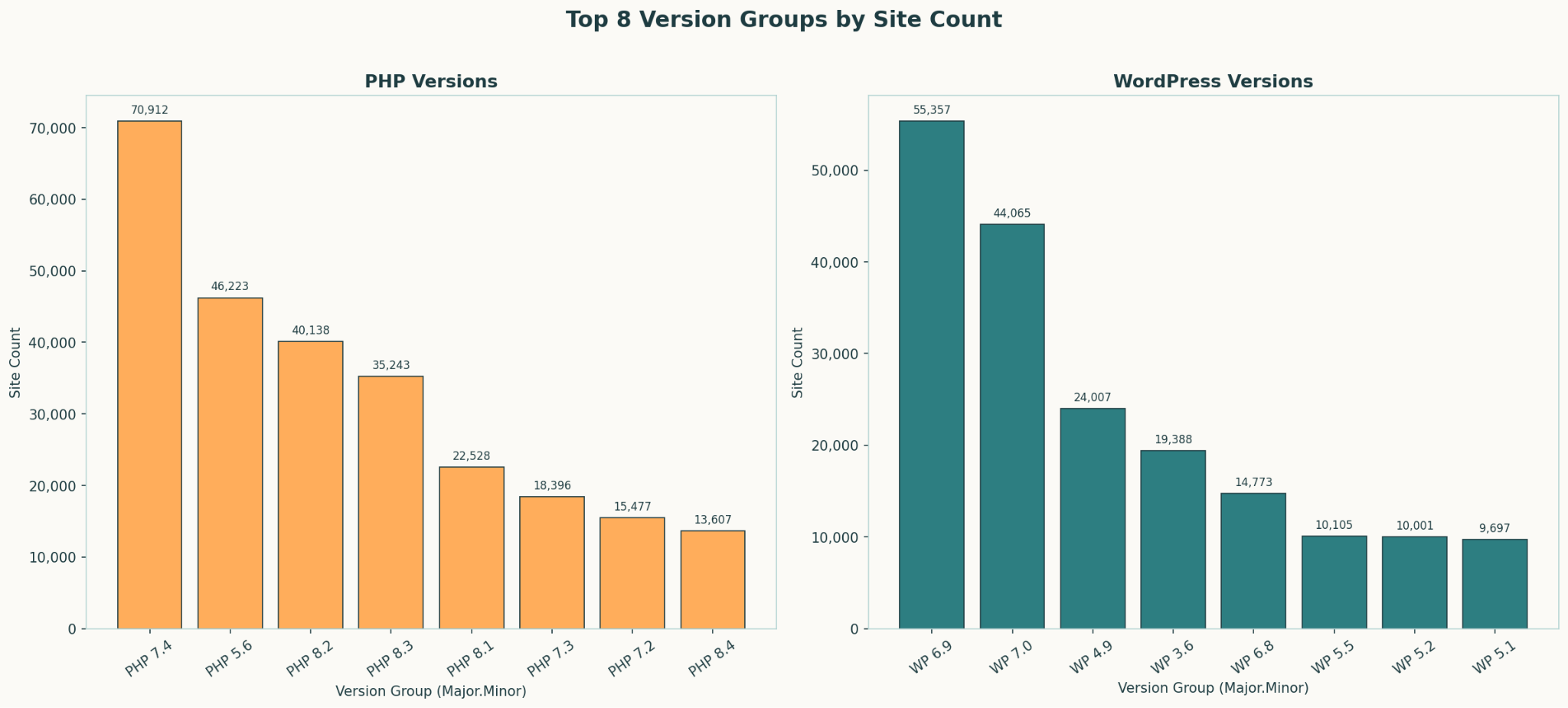
By comparison, within the same population, about 94,000 were on a current patch of PHP (30%). The most common PHP version observed overall was PHP 7.4, with over 20% of sites running it. PHP 7.4 reached end of life in November 2022. By contrast, over 30% of WordPress versions are on 6.9 or higher which are still actively maintained.
We see a significant variation across versions across sites, especially in their PHP backends. It seems that, as a whole, observed sites are running more up-to-date WordPress alongside outdated PHP. This skew toward outdated versions represents a critical security concern for web servers. Not only are older frameworks less efficient, they also are more susceptible to vulnerabilities.
While this case study was centered on WordPress sites, these trends likely reflect the broader landscape of other CMS infrastructure.
The Problem with CMS Architecture
Despite PHP being a major pillar for web infrastructure, it’s concerning to see so many sites running on older versions of PHP. Users reflecting on online forums cite the inconvenience of migrations and redeployment as reasons to skip updates or maintain older backend software. However, defending the attack surface for the backend of these sites is just as important as the front end. PHP upgrades are not optional improvements, but critical security patches. If a web service cannot easily support new patches, then the system is out of date and needs to be upgraded or otherwise hardened with access controls.
The fundamental issue also lies in the architecture of web-servers as a whole. CMSes are not being designed with older backend frameworks in mind. Rather, they work under the assumption that users have the ability to maintain the latest versions of underlying backend software with no blockers or inhibitions. For example, the newest version of WordPress (WordPress 7.0), was pushed out with the intention of integrating new AI features. However, many users are holding off due to security concerns relating to AI and fears of their websites breaking. With new patches being released under the constraints of maintained software, updates can cause sites to become dysfunctional, resulting in users delaying updates. The same idea is reflected with PHP updates: PHP assumes users are only updating from one patch below, making it extremely difficult for users with much older versions to upgrade seamlessly.
The Rise of Plugins
The use of plugins for CMSes is also increasing. In the context of WordPress, plugins are packages of code that extend the core functionality of WordPress. They use PHP code and can include other assets such as images, CSS, and JavaScript. As of June 2026, nearly 7.5 million WordPress sites have a listed plugin.
One of the most visible plugins is called Yoast which serves to automate SEO for websites. Over 5 million web properties are running the Yoast SEO plugin. Yoast is disproportionately more visible by design due to its SEO management and tagging practices as a means to increase web rankings. The plugin automatically signs meta tags on every web page, often with visible versions. Although this exposure doesn’t pose a direct security risk, it serves as a great case study to see the growth of plugins within sites, as well as how often users are patching them.
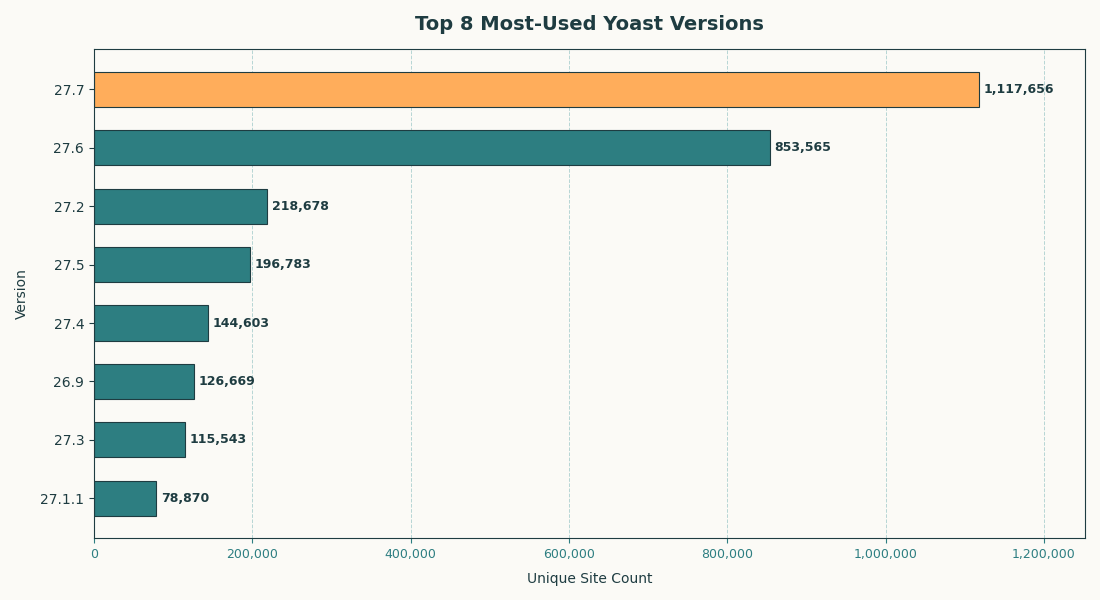
Less than 22% of sites advertising their Yoast versions are on the newest release (27.7, released May 27, 2026). Including version 27.6 brings that figure to 40%. Even for a well-maintained, widely adopted plugin like Yoast, the majority of users are running outdated versions. This is a strong indicator that WordPress plugin patching is broadly deprioritized.
The Risks of Outdated Plugins
Plugins present a unique challenge to secure in the sense that they are not monitored as extensively as WordPress core. As a result, there are thousands of exploits across various plugins. Without proper patching, plugins can carry a variety of vulnerabilities. For example, UpdraftPlus, a popular backup and migration WordPress plugin with over 3 million downloads, has a high risk profile if not maintained. With multiple CVEs which risk data exposure and authentication bypass, it’s imperative for admins to keep track of plugin updates even for well established plugins like UpdraftPlus. Every outdated plugin is its own potential entry point.
Additionally, plugins can serve as an effective entry vector. Attackers can create duplicate versions of popular plugins and trick users into downloading malicious software. Furthermore, malicious actors can compromise popular plugins with a backdoor. Plugins also have fewer regulations, thus there is an inherent risk of plugin software being sold to malicious actors enabling a supply chain attack.
The MR.GREEN WordPress Defacement Campaign
Opportunistic bad actors frequently scan the web for misconfigured or unpatched WordPress sites, which are often treated as low-effort targets. One of the most visible outcomes of such campaigns is website defacement, where an attacker replaces a site’s content with their own prominent message. The message typically includes their “hacker name” or other identifying tag. One active example is the “Hacked By MR.GREEN” campaign: an unknown threat that defaces WordPress sites, replacing content and tagging ‘MR.GREEN’ in HTML page titles.
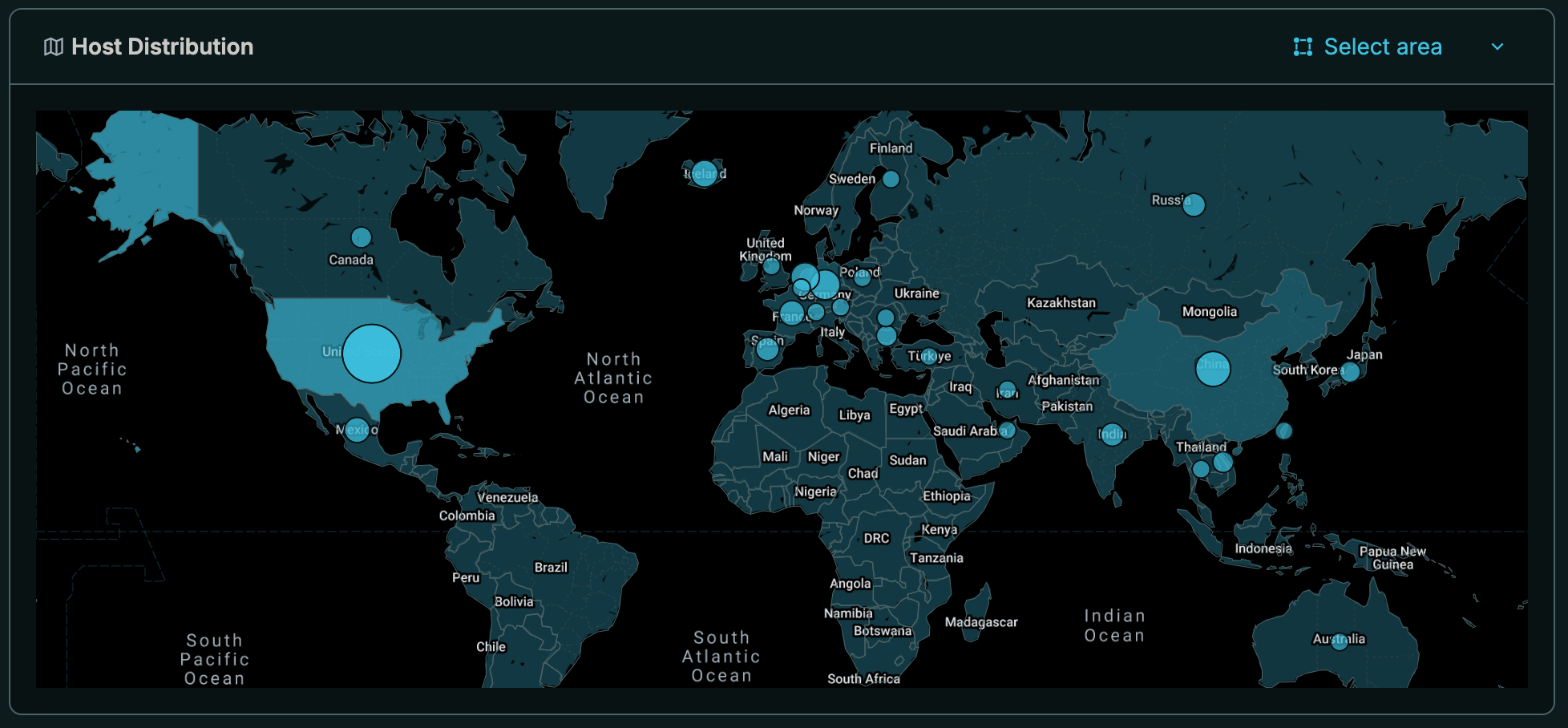
As of June 2026, over 900 websites were defaced with the message “Hacked by MR.GREEN”, with nearly every victim being a CMS, the most common being WordPress.
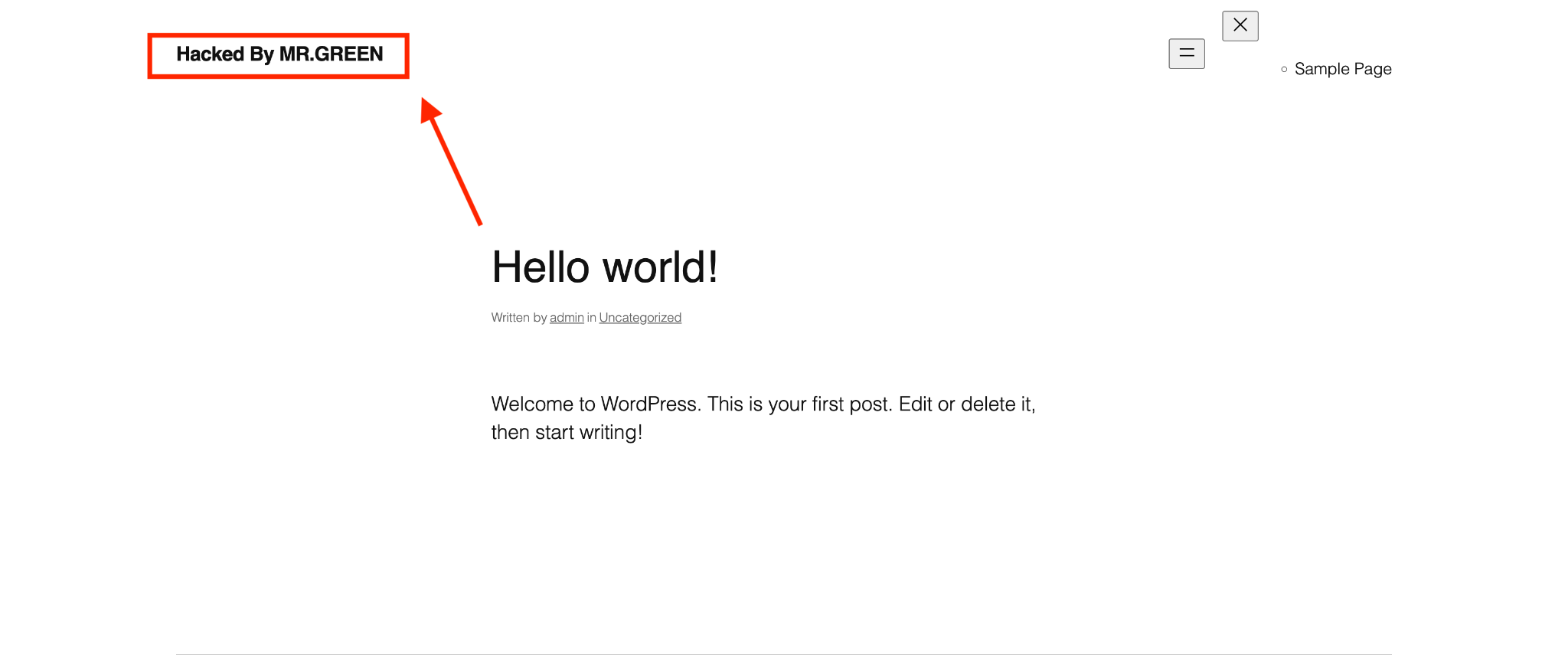
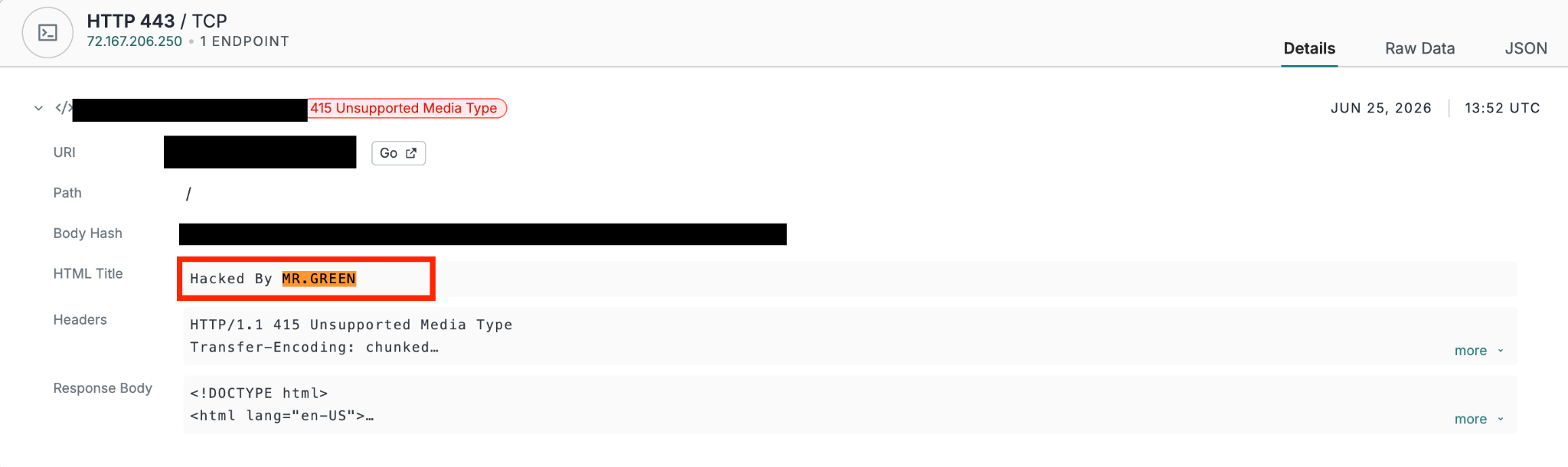
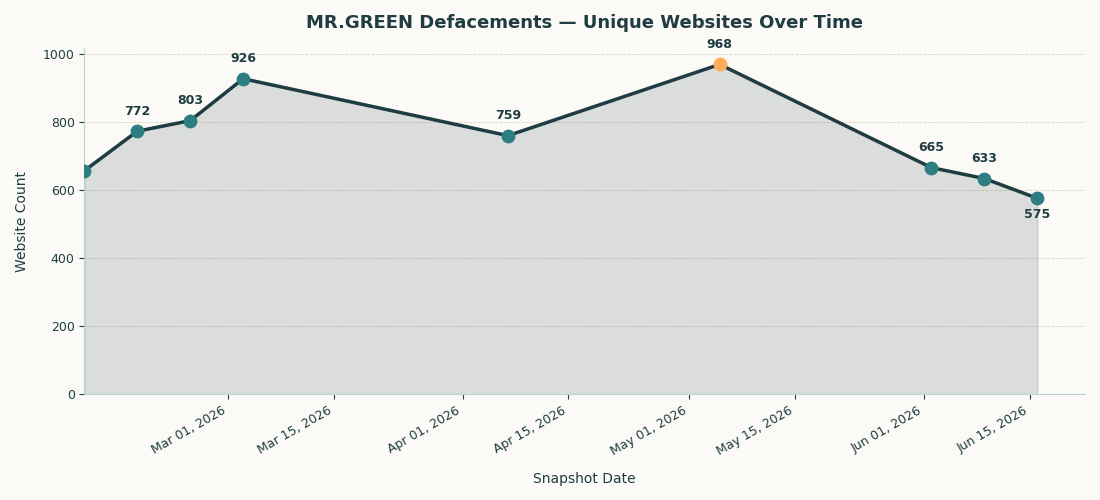
These defacements have been spotted as far back as 2020. However, the campaign remains active today. While the exact access vectors behind MR.GREEN’s campaign are unknown, the affected sites share a recognizable risk profile.
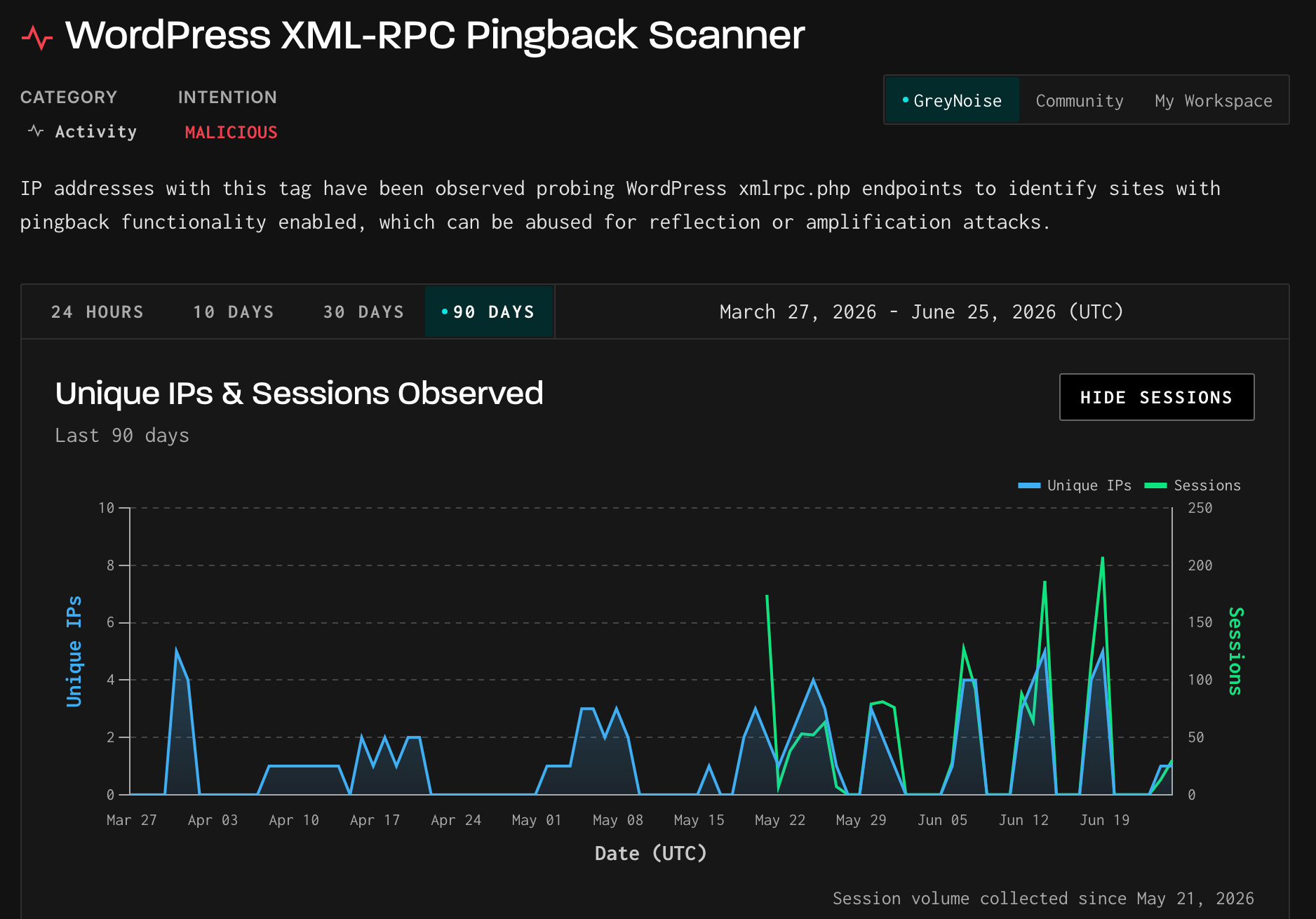
Many show indications of outdated software and outward-facing misconfigurations, such as leaving /wp-admin/install.php exposed or using a default xmlrpc.php file as a way to remotely access the management console. WordPress’s xmlrpc.php is a legacy API that enables remote procedure calls to the site. When left exposed, attackers can brute-force authentication and conduct plugin enumeration.
GreyNoise sensor data shows 70 IPs actively scanning for xmlrpc.php endpoints over the past 90 days, indicating that this is a well-known misconfiguration that opportunistic actors routinely target.
Additionally, many affected sites had misconfigurations in other services, such as exposed SSH ports with no IP restrictions and password authentication enabled. Alone, these mistakes may seem trivial, but they compound quickly. Combined with misconfigurations like SSH ForwardAgent: Enabled on admin connections to compromised servers, or unpatched software vulnerabilities, they can meaningfully widen the attack surface. Even seemingly low-risk services are not immune. For example, SMTP plugins can expose email API credentials and server configuration data to unauthenticated attackers if not secured.
The most compelling part of this story is that there is no apparent secondary objective for these defaced sites. They are simply titled “Hacked By MR.GREEN” and left alone with the default WordPress theme. The only notable service observed running consistently across affected sites is open SSH. Though one could speculate that their use is tied to hosting anonymous networks, there is no concrete evidence to verify this.
Despite not seeming to rely on a novel attack vector, the MR.GREEN campaign highlights the importance of maintaining proper configurations and updates. Leaving CMS and backend platforms on default settings creates unnecessary exposure. It’s possible that after gaining access (potentially through a misconfiguration or vulnerable plugin), MR.GREEN then leverages old WordPress or PHP versions to leave a defacement. A few missed patches may seem fine at first, but EOL software combined with faulty settings and over-permissioned plugins can compound into a meaningful attack surface.
What Can Be Done?
Tips for Maintaining a PHP Backend
- Update on the same patch cycle. PHP versions follow a four-year lifecycle, meaning each major version receives regular security patches for up to four years before reaching EOL. Site owners should check for updates every 1–3 months. Any critical patch releases should be applied as soon as possible. For current PHP versions and EOL dates, visit: https://www.php.net/supported-versions.php
- Plan ahead for version upgrades. After four years, your current version will reach EOL status and you’ll need to upgrade to maintain security coverage. To maximize your runway, aim to migrate to the latest stable version early rather than waiting until you’re forced to. The next PHP version, 8.6, is planned for release in November 2026.
Tips for Maintaining WordPress Sites
- Watch out for pre-releases. WordPress regularly releases beta versions for users to explore new features. For any site handling real traffic or business functions, hold off until the stable release is out. For release announcements, visit: https://wordpress.org/news/category/releases/
- Be cautious with automatic updates. Auto-updates for plugins and core WordPress can save time, but they can occasionally break site functionality or cause compatibility issues. Limit auto-updates to well-established, trusted plugins and handle major version updates manually after testing.
- Check for Plugin Updates. Plugin updates are just as important as WordPress updates. WordFence is a great resource to use when following the latest plugin vulnerabilities: https://www.wordfence.com/threat-intel/vulnerabilities/wordpress-plugins/.
Check Your Site’s Security Posture With Censys
You can check the attack surface of your own site using the following query on Censys Platform:
web.hostname=~”^(.*\\.)?yoursite\\.com$”
Potential findings from the above query:
- Software running such as WordPress or PHP.
- Exposed SSH or other remote access tools
- CVEs scanned within your host/site.
MR.GREEN’s campaign is a reminder that attacks don’t always require sophisticated tooling. They require patience and a target that hasn’t kept pace with maintenance. Most vulnerabilities are trivially exploitable at scale. What makes them dangerous is a mixture of outdated software, and opportunistic misconfiguration. Keeping pace with site growth means more than adding features: it means ensuring the infrastructure underneath them doesn’t become a liability. It falls on everyone to help maintain the internet one update at a time.
Additional Censys Platform Queries
References
WordPress & PHP Fundamentals
- WordPress.com. WordPress, Your Way. https://wordpress.com/
- WordPress Developer Resources. PHP Coding Standards – Coding Standards Handbook. https://developer.wordpress.org/coding-standards/wordpress-coding-standards/php/
- Singh, Harish. Stop Calling PHP Dead. It Runs 70% of the Internet. Medium. September 20, 2025. https://medium.com/@harishsingh8529/stop-calling-php-dead-it-runs-70-of-the-internet-ec86749d7f0f
- Web Host Most Blog. PHP 7.4 Hosting 2026: Why Running PHP 7.4 Is a Security Disaster. Published February 9, 2026; updated May 19, 2026. https://blog.webhostmost.com/php-hosting-versions-2026-74-security-suicide/
Vulnerabilities & Exploits
- VulnCheck. 9 Year-Old PHP Vulnerability Keeps Swinging As One of the Most Targeted Vulnerabilities (CVE-2017-9841). https://www.vulncheck.com/blog/cve-2017-9841
- Kinsta. A Complete Guide on xmlrpc.php in WordPress (What It Is, Security Risks, How to Disable It). Rachel McCollin. Updated April 20, 2026. https://kinsta.com/blog/xmlrpc-php/
- Deep Hacking. SSH Agent Hijacking. https://blog.deephacking.tech/en/posts/ssh-agent-hijacking/
- Cybersecurity News. Critical PHP Remote Code Execution Flaw Lets Attackers Inject Malicious Scripts. Eswar. June 7, 2024. https://cybersecuritynews.com/critical-php-remote-code-execution-vulnerability/
- MalCare. 8 Vulnerable WordPress Plugins Attacked Recently. https://www.malcare.com/blog/vulnerable-wordpress-plugins/
- National Vulnerability Database (NIST). CVE-2026-10795. https://nvd.nist.gov/vuln/detail/CVE-2026-10795
Plugins & Supply Chain
- TeamUpdraft. UpdraftPlus: WordPress Backup, Restore & Migration Plugin. https://teamupdraft.com/updraftplus/
- mySites.guru. Essential Plugin WordPress Backdoor. Phil E. Taylor. Published April 12, 2026; updated June 24, 2026. https://mysites.guru/blog/essential-plugin-wordpress-backdoor/
- Anchor Host. Someone Bought 30 WordPress Plugins and Planted a Backdoor in All of Them. https://anchor.host/someone-bought-30-wordpress-plugins-and-planted-a-backdoor-in-all-of-them/
- The Hacker News. ShapedPlugin WordPress Pro Plugins Backdoored in Supply Chain Attack. June 2026. https://thehackernews.com/2026/06/shapedplugin-wordpress-pro-plugins.html
- Wordfence. Attackers Actively Exploiting Sensitive Information Exposure Vulnerability in Gravity SMTP Plugin. March 2026. https://www.wordfence.com/blog/2026/06/attackers-actively-exploiting-sensitive-information-exposure-vulnerability-in-gravity-smtp-plugin/
- Wordfence Threat Intelligence. Wordfence Plugin Vulnerabilities. June 2026. https://www.wordfence.com/threat-intel/vulnerabilities/wordpress-plugins/wordfence
- Wordfence. Critical Unauthenticated Authentication Bypass Vulnerability Patched in UpdraftPlus WordPress Plugin. June 2026. https://www.wordfence.com/blog/2026/06/critical-unauthenticated-authentication-bypass-vulnerability-patched-in-updraftplus-wordpress-plugin/
Public Forums
- r/PHP. PHP Version Update Breaking Stuff. Reddit. https://www.reddit.com/r/PHP/comments/1p0zi91/php_version_update_breaking_stuff/
- r/PHP. Is Anyone Else Still Maintaining PHP 5.6 in 2026? Reddit. https://www.reddit.com/r/PHP/comments/1s16913/is_anyone_else_still_maintaining_php_56_in_2026/
- r/Wordpress. Upgrading an Old WordPress Site. Reddit. https://www.reddit.com/r/Wordpress/comments/1jz9z2l/upgrading_an_old_wordpress_site/
- r/Wordpress. WordPress 7.0 Drops April 9 — Are Your Autoupdates On? Reddit. https://www.reddit.com/r/Wordpress/comments/1s4jcox/wordpress_70_drops_april_9_are_your_autoupdate/
- r/Wordpress. Really at My Wits’ End with WordPress Websites. Reddit. https://www.reddit.com/r/Wordpress/comments/1mg8ral/really_at_my_wits_end_with_wordpress_websites/
- Stack Overflow. What is “hacked by mr.green” on WordPress? https://stackoverflow.com/questions/60177285/what-is-hacked-by-mr-green-on-wordpress