




On August 23, 2026, a PowerShell dropper reached out to hxxp://binance-idexchange[.]com/333.mp4 for its next stage. Binance, the world’s largest cryptocurrency exchange with hundreds of millions of users, had nothing to do with it — duh!
This mp4 “video” file contained an encrypted, compressed 16.8 MB PowerShell script. Censys ARC published the full chain five days later.
No one ever saw a fake Binance login page in this campaign. The brand name was camouflage for the malware’s own network traffic, chosen so a request in a proxy log would look like it belonged to a crypto exchange.
Point is: Brand Protection programs have more complicated concerns than ever.
Brand abuse online is an infrastructure problem before it’s a content problem. Every impersonation needs a domain, usually a certificate, a server, and something for the victim to look at. These are the exact entities that Censys indexes, for searching with deep history.
This guide walks through them roughly in the order an attacker builds them, with Censys queries you can adapt by swapping in your own brand. You’ll see a lot of scummy scammer tactics, culminating in Section 9: Takedowns.
What Censys covers
Brand protection defends a company’s names, logos, and identity against impersonation. Fraud prevention stops attackers from turning that impersonation into stolen credentials, credit card numbers, or other ill-gotten gains. Both operate outside the corporate perimeter, on the public Internet.
Censys sees the parts of that surface that live on internet infrastructure: domains, web properties, certificates, hosts, and DNS. It does not scan social media profiles or app store listings. Those scams still have to send victims somewhere, though, and the link in a fake profile or the backend API of a rogue app resolves to infrastructure Censys can see.
While the Censys web app will be shown in screenshots for illustrative purposes, everything in this blog can be done via API and easily automated.
1. Certificates: the lookalike’s first public record
A TLS certificate is what allows a website to use HTTPS and show the padlock in a browser. It tells the browser that the encrypted connection is authorized for a particular domain name.
Before issuing one, a certificate authority (CA) usually verifies only that the requester controls that domain. It does not verify that the site is legitimate, that the operator is who they claim to be, or that the domain has any reason to exist.
Ergo, an attacker can register {BRAND}-support[.]com, prove control of it, and automatically receive a free certificate within minutes. It can even be fully automated. The resulting padlock means the connection is encrypted. It does not mean the site belongs to {BRAND}.
Attackers still want HTTPS because browsers warn users about plain-HTTP pages, especially when passwords or payment information are involved. A phishing site without HTTPS immediately looks suspicious.
That creates an opportunity for defenders. Modern browsers require publicly trusted certificates to be recorded in Certificate Transparency (CT) logs, which act as public records of certificate issuance. In most cases, the domain name being certified appears in those logs before or as the certificate is issued.
Censys ingests Certificate Transparency data. So when an attacker requests a certificate for a lookalike domain, they may expose that domain before the phishing page is finished, advertised, or visited by a victim.
Certificates appear repeatedly throughout this guide. Section 2 examines a phishing site operated by APT group UNC1151, whose certificate was its only public trace. Section 5 shows how a certificate served directly by an origin server can reveal infrastructure hidden behind a CDN. In Section 9, certificate fingerprints and issuing CA details become useful evidence for a takedown request.
For defenders, certificates are more than encryption metadata. They are often one of the earliest public signals that suspicious infrastructure exists!
Once you find a cert impersonating your brand, you can dig deeper and search for infrastructure using that cert – this example was found searching for Google Chrome.

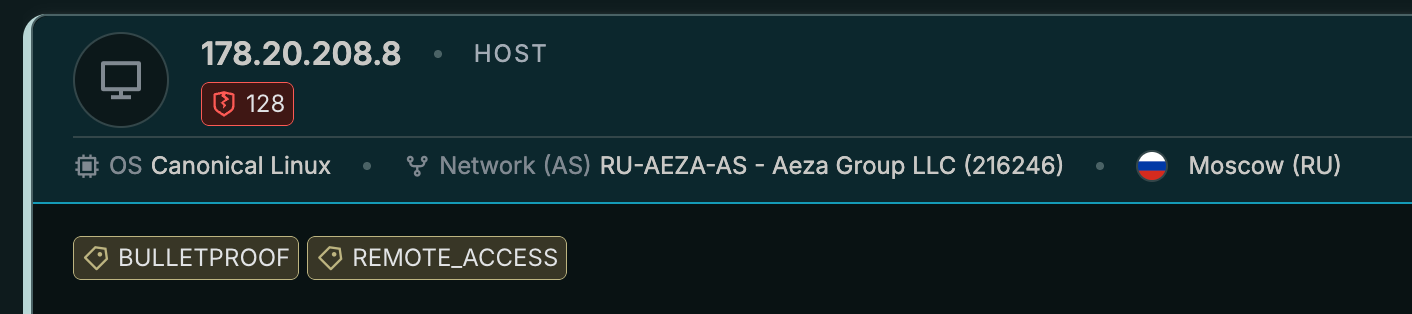
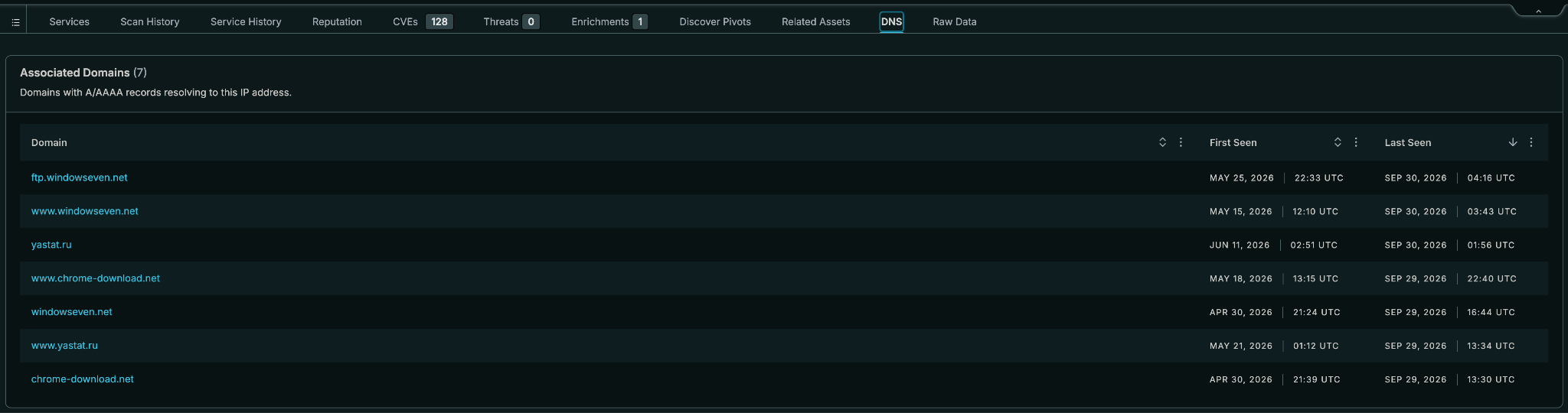
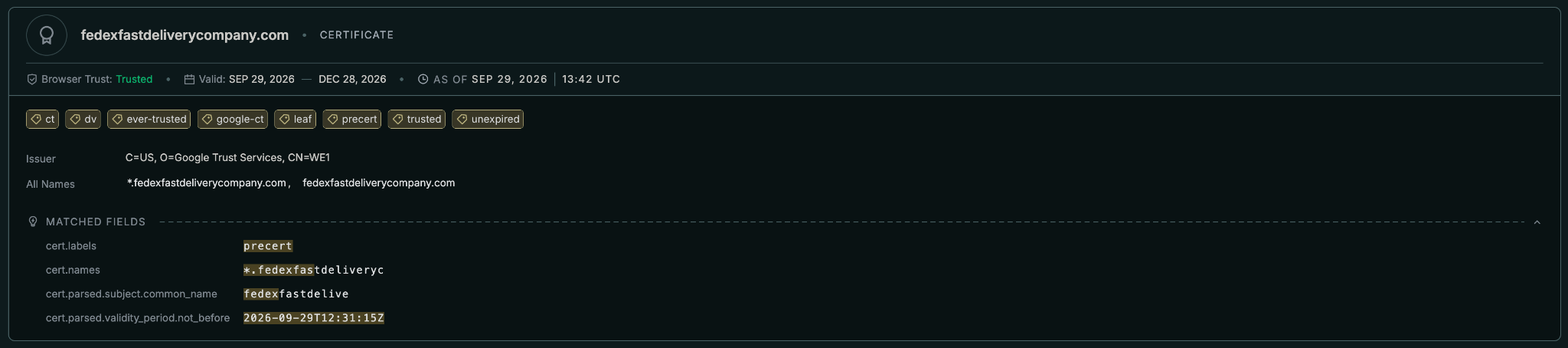
Watching new certificates for your brand
cert.parsed.validity_period.not_before >= "now-1d" and cert.parsed.validity_period.not_before < "now" and cert.labels = "precert" and cert.parsed.subject.common_name =~ "({BRAND})"The precert label limits results to just that: the entry logged just before issuing the real certificate. That’s the earliest public trace a lookalike leaves, often before the site behind it exists. The time window means “the last 24 hours” from whenever the query runs. Saved as a Collection (Section 8), it becomes a daily feed of new certificates carrying your name.
Expect noise at first, your own certificates included. Trim false positives and refine with extra clauses as you learn what normal looks like; cert.names < 15, for example, can help drop certificates covering long lists of names, which tend to be CDN and multi-tenant certificates rather than purpose-built lookalikes.
But wait: the limit to CT monitoring?
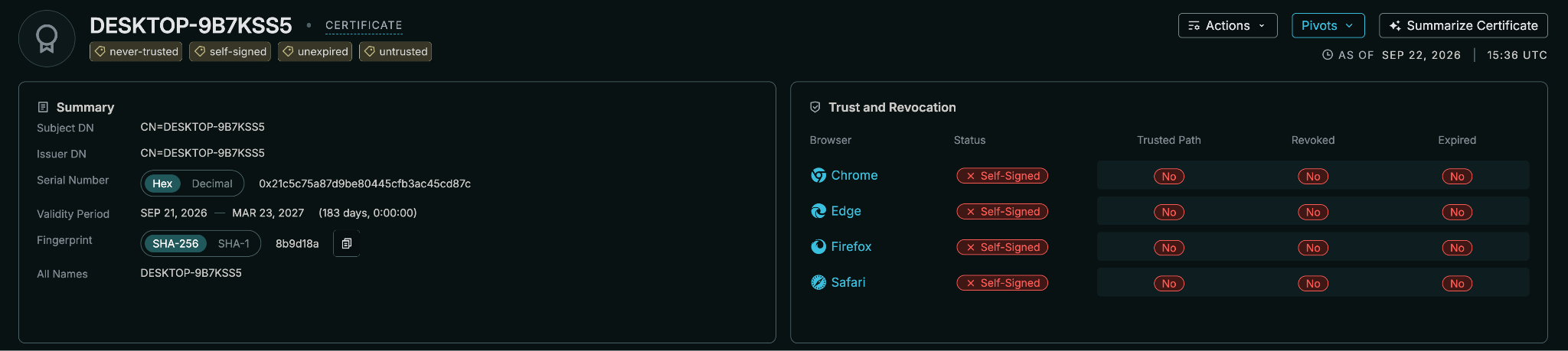
Yes, one hard limit: CT only sees certificates issued by public CAs. The binance-idexchange[.]com carrier was fetched over plain HTTP on port 80. Censys ties its infrastructure to a few self-signed certs, such as this one issued to a Windows machine name, rather than to any domain. Never logged to CT. There’s no brand in it, which is why the next sections exist.
2. Names: typos, prefixes, and flattened dots
Typosquats
CenQL’s twist() function generates permutations of a domain (character swaps, omissions, homoglyph-style substitutions) and matches them against a field.
It runs fewer permutations than dnstwist and struggles with two- and three-character labels (e.g., ab[.]com), but it’s built into the query language and works inside a Collection!
twist(web.hostname, `{BRAND_DOMAIN}`) and not web.hostname = "{BRAND_DOMAIN}" and not web.hostname =~ "\\.{BRAND}\\.{TLD}$"The two exclusions remove your apex and every subdomain of it without accidentally excluding not{BRAND}.{TLD}, which does not end in .{BRAND}.{TLD}.

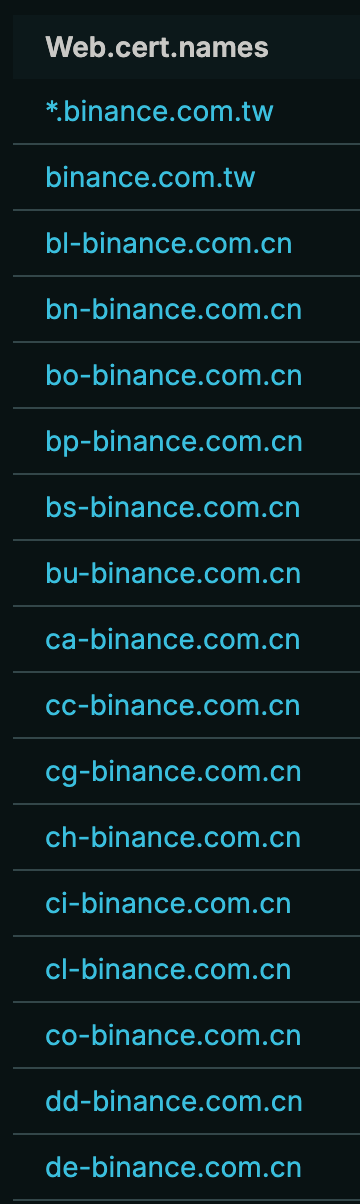
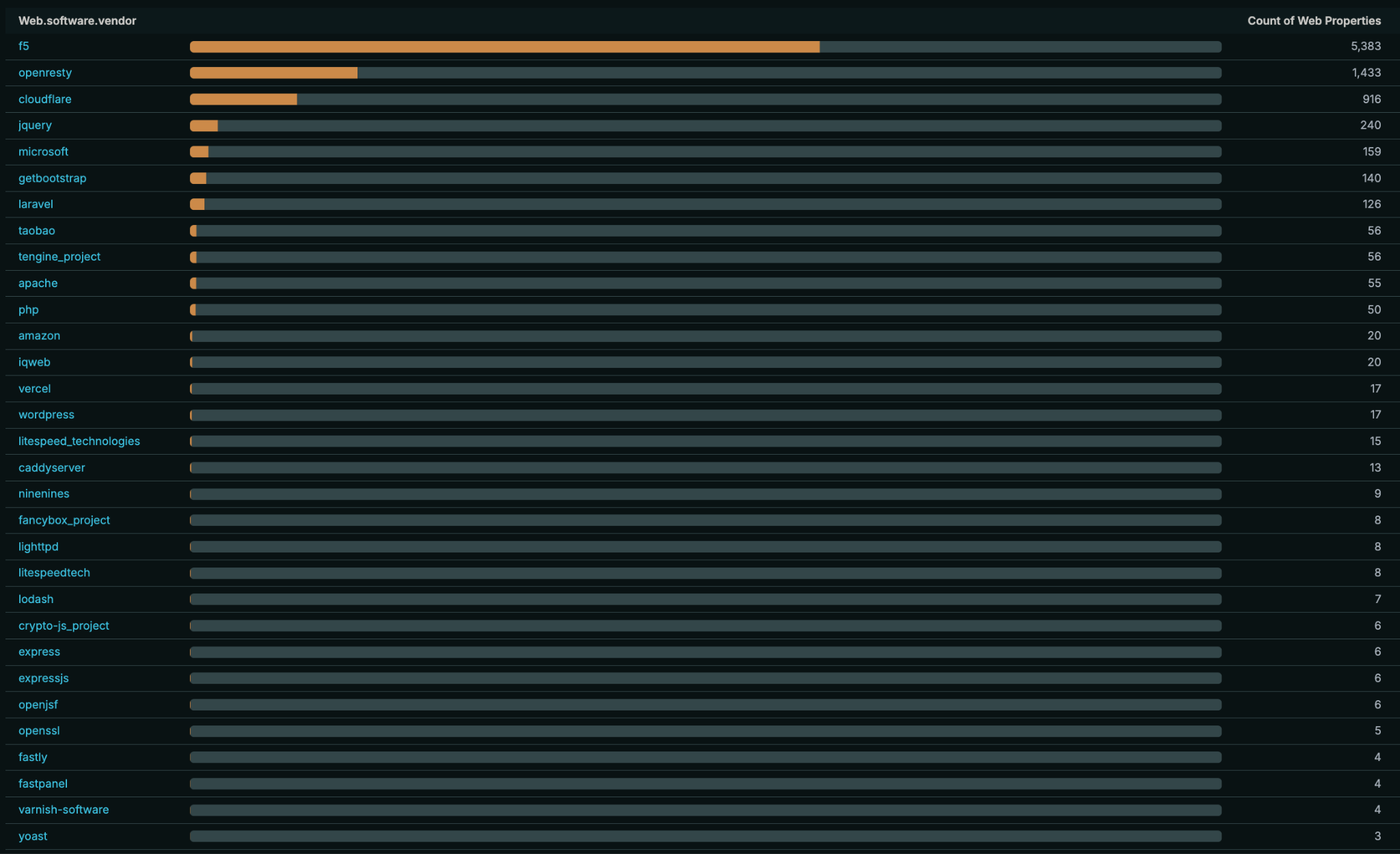
Reminder: click the Reports tab to break results down on different slices. This can give you an idea of the cohort’s certs, software/hardware, and more.
Brand as a prefix on someone else’s domain
Typosquats are the textbook case, and yet Censys ARC keeps finding another category. Check out three hostnames from recent research:
binance-idexchange[.]com(the NetSupport carrier above)google[.]2oauth[.]com, a carrier host from the same MP4 clusterusps[.]xupqnqz[.]one, the SMS lure in ARC’s USPS smishing investigation
Not typos. Each puts the real brand at the front of the hostname and hangs it off an attacker-owned domain.
On a mobile phone, where the address bar truncates, the victim reads “usps” and stops. twist() will not find these, because the registered domain looks nothing like the brand’s.
A prefix regex, on the other hand, catches all three shapes:
web.hostname =~ "^{BRAND}[-.]" and not web.hostname = "{BRAND_DOMAIN}"[-.] matches a hyphen or a dot after the brand label. Add exclusions for things like your alternate TLDs and country domains (not web.hostname = "..."), and your Collection will stay clean and righteous.

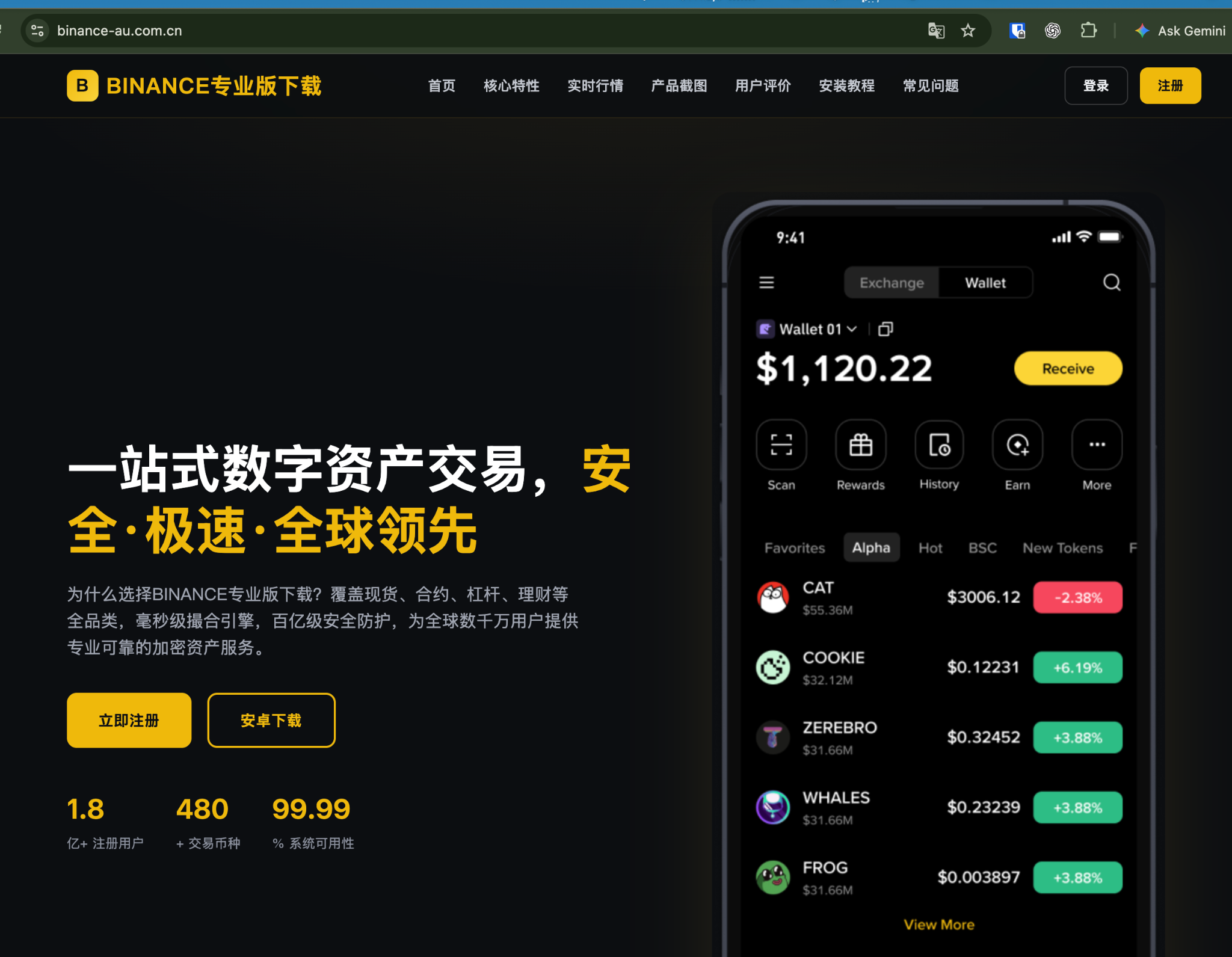
binance-au.com.cn
You may capture even more if you adjust the first clause to look for subdomains as well: ^(.*\\.)?binance[-.].
Flattened dots
ARC’s UNC1151 research turned up a third pattern. The actor impersonated three Ukrainian portals, with hostnames i-ua[.]cc[.]cd, bigmir-net[.]cc[.]cd, and meta-ua[.]cc[.]cd.
The operator took the real domain, replaced the dot with a hyphen, and registered it as a subdomain of a shared parent.
web.hostname =~ "{BRAND}-{TLD}" or cert.names =~ "{BRAND}-{TLD}"Why the certificate half of this query? ARC found a certificate for meta-ua[.]cc[.]cd but never saw it presented on any IP in our dataset. The site sat behind Cloudflare, and that certificate only encrypted the hidden leg between Cloudflare and the operator’s own server. A server like that hands over a certificate only when a visitor asks for that exact hostname. Once the certificate supplied the name, a curl --resolve request to campaign IP 45[.]194[.]44[.]46 for meta-ua[.]cc[.]cd returned a live META.UA impersonation page.
Product names count, too
ARC researcher Andrew Northern flagged gta-six-leaks[.]com during the August 2026 GTA VI leak wave. This fake CAPTCHA “security check” talked visitors into a ClickFix self-infection.
The brand being exploited was Grand Theft Auto — developer Rockstar Games or affiliates appear nowhere in the hostname. Customers search for products, and attackers register what customers search for.
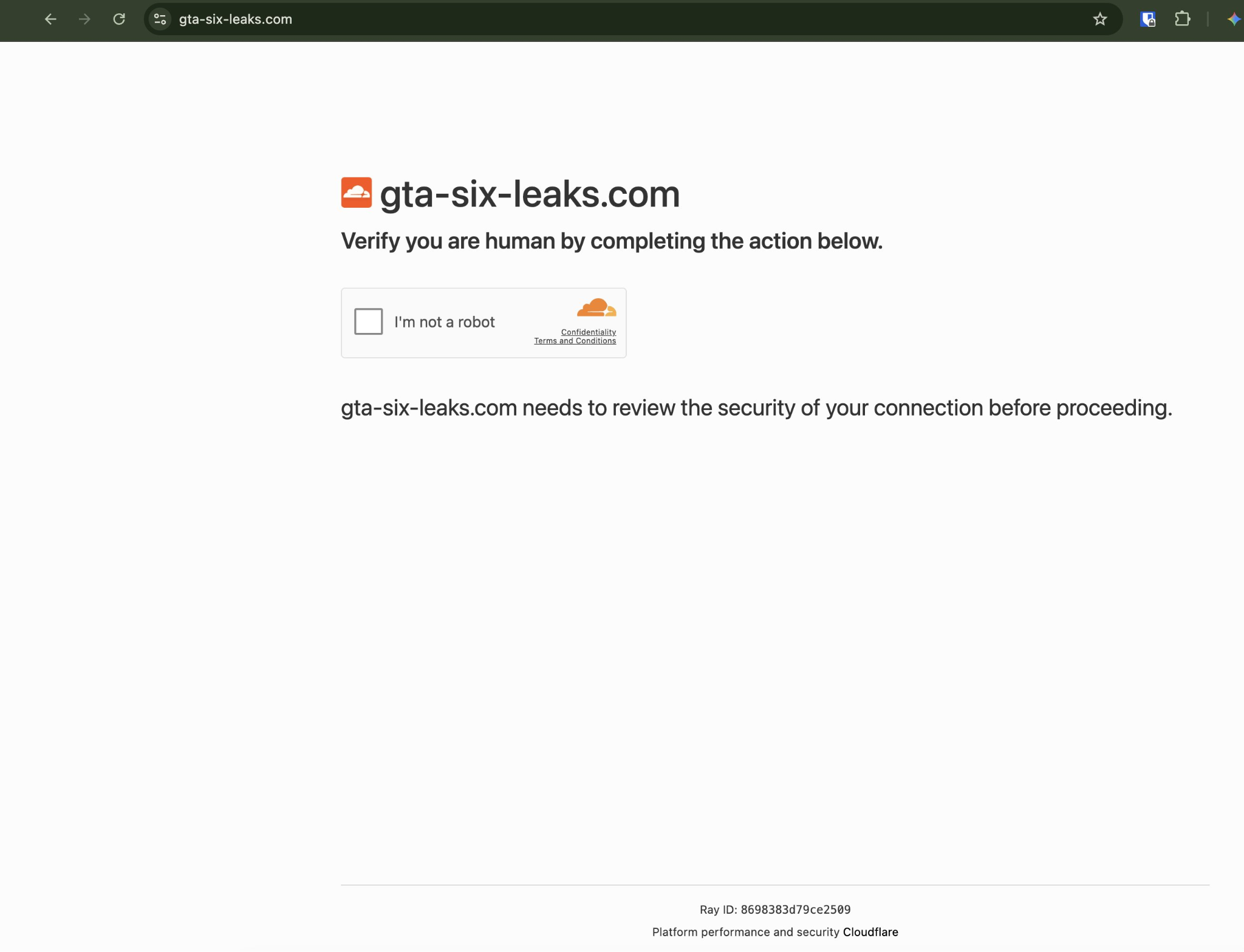
web.hostname =~ "{PRODUCT}" and not web.hostname = "{BRAND_DOMAIN}" and not web.hostname =~ "\\.{BRAND}\\.{TLD}$"Add exclusions for any official product domains. Product-name queries run noisier than brand queries (news, resellers, fans, etc.), so expect to need exclusions.
3. Content: attackers copy your homework
The fake Google login in the UNC1151 campaign lived at account[.]check-profile[.]digital/Verify. The hostname contains no brand at all. The name-based queries above miss this. However, what the page could not avoid was looking like Google, and looking like a brand means copying that brand’s artifacts.
Titles and login forms
web.endpoints.http.html_title: "{BRAND}" and web.labels.value = "LOGIN_PAGE" and not web.hostname = "{BRAND_DOMAIN}" and not web.hostname =~ "\\.{BRAND}\\.{TLD}$"You can and should search in your native language, too. The I.UA impersonation from UNC1151 served the title Паспорт - I.UA (I.UA’s own account page is called “Passport”), so a title search in the brand’s own language and naming would have caught it.
To catch brandless hostnames specifically, pair account-security vocabulary in the name with your brand in the content:
web.hostname =~ "(account|verif|secur|login|support)" and web.endpoints.http.html_title: "{BRAND}" and not web.hostname =~ "\\.{BRAND}\\.{TLD}$"ARC’s UNC1151 indicator list reads like a thesaurus for this regex: check-account[.]digital, mail-secure-login[.]digital, account-protection-team[.]icu, verification-service[.]cc[.]cd.
Hotlinked assets: search for your own URLs?!
Many clones don’t copy your files at all. They point at them. Censys researchers found r.oblox[.]com[.]et rendering a spoofed version of Roblox homepage while loading real Roblox assets straight from js.rbxcdn[.]com and www.roblox[.]com.
The operator doesn’t have to host a single image – but lucky for us, every one of those references named Roblox infrastructure in the page source.
Search page bodies for your CDN hostnames and your primary domain:
web.endpoints.http.body: "{CDN_HOST}" and not web.hostname = "{BRAND_DOMAIN}" and not web.hostname =~ "\\.{BRAND}\\.{TLD}$"You can even expand the search outside of the HTTP body. Checking HTTP headers and redirect chains nets you even more finds.
web.endpoints.http.headers: (key = "Location" and value: "{BRAND_DOMAIN}") or web.endpoints.http.redirect_chain.hostname: "{BRAND_DOMAIN}"Would you look at that: the Roblox query turns up headshotz[.]ai, which is… just a pixel-perfect copy of the real Roblox homepage?!
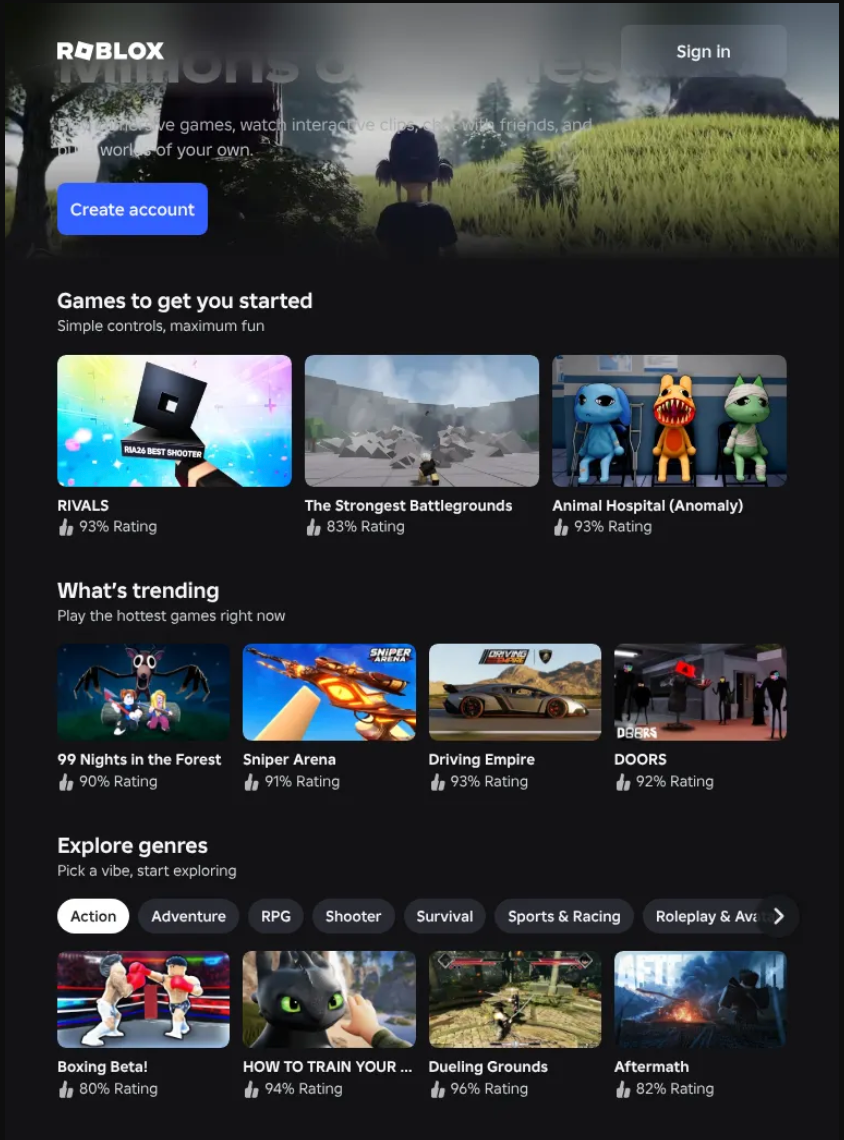
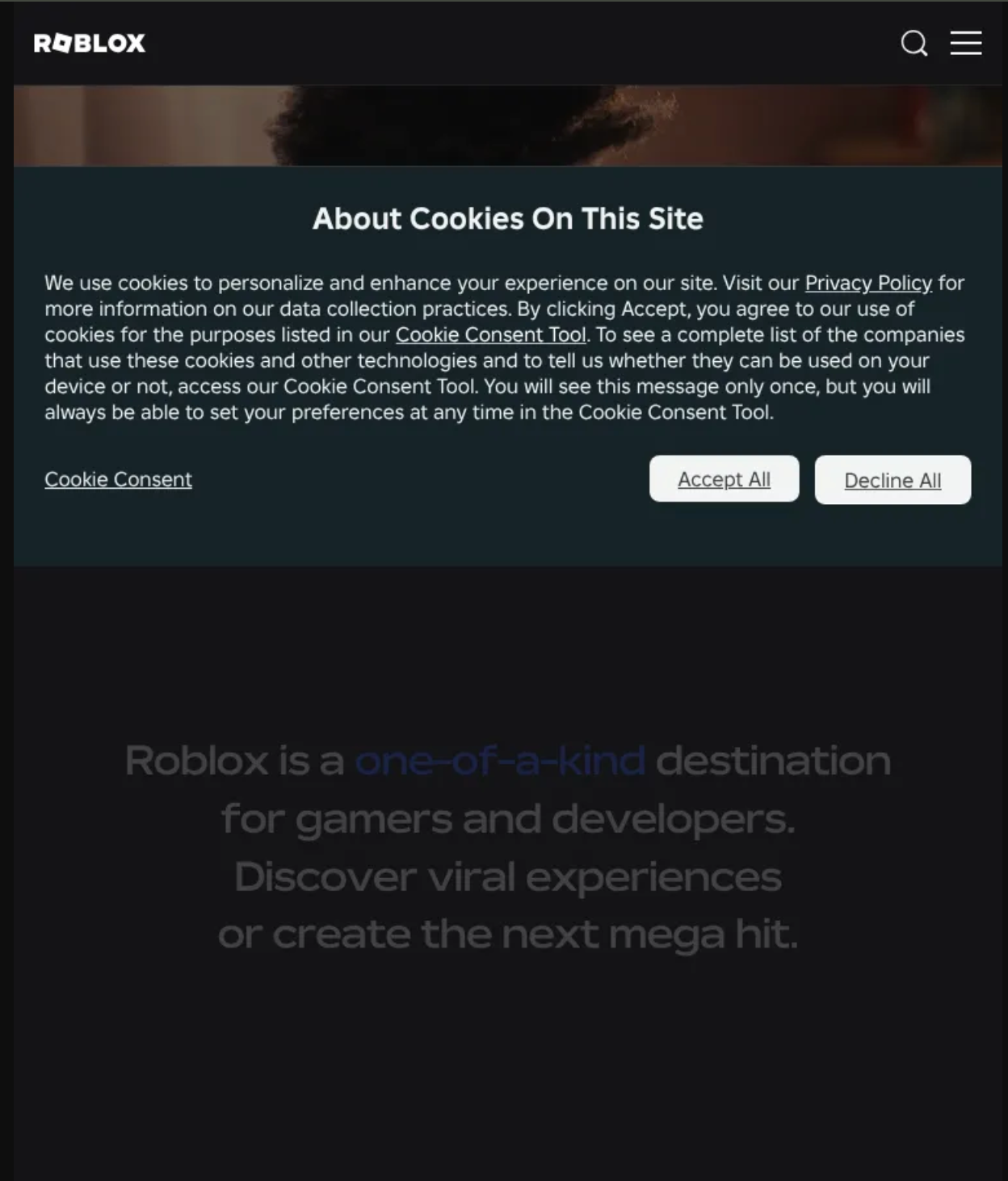
Pictured: r.oblox[.]com[.]et (left), headshotz[.]ai (right)
Your analytics tag
This one comes from the USPS smishing kit, and it’s my personal favorite detection in this guide.
The kit did not redraw USPS’s website. It served USPS’s own production HTML, CSS, fonts, and images from the phishing host, including USPS’s real head.html. That file contains USPS’s Google Analytics 4 tag (G-CSLL4ZEK4L). Every victim who loaded the kit fired an analytics hit into the victim’s own marketing pipeline.
Your measurement ID belongs on your domains and nowhere else:
web.endpoints.http.body: "{ANALYTICS_ID}" and not web.hostname = "{BRAND_DOMAIN}" and not web.hostname =~ "\\.{BRAND}\\.{TLD}$"The same trick works for every identifier your <head> carries: tag manager container IDs (GTM-XXXXXXX), marketing automation IDs, and search-console verification tokens (google-site-verification). The verification token is the strongest of these, since no one else has a legitimate reason to serve it.
It also works in reverse. Ask your marketing team to report any analytics traffic arriving from referrer hostnames you don’t own. They are, as Censys ARC put it, one of the few parties positioned to see a cloned-site campaign land in real time.
Favicons: for copies that don’t point home
The hotlink search stops working the moment an operator downloads your files and serves them locally. The USPS kit did exactly that: USPS’s production assets sat under the kit’s own /us_post_usps/ path on the phishing host, so nothing in the page pointed back to USPS’s servers.
A favicon hash still matches a kit built that way, because identical bytes hash identically wherever they’re served from. It also catches clones that drop your icon at /favicon.ico with no <link> tag, and bare-IP hosts with little or no page body.
To get your favicon hashes:
- Check your Censys record first. Look for
web.endpoints.http.favicons.hash_sha256on your real site in Censys. - If you hash the file yourself, fetch it the way a scanner does. Use
curl -skL <icon URL> | shasum -a 256. Don’t use the browser’s “Save image as”: CDNs can serve browsers a WebP or AVIF version of the same URL, and that hash may not match what Censys stored. - Verify before hunting. Search the hash with no exclusions. Empty results may indicate false negatives, given the fickle nature of file hashing.
web.endpoints.http.favicons.hash_sha256 = "{FAVICON_SHA256}" and not web.hostname = "{BRAND_DOMAIN}" and not web.hostname =~ "\\.{BRAND}\\.{TLD}$"host.services.endpoints.http.favicons.hash_sha256 = "{FAVICON_SHA256}" and not host.dns.names = "{BRAND_DOMAIN}" and not host.dns.names =~ "\\.{BRAND}\\.{TLD}$"4. Reputation and threat categories: triage before you read
Name and content queries produce candidates. Some are phishing pages. Some are fan sites, or a reseller who never read the trademark guidelines. Two Censys data points sort them before an analyst opens each one.
Host reputation score
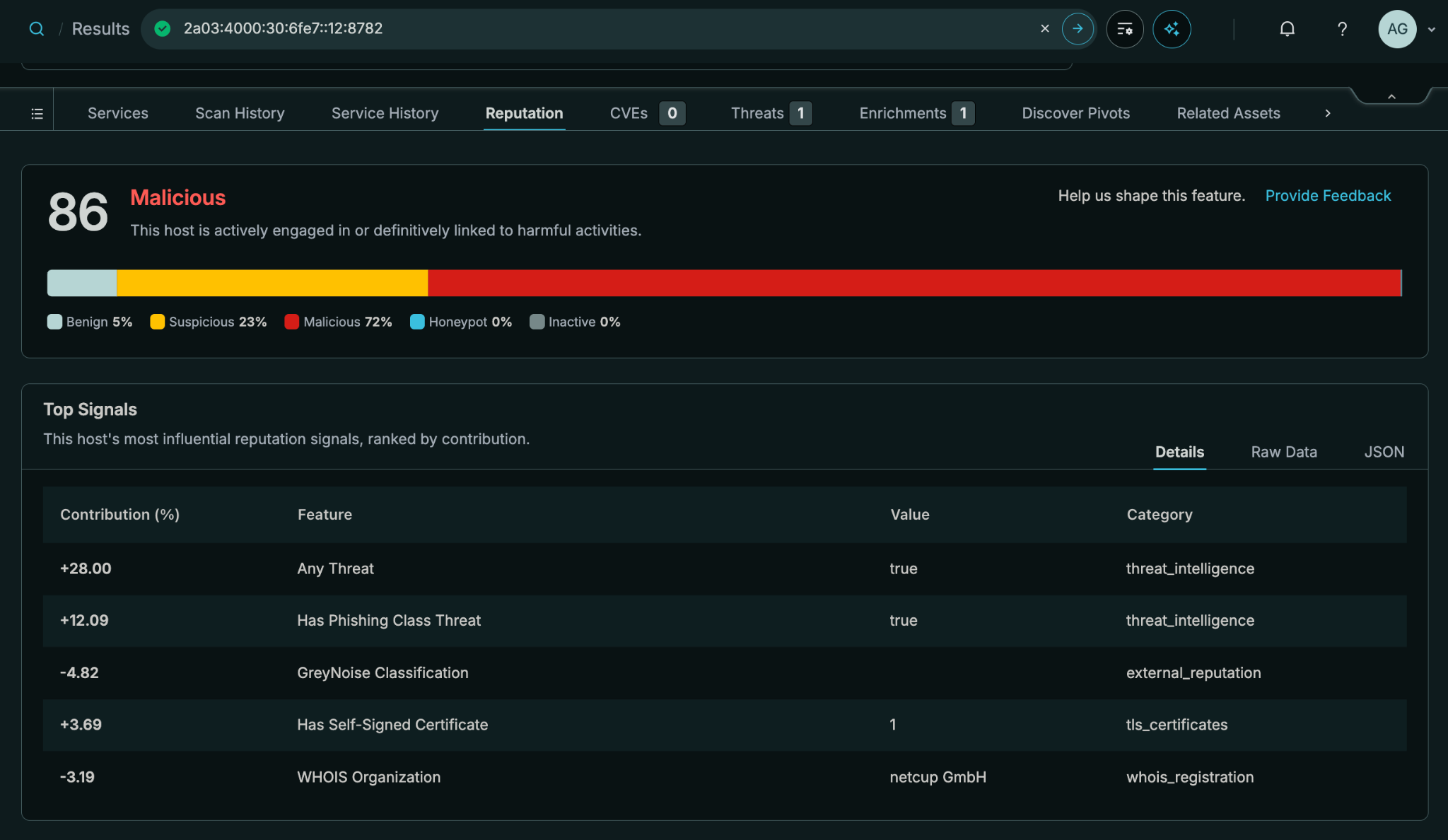
Every host in Censys gets a reputation label and a 0 to 100 risk score from a machine-learning model. The model weighs threat detections, attacker-tooling fingerprints, GreyNoise classifications, VPN and proxy indicators, exposed CVEs, TLS hygiene, DNS footprint, WHOIS registration data, and other Censys intel signals.
A threshold of 40 is a wide suspicion net. On its own it returns far too much. Intersected with your brand, it gets useful:
host.reputation.score > 40 and host.services.cert.names =~ "{BRAND}"host.reputation.score > 40 and host.services.endpoints.http.html_title: "{BRAND}"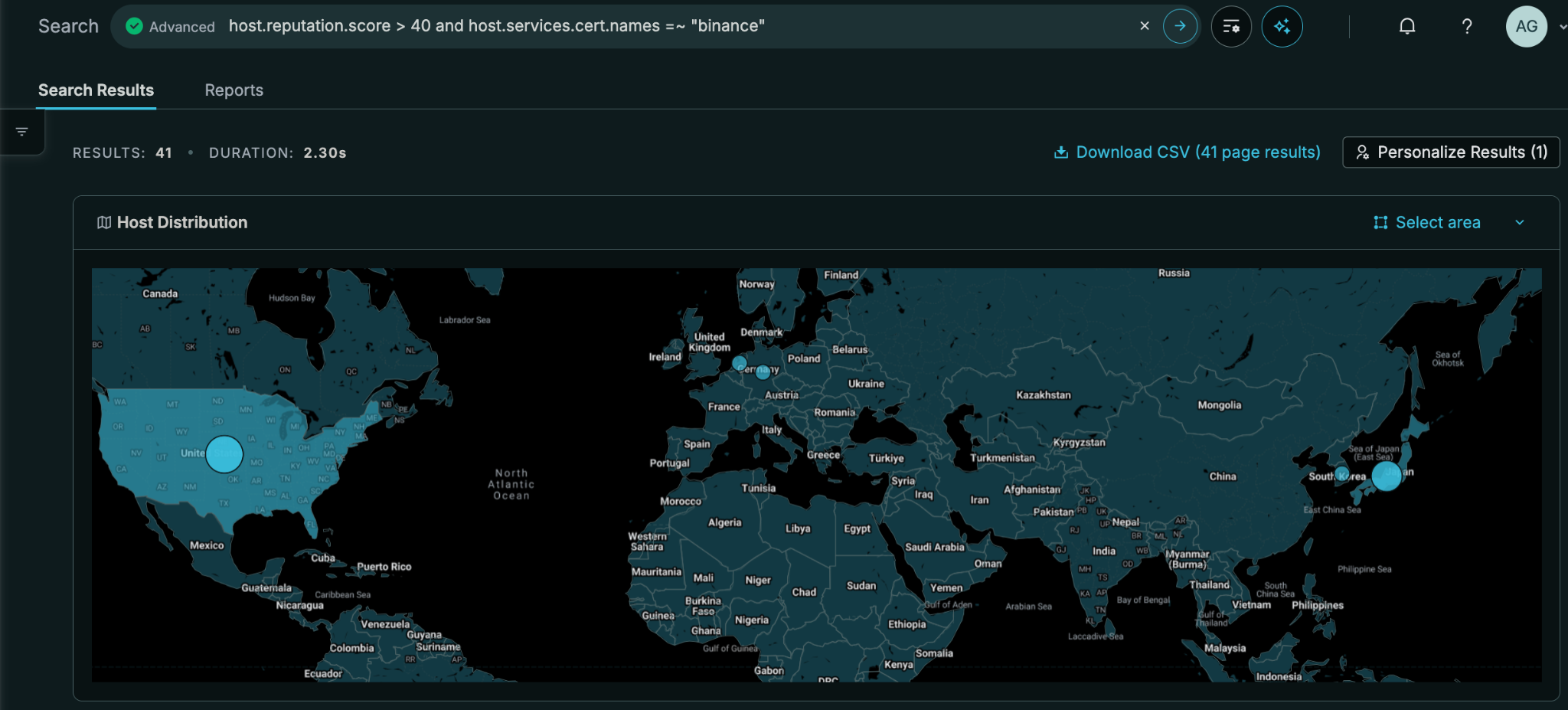
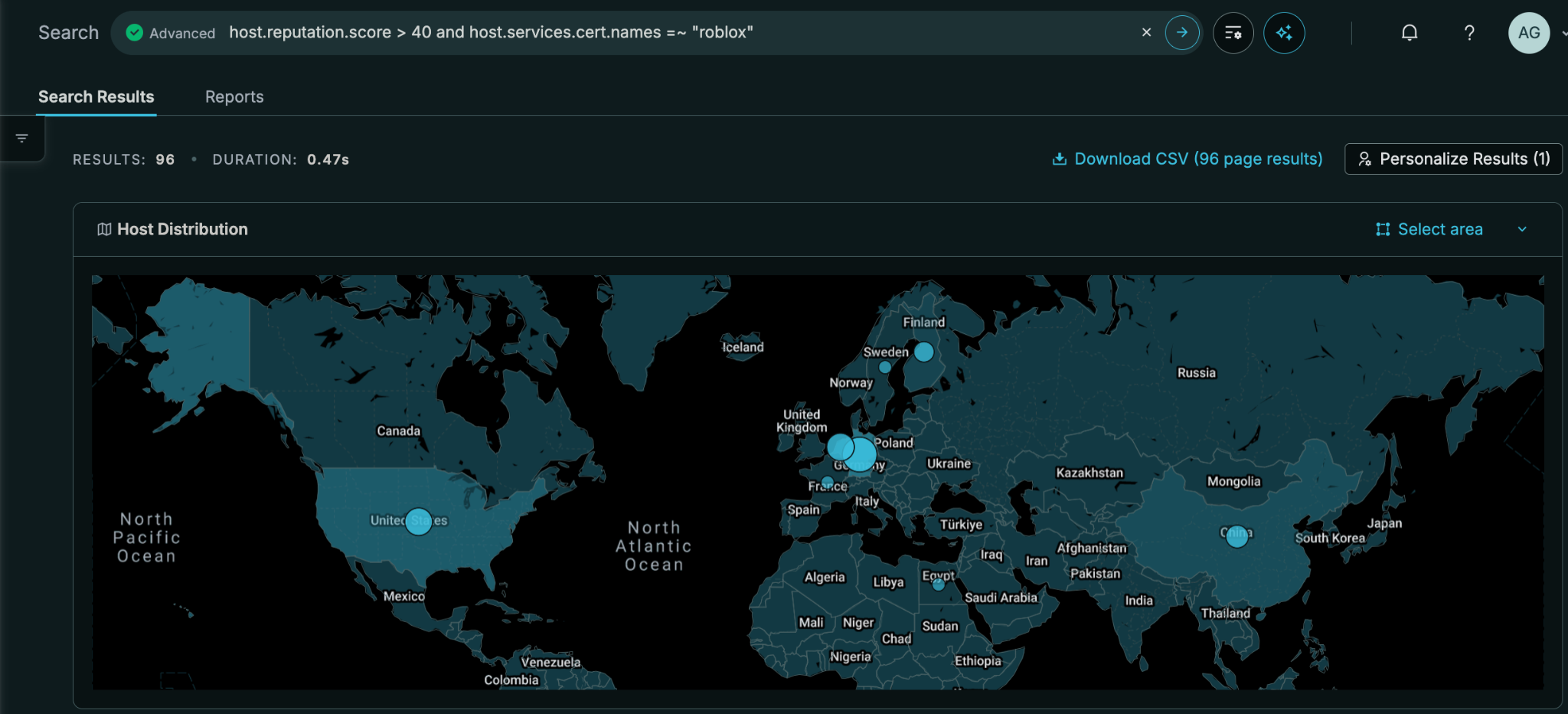
Protip: Censys Platform gives you a geographic breakdown for ease of narrowing to different parts of the world.
5. Pivots: from one lure to the whole operation
Takedowns against a single domain buy hours. The operator has already registered the next one. The durable win is finding everything else the same operator runs, and that means pivoting on attributes the operator chose once and reused.
CensEye Pivots
Manual pivots can handle the first pass. Open any host or web property, run CensEye, and it lists the values on that asset alongside how many other assets on the internet share each one.
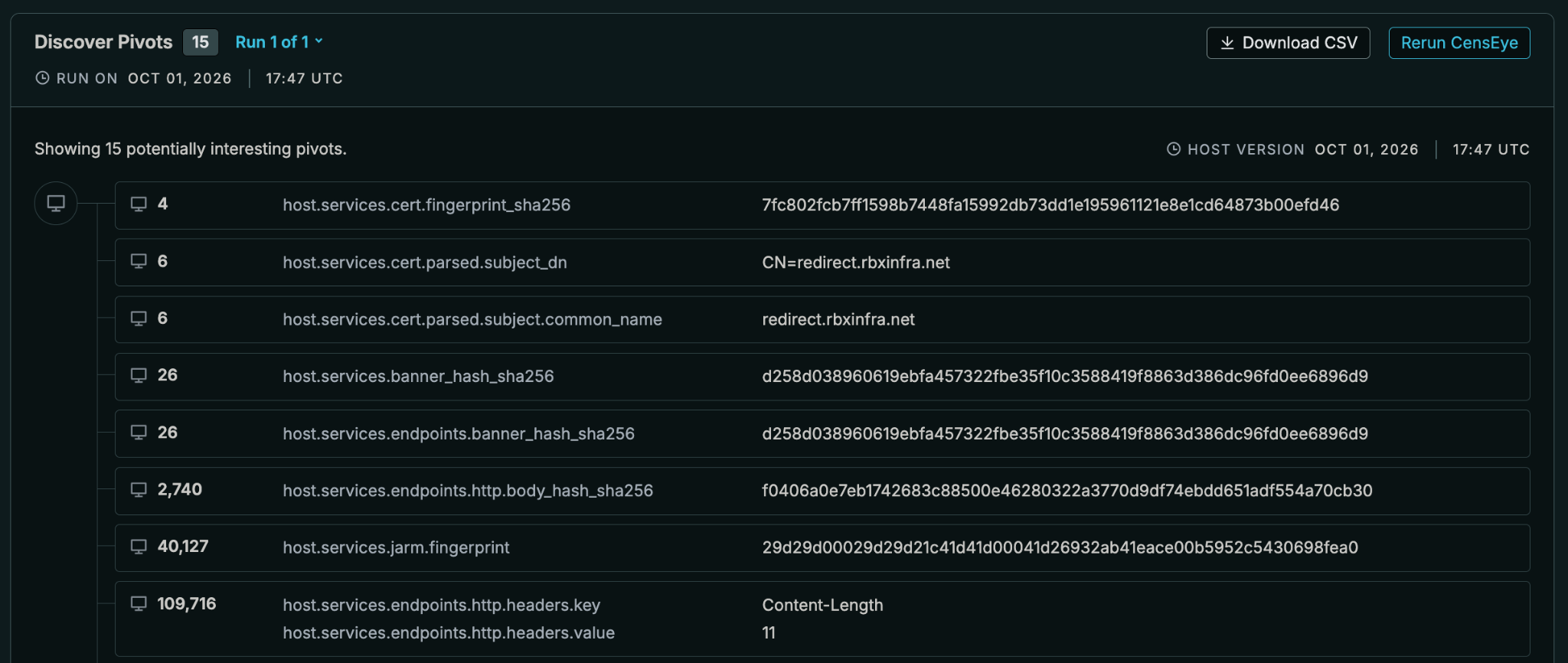
Read the counts, not the field names. Four hosts present the exact same certificate, and six share its common name, redirect[.]rbxinfra[.]net, a hostname dressed up to sound like Roblox’s own plumbing. Twenty-six share the service banner hash. Those are leads: small enough to review by hand, specific enough that sharing them is no coincidence.
Combine the strong pivots into one query and you have the operator’s footprint.
Censys Investigator: let an agent pivot for you
Manual pivoting works for one seed. Brand teams rarely have one.
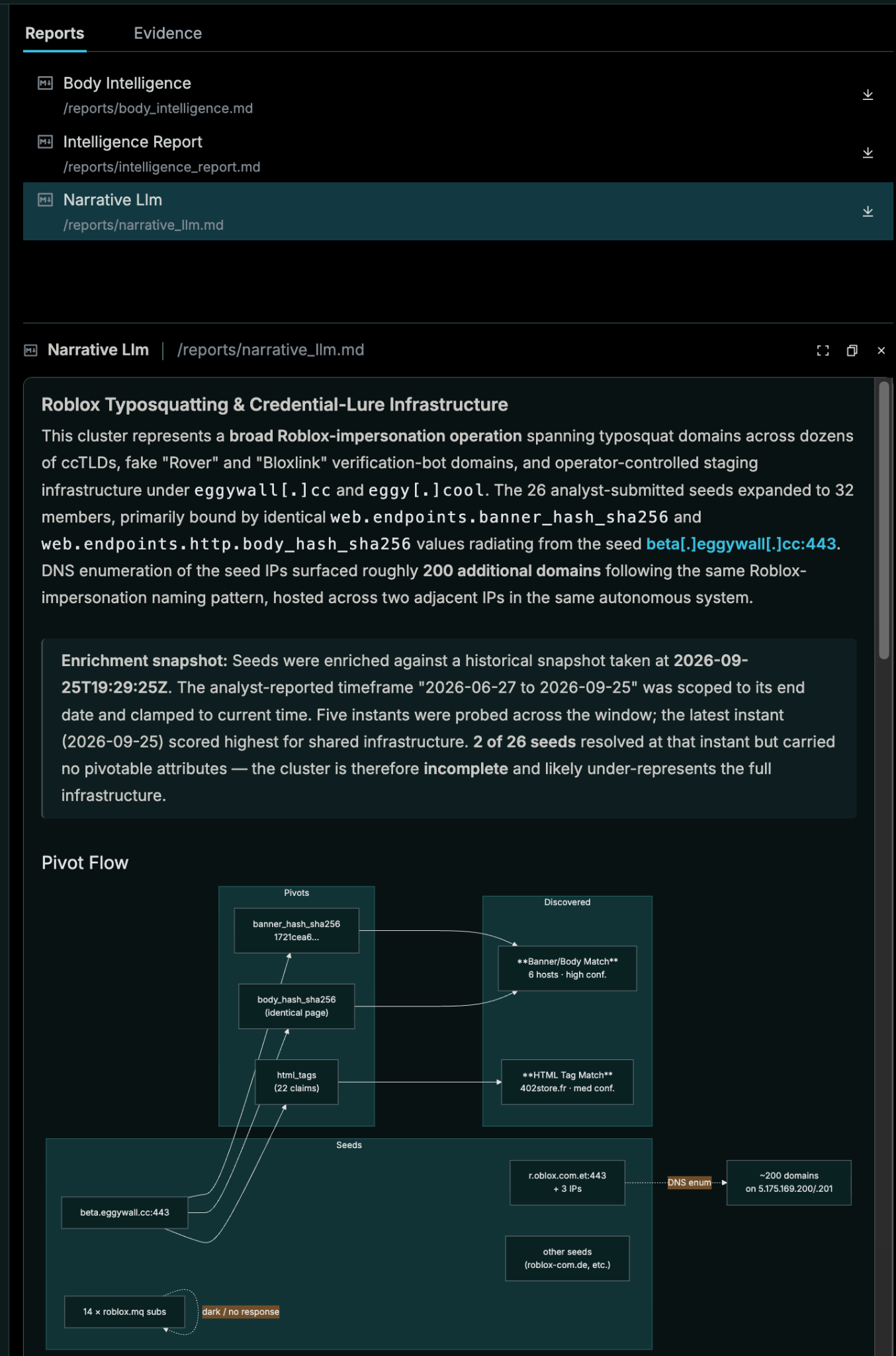
Censys Investigator takes up to 100 indicators at once (IPs, domains, URLs, host:port pairs, or a whole intel report), checks each one’s history, pivots on shared attributes, profiles the web content, and returns a ranked cluster plus queries. Add a date range to the prompt and it searches history, too.
We gave it 3 Roblox lookalike domains. It grew them into a 32-member cluster, bound by identical banner and body hashes radiating from one seed, beta[.]eggywall[.]cc. DNS enumeration of the seed IPs surfaced roughly 200 more domains following the same naming pattern, all on two adjacent IPs in one autonomous system.
The cluster also included fake “Rover” and “Bloxlink” domains. Those are real Discord bots Roblox players use to verify their accounts, so the operator was impersonating the tools around the brand as well as the brand itself.
For a standing brand program, the API is the better door. Create a job from a day’s lookalike hits (or upload an intel file first), poll job status, and pull the results into your ticket queue. Pair it with the precert Collection from section 1 and new lookalikes arrive already clustered.
6. History: what the operator already burned
Phishing hostnames live for hours or days. Resolve one a week later and it looks like the operation vanished. It usually just rotated, and Censys kept the records.
ARC’s USPS investigation started with a single SMS link. The lure resolved to one Tencent Cloud IP, 43[.]157[.]174[.]200. That host’s DNS tab in Censys showed dozens more sibling hostnames.
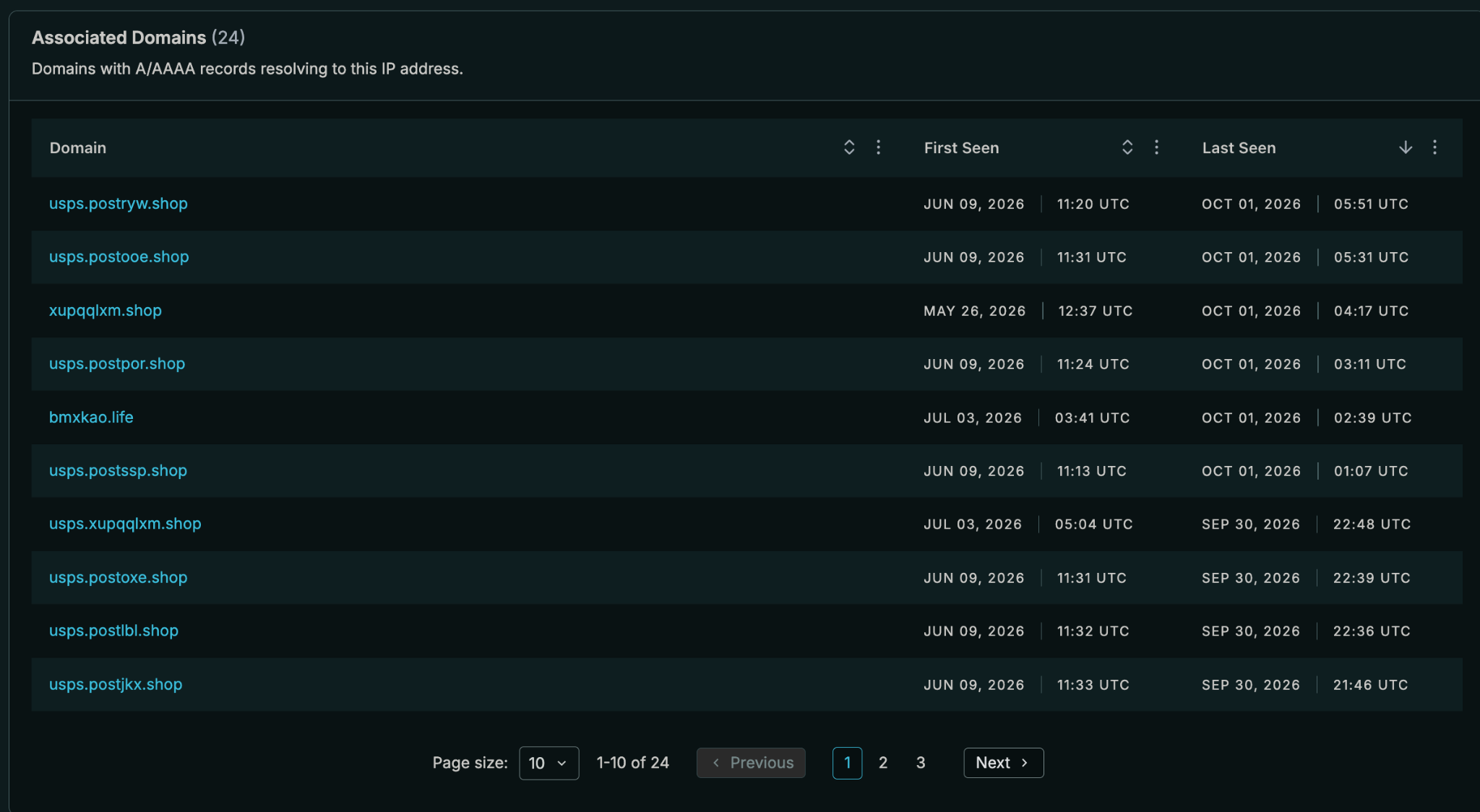
Across the seven IPs eventually confirmed in the cluster, Censys DNS resolution data held 682 unique lookalike hostnames. Most no longer resolved. They were still in the historical record with first-seen and last-seen timestamps, which let researchers reconstruct the rotation cadence.
Censys Active DNS makes this possible – it resolves A, AAAA, CNAME, MX, NS, SOA, and TXT records itself, roughly every 24 hours, and keeps the history.
Opposite to the example above, from a domain you can pivot to its hosts, certificates, and web properties. Censys ARC has extensively tracked SMS phishing campaigns impersonating electronic tollbooth service E-ZPass.
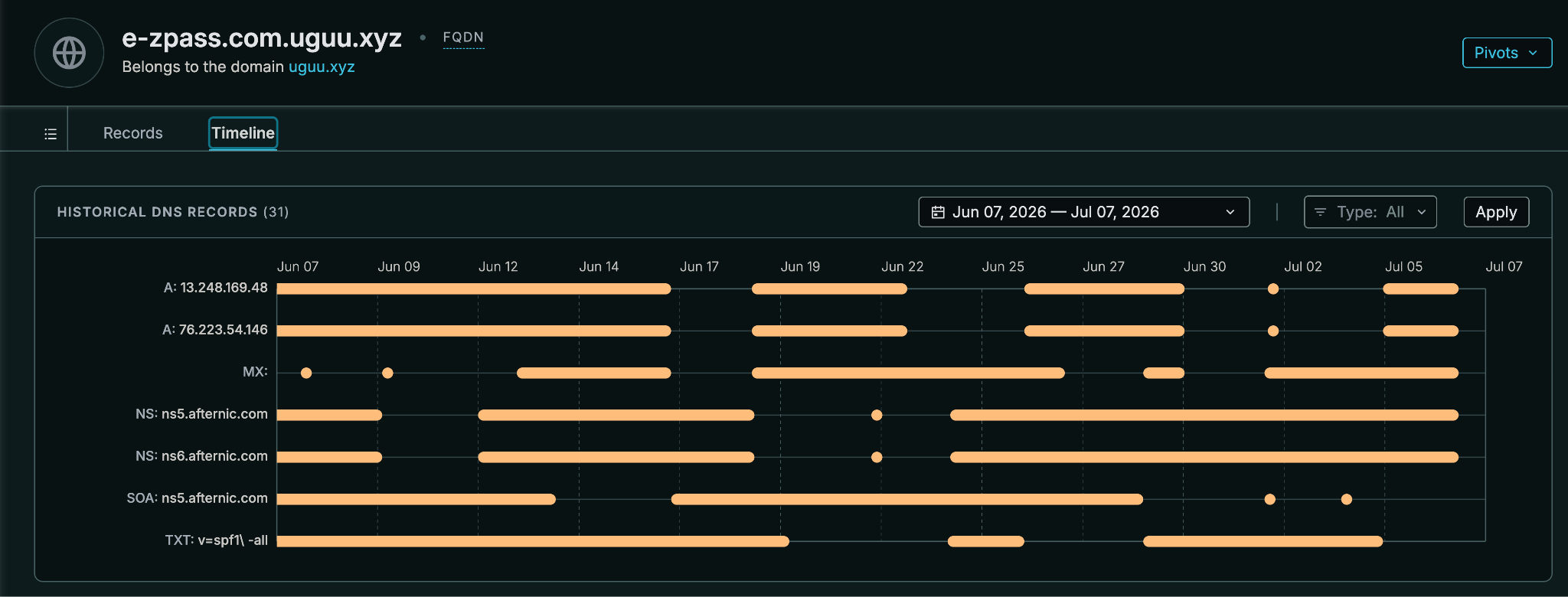
Bidirectional win!
Host and certificate history round out the picture. A host page can be viewed as it was at a past scan, which answers “what was this IP serving on the day of the report?” Certificate history shows every host that presented a certificate over time, which is how the UNC1151 origin kept giving up new domains.
7. Your own attack surface is part of your brand
The most convincing phishing page for your brand is one hosted on your actual domain. A forgotten marketing microsite running end-of-life software, or a subdomain CNAME pointing at a cloud resource you deleted, lets an attacker serve content under your name with a valid certificate.
The UNC1151 phishing link did not go straight to the fake Google page. It went first to a compromised Ukrainian website, which redirected onward. That site’s owner became part of someone else’s campaign.
(web.hostname = "{BRAND_DOMAIN}" or web.hostname =~ "\\.{BRAND}\\.{TLD}$") and (web.vulns.kev.date_added: * or web.software.life_cycle.end_of_life = true)This returns your web properties with a CISA Known Exploited Vulnerability or end-of-life software.
For dangling DNS specifically, Censys ASM separately tracks it as its own risk type.
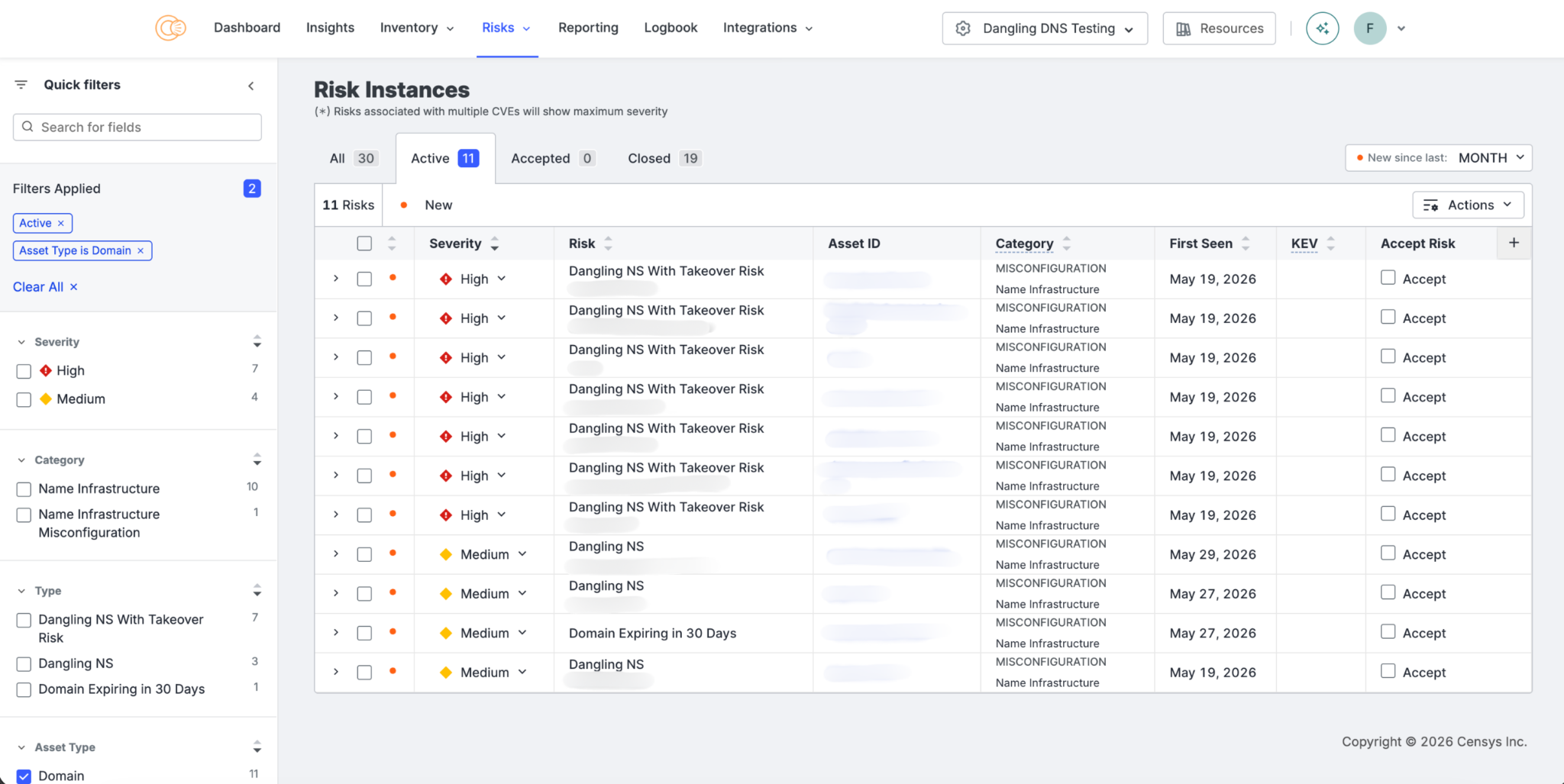
8. Operationalize: Collections
Collections turn queries into monitors and detections
Every query in this guide is a point-in-time investigation until you save it as a Collection. Collections re-evaluate continuously as scan data arrives, adding and removing assets. Both events can trigger webhooks to Slack, a SOAR, or a ticketing system.
A starting set:
- New precerts from section 1. Highest volume, earliest signal. Route to a triage channel.
- Brand-prefix and twist hostnames from section 2. Medium volume. Tune exclusions in the first week.
- Favicon and analytics-ID matches from section 3. Low volume, high confidence. Route straight to the takedown queue.
- Phishing and deceptive threat types, or reputation above 40, intersected with brand from section 4. Low volume, high severity.
- Own-surface KEV and EOL from section 7. Route to the team that owns the asset.
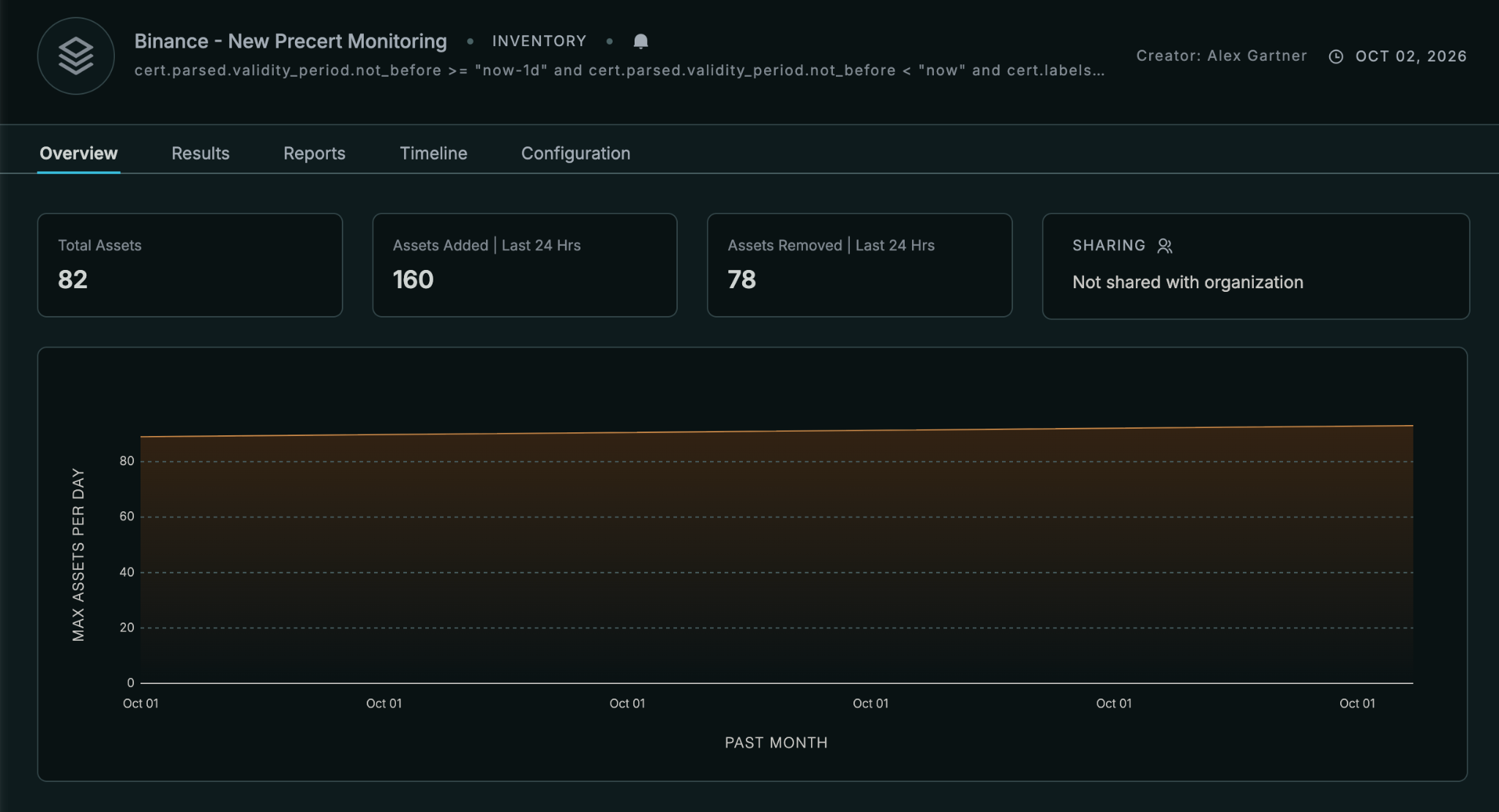
9. Takedowns: who to contact, and with what
Eight sections in and we’ve only fought half the battle. Removing this content means sending the right evidence to the party that can act.
Censys host records answer “who is that party” faster than a manual WHOIS dig.
Edge, relay, or origin?
Confusingly, the IP address your finding resolves to isn’t always the machine running it. Three kinds of address show up in brand investigations, and each needs a different takedown:
- Origin: the server that actually hosts the phishing kit, usually rented by the operator from a hosting provider. This is the one you want taken down.
- Edge: a server run by a CDN or security service such as Cloudflare. Visitors connect to the edge, and the edge quietly fetches the page from the origin behind it. One edge address serves thousands of unrelated websites, so it identifies the provider, not the operator.
- Relay: a VPN, proxy, or compromised device that forwards someone else’s traffic. The address belongs to whomever owns the machine, passing traffic along.
Think of an edge as a building’s front desk: every visitor talks to it, it serves every tenant, and it won’t give you information about a tenant without good reason.
Roughly half of the MP4 cluster’s hostnames resolved to 12 Cloudflare edge addresses.
Complaining to the owner of those IPs about “your server” would go nowhere. Censys labels tell you which kind you’re looking at before you write the complaint.
The WAF label (web.labels.value = "WAF" or host.services.labels.value = "WAF") means a protective layer sits between the visitor and the server. That provider’s abuse desk gets the complaint, with the hostname, since the IP alone identifies thousands of customers.
Censys also enriches hosts with IPinfo network data. host.network.hosting marks IPs belonging to a hosting provider, which has an acceptable use policy and an abuse desk that enforces it. host.network.mobile and host.network.satellite mark carrier networks, where a phishing page is more likely running on a compromised device or behind a proxy exit, and a complaint to the carrier rarely removes anything. The host.privacy.* fields flag VPNs, open proxies, Tor exits, and relays, and host.privacy.service_provider names the service. That helps on the fraud side: an account-takeover login from an IP flagged here came from a relay, and the operator is somewhere upstream.
The contacts are already in the record
Host records carry parsed WHOIS for the network owner, including abuse and admin contacts:
host.whois.organization.abuse_contacts.email, .name, and .handlehost.whois.organization.admin_contacts.email, .name, and .handle
The handle is the regional registry’s identifier for the contact (a RIPE handle for European networks, for example). It’s useful when an abuse address bounces and you need to look the contact up in the registry directly. Admin contacts are the escalation path when an abuse desk goes quiet.
Report Builder turns this into a batch process. Break a brand Collection down by host.whois.organization.abuse_contacts.email and you get one row per abuse desk with a count of offending hosts. Fifty individual complaints become a handful, each listing every IP at that provider. Break down by host.autonomous_system.name to see which providers carry the most abuse, and by web.cert.parsed.issuer.organization to see which CAs are issuing the lookalike certificates, since CAs can revoke them.
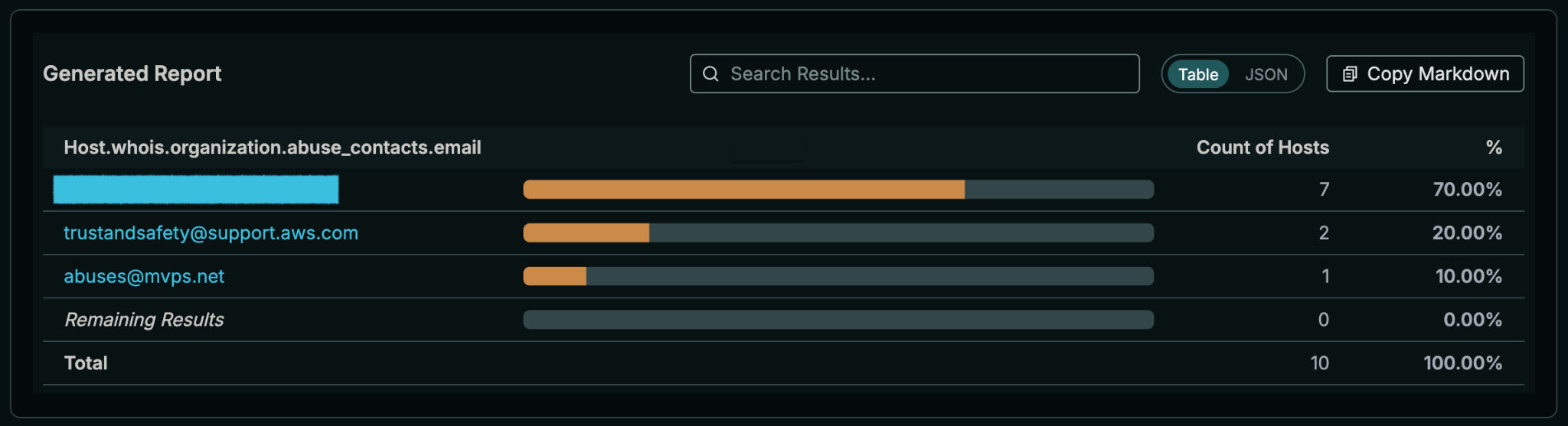
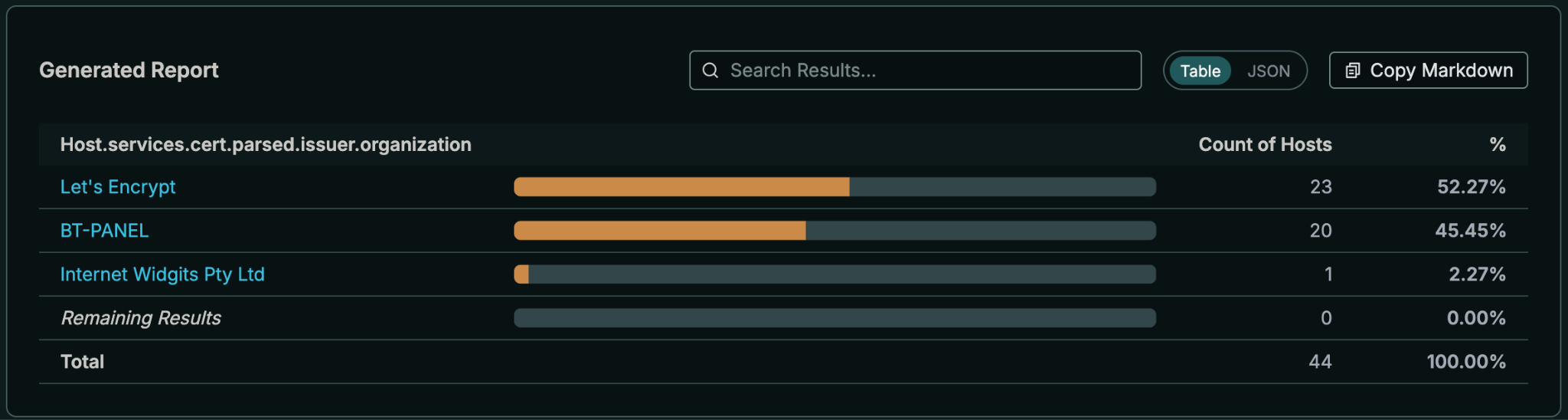
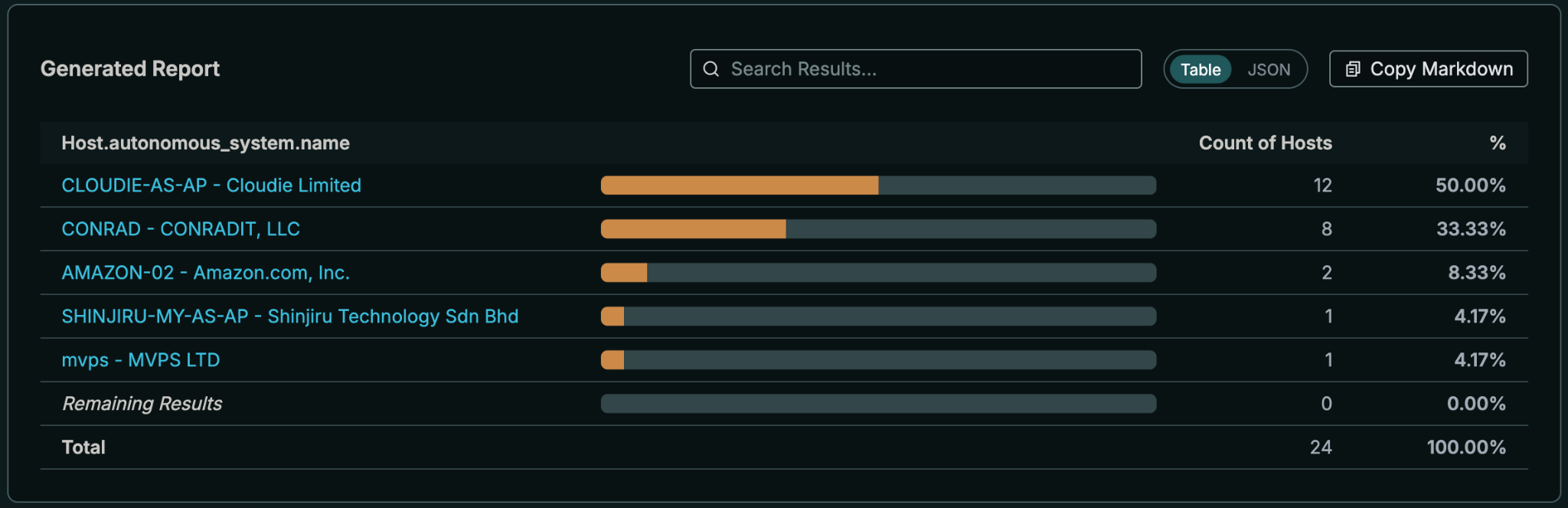
For teams automating this in a SOAR playbook, the Unlimited Host Enrichment API returns a compact profile per IP (some fields only – WHOIS, DNS, labels, reputation, GreyNoise, network and privacy classifications including the IPinfo hosting, mobile, and satellite flags) without drawing down Censys credits.
What goes in the request
A takedown request that works includes the defanged URL, first-seen time from Censys, a screenshot, the certificate fingerprint, whether the IP is a CDN edge or an origin, and the specific artifact proving impersonation (your favicon hash, your analytics ID, your copied template path). Registrars and hosts act faster on evidence than on assertions.
10. A note on email authentication
SPF, DKIM, and DMARC stop attackers from sending mail that claims to be from your exact domain. They do nothing about {BRAND}-support[.]com, because the operator owns that domain and can publish perfectly valid authentication records for it. DMARC and lookalike monitoring cover different halves of the same problem.
Active DNS helps with the lookalike half. An impersonation domain with an MX record can receive replies. One with SPF in its TXT records is set up to send. Checking the Records tab on a lookalike’s FQDN page tells you whether you are dealing with a web phishing page or an email operation.
Fare thee well
Attackers have one structural disadvantage in brand impersonation: to look like you, they have to use your artifacts. Your favicon, your page titles, your analytics tag, your template paths. Your own files! You know your artifacts better than any threat feed does, which makes them the highest-confidence detections you can write.
The gaps are real too. CT feeds miss plain-HTTP infrastructure. Body search may not see the full text of longer pages. CDNs hide origins until an operator slips. Social profiles and app listings are out of Internet scan range until they link somewhere. Each gap is covered by a different layer in this guide, which is the argument for running all of them: a campaign that hides from one usually shows up in another.
The next time a single phishing link lands in the SOC queue, treat it as a seed. In the USPS case, one SMS link led to 681 other hostnames that were already sitting in the historical record.
Go forth and give ‘em hell.
Addendum
Template conventions
| Placeholder | Meaning | Example |
{BRAND} | Your primary brand label, lowercase | acme |
{TLD} | Your primary TLD, without the dot | com |
{BRAND_DOMAIN} | Your apex domain | acme.com (unescaped in queries; acme[.]com in prose) |
{PRODUCT} | A product or franchise name customers search for | acme_heavy_iron_anvil |
{ANALYTICS_ID} | Your GA4 measurement ID (or analytics equivalent) | G-XXXXXXXXXX |