




Censys Investigator, our agentic framework, now has an API.
The same inputs you’d give it in Platform (domains, IPs, or a full threat intel report) can now come from a script, a SOAR playbook, or an AI agent.
You get back an in-depth new report, detailing the broader attacker campaign or cluster. This includes new IPs and domains for blocklists and log searches. New certs, website signatures, favicon hashes, and other advanced indicators with which to engineer detections. And best of all: you can plug in from the tools in which you already work.
This blog will cover how Investigator works, example use cases, and how you can use it to build repeatable workflows in your environment.
How the Censys Investigator API Works
The Censys Investigator allows you to work with the Censys Investigator directly from a script, SOAR, or AI agent, using the same inputs you use in Platform. Each investigation produces a report of the infrastructure related to your inputs: IPs, domains, and services that share fingerprints with what you submitted, plus a CenQL query that best matches the whole cluster. Through the API, that report comes back as a downloadable archive for your AI agents and pipelines.
We’ve built this for a variety of SecOps functions:
- CTI: A vendor report lists the indicators that they observed — rarely a comprehensive map. Feed those indicators, or the report itself, into Censys Investigator to get the rest of the campaign. That gives you more blocklist entries, more retro-hunt targets, and a query you can monitor for new infrastructure as the operator builds it.
- L2+ SOC triage: An escalated alert on an unknown IP or domain comes back with the infrastructure around it. The analyst can judge severity by whether it’s a one-off, part of a campaign, or a false positive. Then close the case with the whole cluster blocked instead of a single address.
- DFIR: The C2 you found is rarely the only C2. Censys Investigator gives responders sibling infrastructure to search for in proxy, DNS, firewall, and EDR telemetry. That’s how you find the second compromised host and scope the incident correctly.
The most immediate, direct output is new IPs and domains for blocklists and log searches, derived from indicators you already trust. Secondarily, you have new certs, favicon and banner hashes, or other advanced indicators with which to engineer detections.
Example. On September 29, Microsoft published seven domains from a phishing campaign that abused MSP360 RMM to install ScreenConnect.
Censys Investigator expanded those seven into a 69-asset cluster run by the same operator, including domains Microsoft didn’t list such as:
adacompliantsigns[.]onlinesupoort-pdf[.]commainethome[.]promet[.]macroteams[.]siteflowmeinhomes[.]comchapalasrealtor[.]com
If your users could be targeted by this campaign, search your DNS and proxy logs for these domains and add them to your blocklists alongside Microsoft’s originals.
Next, let’s talk about how you can build this yourself as a repeatable workflow.
CTI: Turn a Vendor Report Into a Watched Cluster
A cron job watches the vendor blogs your team already reads (such as the Microsoft example above), fetches each new article, and uploads it as-is. Censys Investigator extracts the indicators itself.
import feedparser
from datetime import datetime, timedelta, timezone
def investigate_report(url, published):
    page = requests.get(url).content
    up = requests.post(f"{API}/files", params=ORG, headers=HDR, json={
        "content_type": "text/html",
        "filename": url.rstrip("/").rsplit("/", 1)[-1] + ".html",
        "size_bytes": len(page),
    }).json()["result"]
    requests.put(up["upload_url"], headers=up["upload_headers"], data=page).raise_for_status()
    lookback = (published - timedelta(days=90)).strftime("%Y-%m-%dT%H:%M:%SZ")
    return investigate(file_ids=[up["file_id"]], start_time=lookback)
for entry in feedparser.parse(VENDOR_FEED).entries:
    if is_new(entry.link):
        published = datetime(*entry.published_parsed[:6], tzinfo=timezone.utc)
        results = investigate_report(entry.link, published)
        requests.post("https://api.platform.censys.io/v3/collections", params=ORG, headers=HDR, json={
            "name": f"Investigator: {entry.title}",
            "query": cluster_cenql(results),
        }).raise_for_status()
Against Microsoft’s report, three of the seven IOCs proved useful for pivoting. Two of them led to 58 additional ScreenConnect hosts and websites (matching banner hashes). The whole operation was tied together by a ScreenConnect extension UUID in common.
The last step turns the cluster’s CenQL query into a Collection, so new infrastructure from this operator shows up without anyone re-running the hunt.
Add a Collection webhook and push results to OpenCTI (or other threat intel platform you use) in real time. New relays as the actor stands them up.
L2+ Triage: A New Step In Your Playbook
An EDR alert fires on a workstation reaching out to 193[.]178[.]159[.]128 on port 8000. The IP has no reputation, and the alert escalates to L2.
Instead of handing the analyst one IP, the SOAR playbook pulls every outbound destination from that workstation in the 24 hours around the alert. That includes the IP, a password-reset domain the user visited shortly before, and a handful of other IPs and domains. It then submits all of them as one investigation:
def soar_action_investigate(alert):
    t = alert["first_seen"]
    iocs = edr.outbound_destinations(alert["host_id"], start=shift(t, hours=-24), end=t)
    results = investigate(iocs, start_time=shift(t, days=-14), end_time=t)
    case.attach(results)
    case.add_note(cluster_cenql(results))
    firewall.stage_block(cluster_members(results))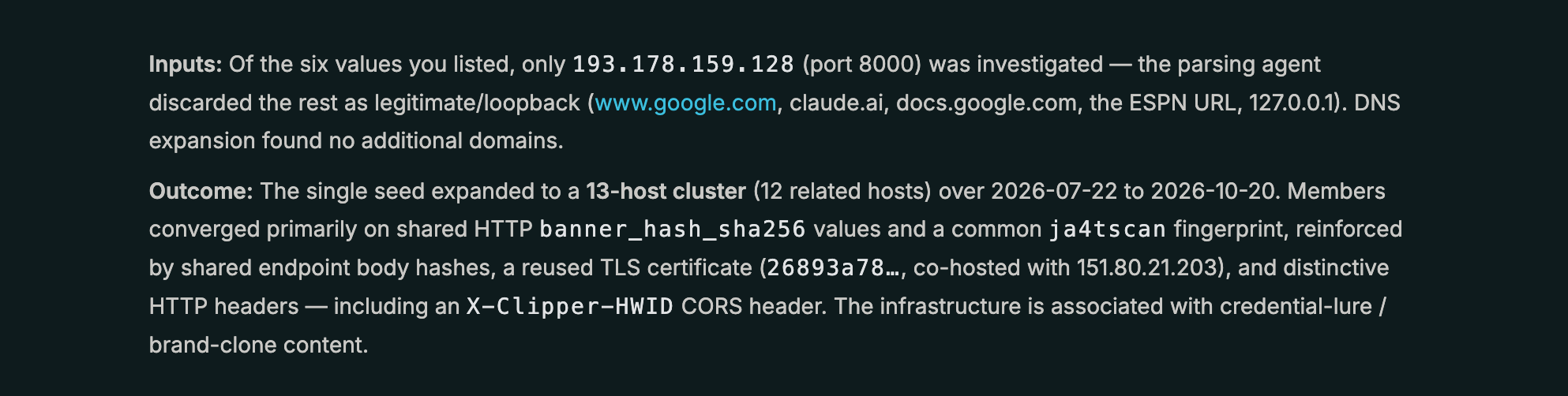
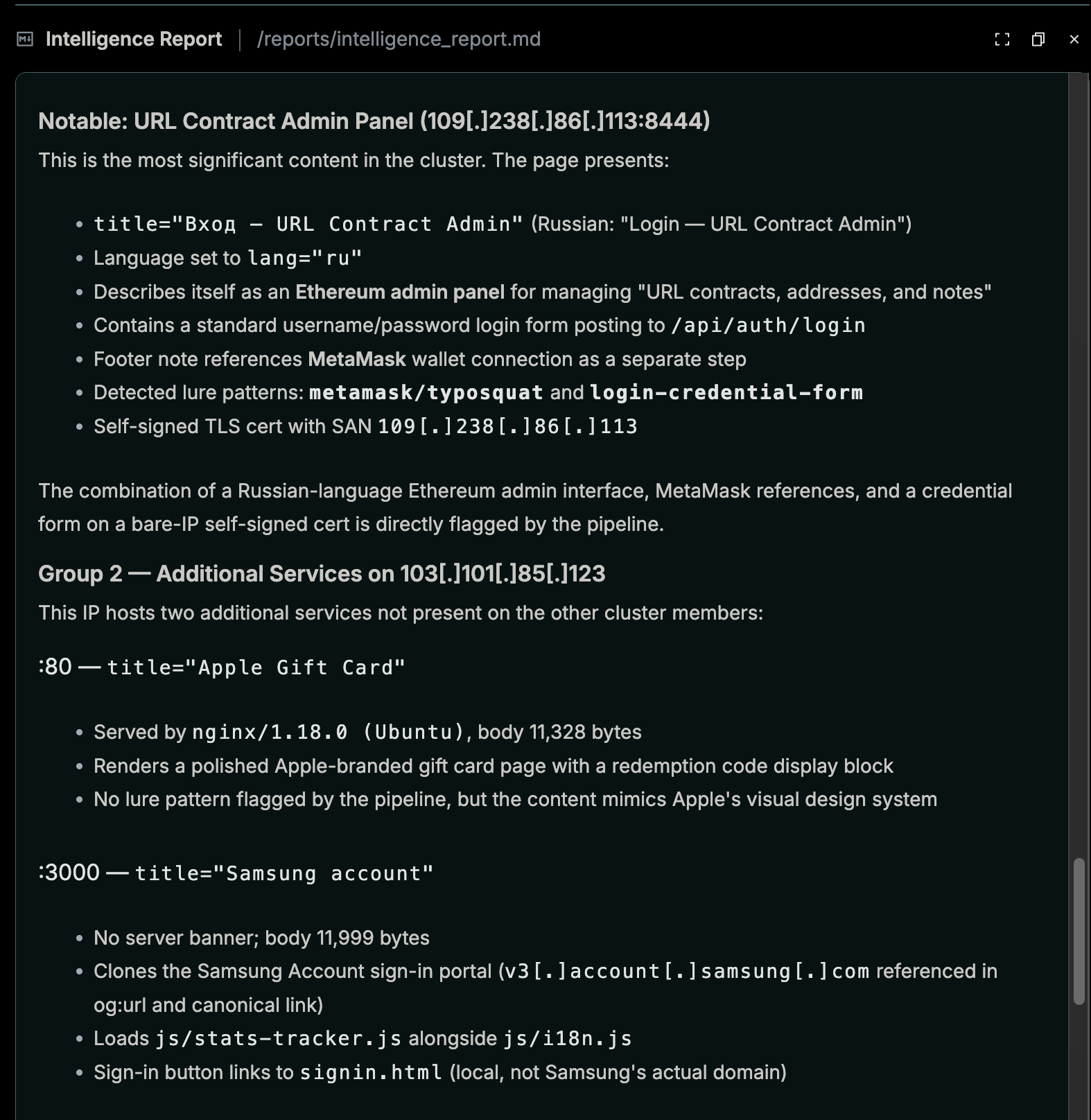
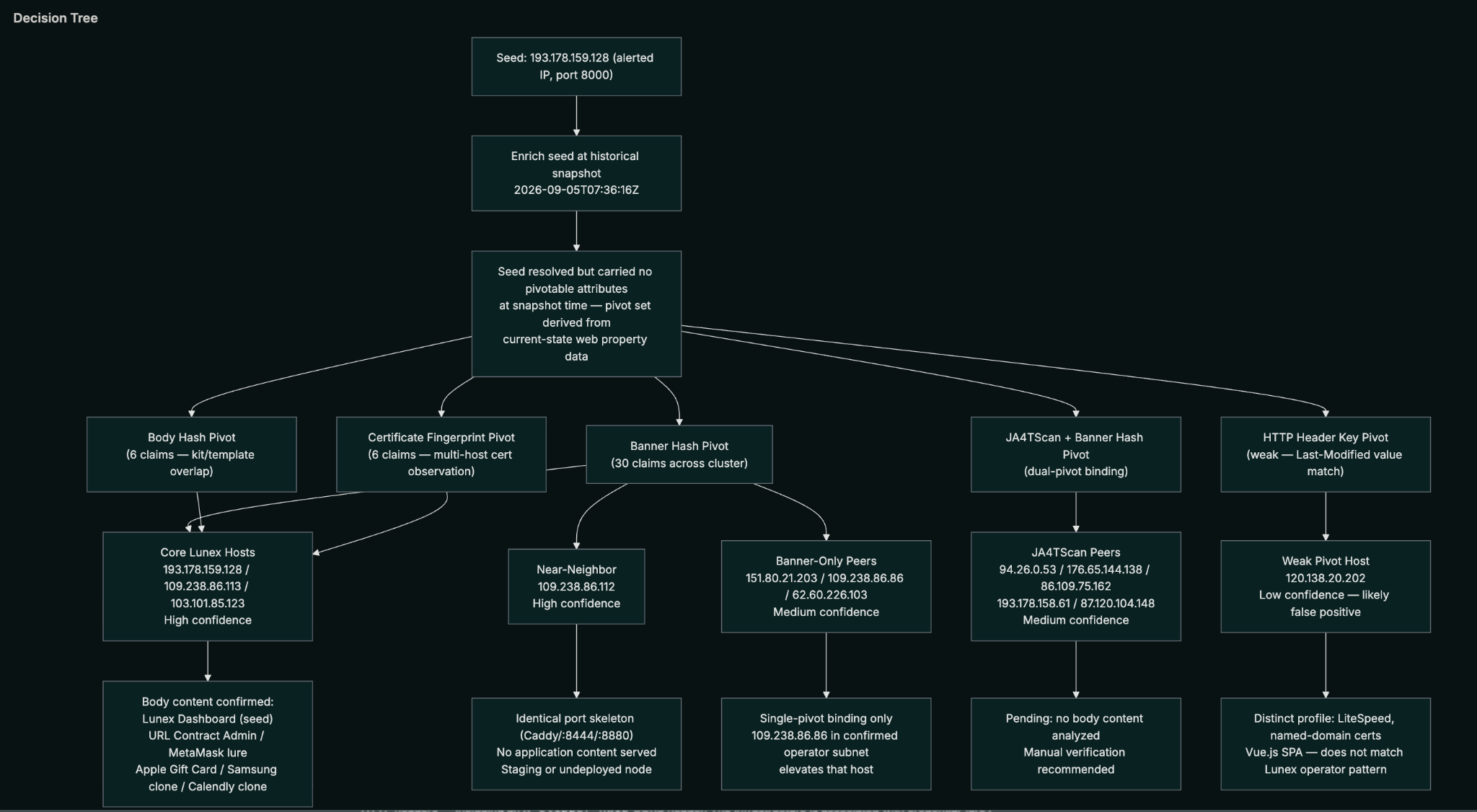
Ten destinations go in, and a 25-asset cluster comes back. The workstation was targeted by a Lunex Stealer operation.
The case closes with those hosts staged for blocking, and the cluster query goes to the hunt team to sweep for other workstations that reached any of them.
DFIR: Give the IR Agent an Investigation Tool
During an incident response, EDR identifies a remote access trojan on a set of servers. Responders dig back through firewall logs and find those servers talking to seven external IPs and one domain, verify-cloud[.]digital, starting four days ago. By now, some of that infrastructure may have moved on.
The responders’ AI agent has Censys Investigator registered as a tool, in addition to other skills. It checks the organization’s remaining allowance, then submits the eight C2 indicators with a start_time and end_time taken from the first and last log entries:
def investigator_tool(indicators: list[str], start_time: str, end_time: str):
    usage = requests.get(f"{API}/usage", params=ORG, headers=HDR).json()["result"]
    if usage["remaining"] == 0:
        return {"error": "Investigation allowance exhausted", "retry_after": usage.get("next_expire_time")}
    results = investigate(indicators[:100], start_time=start_time, end_time=end_time)
    return {"cenql": cluster_cenql(results), "report": read_report(results)}
The time window keeps Censys Investigator focused on what those IPs and domains were serving while the attacker was in the environment, rather than today’s state. (Censys’ Internet Map maintains four years of history in hot storage for querying).
Eight indicators go in, and 46 assets come back. The largest group is nine .us domains named like small businesses, including harborhouseplumbing[.]us, cobblestonecafe[.]us, and novalineyoga[.]us. Each has the same five subdomains, a certificate of its own, and DNS pointing at 91[.]219[.]236[.]179, one of the incident’s C2 IPs. Separately, the IP behind verify-cloud[.]digital also hosts reviewscene[.]com.
None of those domains appeared in the logs the responders started with. All of them are now on the list to search for in DNS and proxy history across the rest of the environment.
Limits
Investigations cost no Censys Credits. Each user can run three at a time, each organization gets 150 per week, and results are retained for seven days. Batch related indicators into one job rather than many small ones.
Where This Goes
Microsoft’s seven domains were partly gone within a week of publication. The banner hashes and extension UUID behind them will last longer, because changing them means rebuilding the deployment. Every report your team reads and every alert it escalates can lead to those longer-lived signals, and with the API, that expansion can run automatically.
Censys Investigator is available on the Adversary Investigation module.