



Executive Summary
- AdaptixC2 is an open-source post-exploitation C2 framework whose default configuration ships branded HTTP headers (
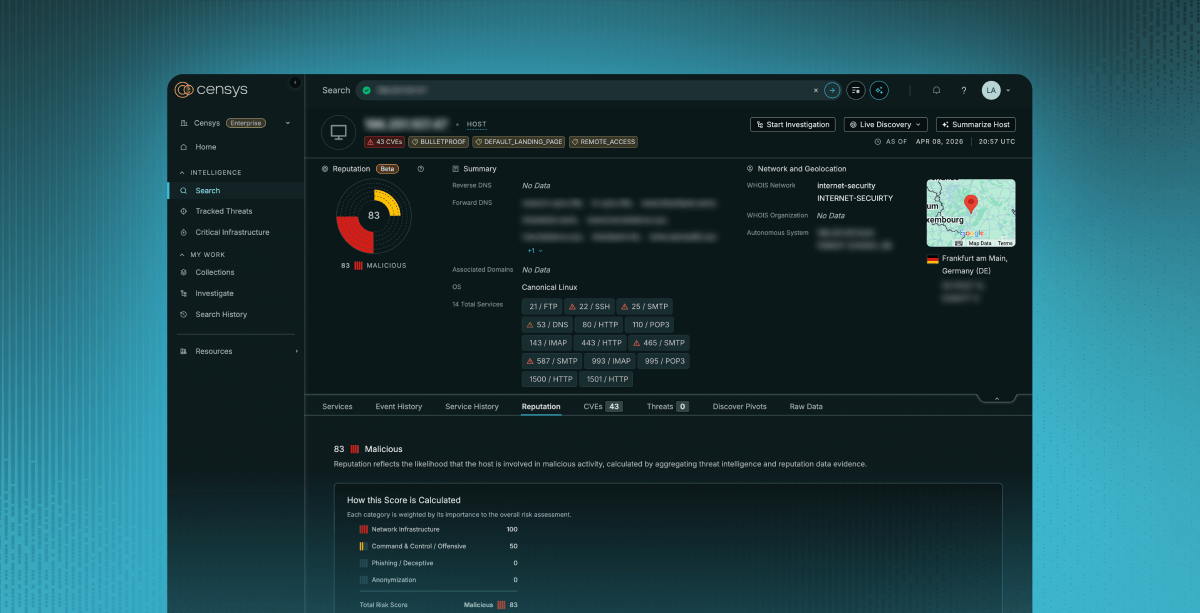
Server: AdaptixC2, Adaptix-Version: v1.2) on every unauthenticated request, making deployed servers trivially identifiable from passive scanning. - As of 16 June 2026, Censys tracks 412 web properties across 236 hosts running AdaptixC2 with default or near-default settings.
- Three beacon listener clusters (Hivelocity, M247, PSB Hosting) – each spanning multiple IPs across adjacent subnets with identical default TLS certificates – suggest individual operators running coordinated, redundant callback infrastructure.
- One host (
2.26.229[.]254) was actively serving payloads, including a Linux installer with 12 persistence mechanisms and Russian-language comments. - Operators who modify the
Serverheader to evade detection leave the default 404 page body intact. Querying on both signals catches this class of evasion. - All detections are available in Censys via the THREAT-0210 threat label.
AdaptixC2 is an open-source post-exploitation framework with a default configuration that makes deployed servers trivially identifiable from passive scanning. As of 11 June 2026, Censys tracks 390 web properties — each a distinct IP or hostname and port pair — across 217 hosts running AdaptixC2 with default or near-default settings. This includes three distinct beacon-listener clusters that suggest coordinated multi-server deployments and one host serving implants from an open directory. The framework ships branded HTTP headers on every unauthenticated request, so the first passive probe identifies the framework without authentication or endpoint knowledge.
Not all of these hosts represent malicious activity. Some are almost certainly authorized red team infrastructure. What we can say from passive scanning is that the infrastructure exists, it’s detectable, and defenders who understand the fingerprint can make informed decisions about what to block or monitor.
What Is AdaptixC2?
Post-exploitation frameworks provide the tooling operators use after gaining an initial foothold: maintaining access, running commands, moving laterally, and collecting data from compromised systems.
AdaptixC2 is a publicly available post-exploitation framework written in Go (teamserver) and C++/Qt (GUI client). It’s designed for red team engagements, though like most offensive frameworks it sees use in unauthorized operations as well. The project is at v1.2 and has less public analysis coverage than older frameworks like Cobalt Strike, Havoc, or Sliver.
The framework ships two agent families. In C2 terminology, an agent is an implant that runs on a compromised host and checks in with the operator for tasking, not an AI agent. The Beacon agent is a C++ implant supporting Beacon Object File (BOF) execution on Windows, Linux, and macOS; the Gopher agent is a Go implant with async BOF support across the same platforms. The framework implements listeners as loadable plugins (“extenders”) covering HTTP/S, DNS/DoH, SMB named pipes, and raw TCP transports. The teamserver exposes a full REST and WebSocket API for operator control — credential management, agent tasking, screenshot capture, tunnel management, and multi-operator collaboration.
What makes AdaptixC2 detectable at scale is a design choice in profile.yaml: the error block sets Server: AdaptixC2 and Adaptix-Version: v1.2 on every unmatched route. They appear on any request that doesn’t match the configured endpoint — no authentication required, no prior knowledge of the endpoint path needed. Passive scanners see the banner on the first probe.
Architecture
Teamserver
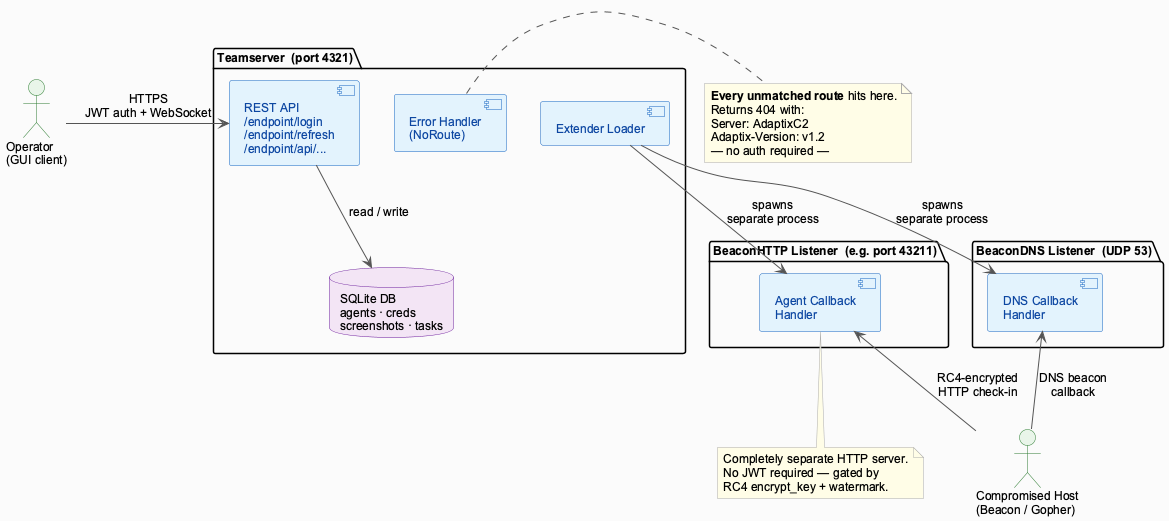
The teamserver is a single Go binary. At startup it loads profile.yaml to configure the network interface, port, endpoint path, password, and HTTP response behavior. It then generates or loads a self-signed TLS certificate, loads extender plugins from disk, starts an HTTPS server via gin, and restores state from a SQLite database.
The router hierarchy in connector.go defines four distinct groups under the configured endpoint (default /endpoint):
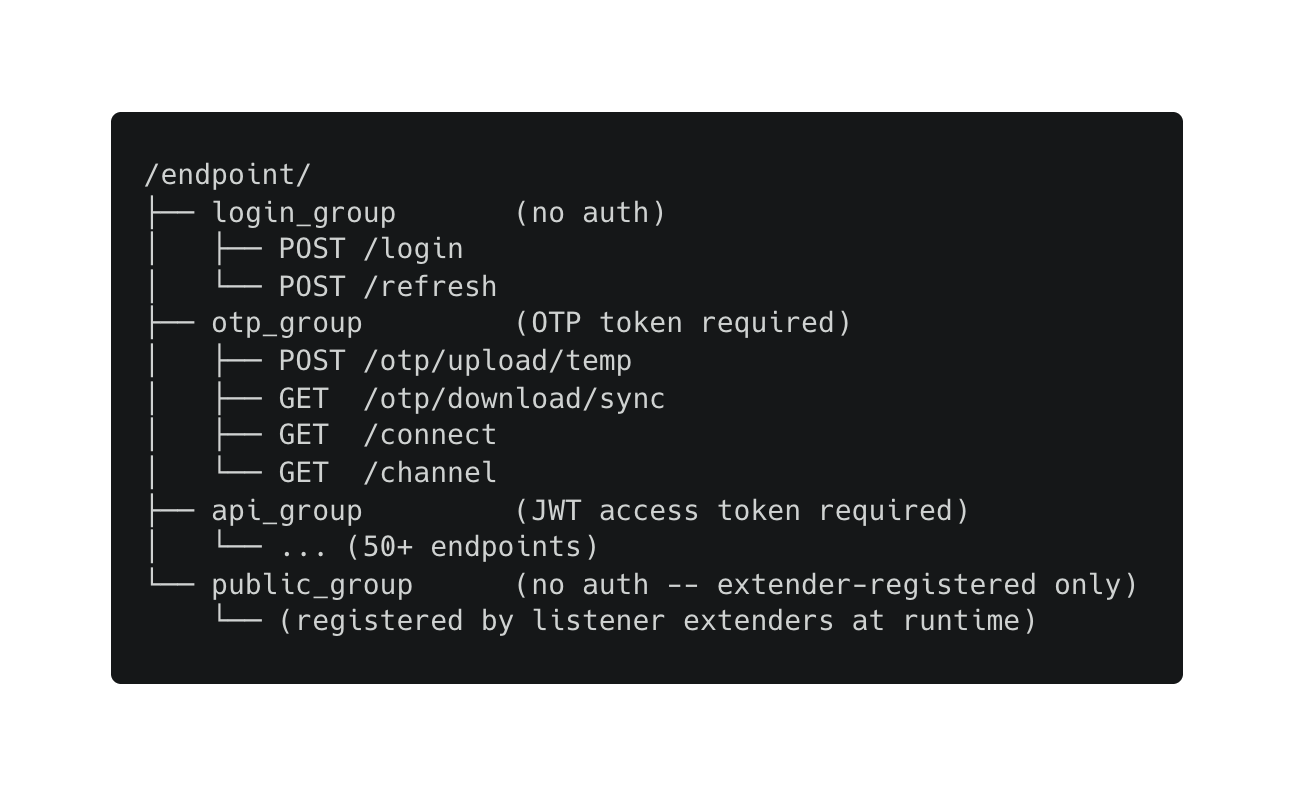
Anything outside the /endpoint prefix, and any path under /endpoint that isn’t registered, hits the NoRoute handler, which returns the configured error response — the 404 page with the branded headers.
Authentication Model
Authentication is two-tier. The /login endpoint takes a JSON body with a username and password and returns a short-lived JWT access token (12 hours) and a long-lived refresh token (168 hours, or seven days). Each startup generates fresh JWT signing keys via crypto/rand and signs tokens with HS256.
OTP tokens gate WebSocket upgrades and one-time file transfers. An authenticated operator calls /otp/generate with a JWT access token to create a 64-character hex OTP. These tokens are single-use — calling the corresponding endpoint twice with the same token fails.
Extender System
Listeners compile to Go shared libraries (.so files) that load at runtime. When a listener starts, it can register routes on either the api_group (JWT-protected) or the public_group (unauthenticated). This is the correct design for agent callbacks — agents don’t carry operator credentials, so their check-in endpoints can’t require JWT auth.
In practice, the HTTP beacon listener (BeaconHTTP extender) doesn’t use the teamserver’s public endpoint group at all. It starts its own separate HTTP server on the operator-configured callback port, independent of the teamserver:
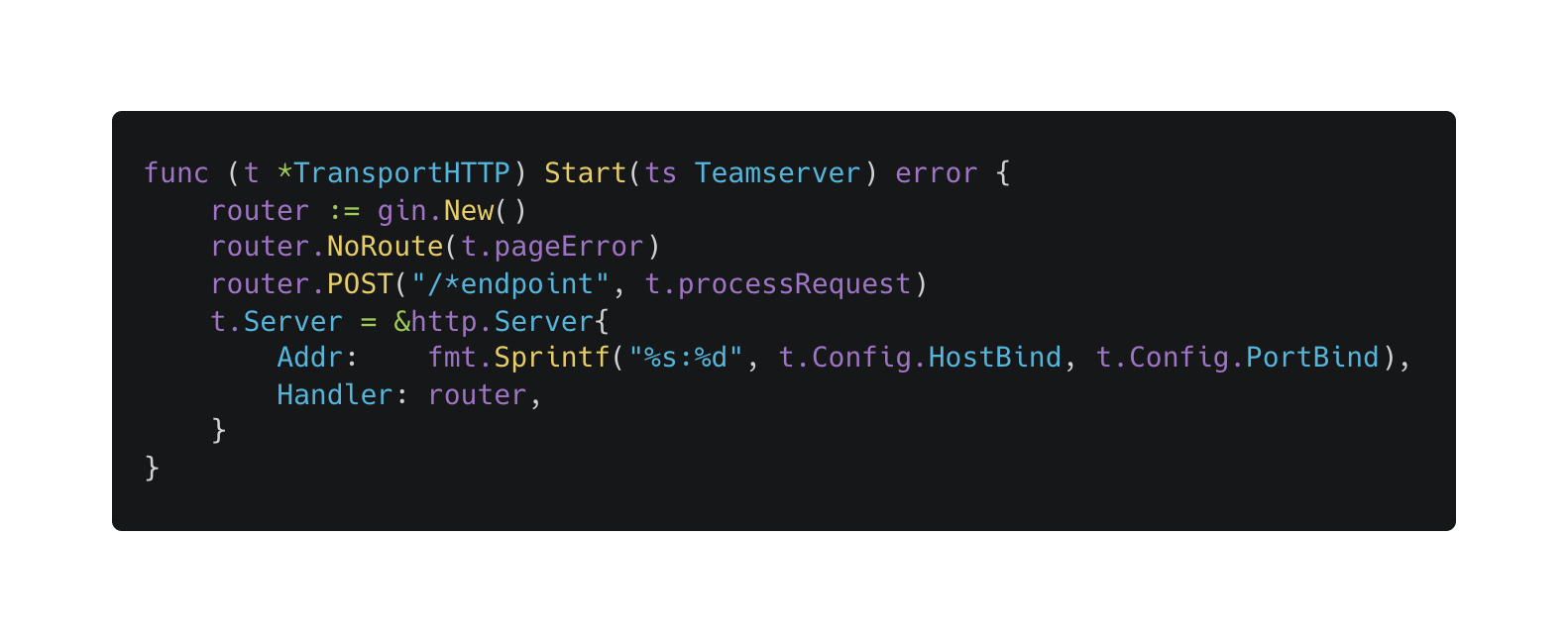
This is why the Censys scan finds two distinct populations — teamservers (typically port 4321, operator API) and beacon listeners (high ports like 43211, agent callbacks). Both surfaces return the default 404 page, but they serve different purposes.
The Fingerprint
Detection relies on two independent signals from the default configuration, both visible without authentication.
The headers. The default profile.yaml sets these headers in HttpServer.error.headers:
HttpServer:
  error:
    status: 404
    headers:
      Content-Type: "text/html; charset=UTF-8"
      Server: "AdaptixC2"
      Adaptix-Version: "v1.2"
    page: "404page.html"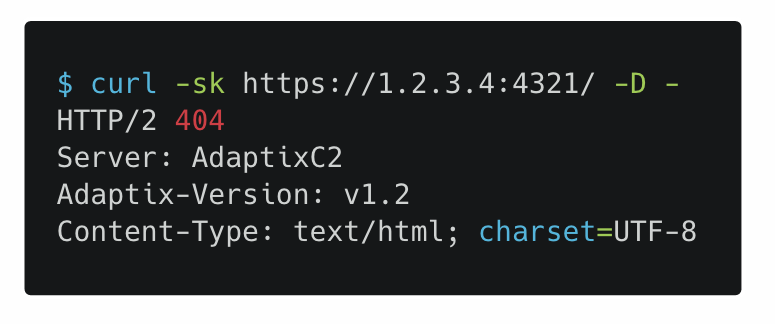
Because this is the error handler, not a specific route, these headers appear on any path that doesn’t match the configured endpoint. Even when an operator uses the default /endpoint path, API access still requires a valid JWT. But any request to /, /robots.txt, /favicon.ico, or any arbitrary path returns a 404 with Server: AdaptixC2 in the response.
The 404 body. The default 404page.html contains:
<h1>AdaptixC2 404</h1>
<p>You need to enter the correct connection details.</p>
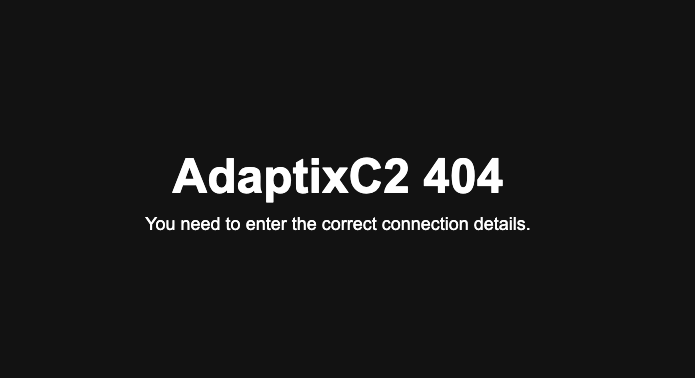
This string is specific enough to use as a standalone indicator when an operator has changed the response headers.
Combined query:
host.services.endpoints.http.headers: (key: "server" and value: "AdaptixC2") or host.services.endpoints.http.headers: (key: "adaptix-version" and value: "v1.2")
Follow Along in Censys
Body-only fallback (catches header-modified deployments):
host.services.endpoints.http.body: "You need to enter the correct connection details."
DNS listener (tertiary signal). The BeaconDNS extender sets AA=true on every response and returns TXT "OK" for any query that doesn’t match its beacon protocol format — specifically, any query with fewer than five labels. Censys captures this as a DNS service with version: "OK" on UDP/53.
host.services.dns.version: "OK" and host.services.protocol = "DNS"
This query returns around 30 hosts globally. Most are legitimate DNS servers hiding their BIND version with a custom string, so the signal needs cross-referencing, either against the Adaptix C2 threat label or via active probe. Querying a random short hostname returns TXT "OK" (what Censys captures), while a query formatted as a beacon-check-in (five or more dot-separated labels in the BeaconDNS protocol format) returns A 127.0.0.1 on a genuine listener. Default TTLs jitter between 10 and 70 seconds). On hosts that aren’t running BeaconHTTP, this is the only passive signal.
Discovery
We started from the source code. AdaptixC2’s profile.yaml and 404page.html are both in the public GitHub repository — the fingerprint follows directly from reading them, no prior infrastructure exposure needed. We confirmed the expected headers against live deployments and ran both queries against Censys.
The combined scan returned 236 unique hosts. The default configuration is explicit enough that a single query captures most of the population. The harder work was making sense of what those hosts represent.
Censys ARC Perspective
The hosts break down across a range of ASNs and geographies, with clustering that suggests organized deployment.
Port Distribution
| Port | Count | Notes |
4321 | 46 | Default teamserver port |
43211 | 15 | Common beacon listener port |
8080 / 8443 / 8989 | ~3 each | Non-default teamserver ports |
Various (1337, 9999, 8562, etc.) | 50+ | Operators choosing non-standard ports |
The 46 hits on port 4321 confirm that many operators deploy with the default configuration and leave the port unchanged. The 15 hits on 43211 concentrate in two of the three beacon listener clusters described below.
Top ASNs
| ASN | Name | Hosts | Notes |
| AS29802 | HVC-AS (Hivelocity) | 13 | Beacon listener cluster; multiple active AdaptixC2 servers observed across 23.227.203.0/24, 46.21.153.0/24 |
| AS9009 | M247 | 9 | Beacon listener cluster; 38.132.122.x, 146.70.87.x |
| AS132203 | Tencent | 7 | Port 4321; servers hosted in HK and CN Tencent Cloud regions |
| AS9081 | PSB Hosting | 6 | Beacon listener cluster; 45.155.69.x, |
| AS20473 | Vultr | 5 | Geographically spread |
Geographic Distribution
| Country | Hosts |
| US | 38 |
| HK | 18 |
| CN | 14 |
| NL | 12 |
| SG | 8 |
| DE | 8 |
| FR | 5 |
| RU | 3 |
The US count is high partly because Hivelocity is a US-based provider, and those hosts are almost certainly beacon listeners rather than teamservers. The Hong Kong and China hosts cluster on Tencent Cloud, consistent with East Asia-based operators or operators targeting that region.
Notable Hosts
| IP | Port | Notes |
185.190.142[.]66 | 4321 | Contabo FR; RDP (3389) also open; certificate O=OpenClaw on port 443 |
89.125.255[.]29 | 4321 | RoyaleHosting NL; self-signed certificate with C=RU, ST=as, O=as |
38.147.173[.]24 | 8562 | Lucidacloud HK; port 50050 also open |
156.225.22[.]201 | 1337 | cognetcloud HK; non-standard port |
202.95.8[.]92 / .97 / .98 | 4321 | CTG Server HK; three sequential IPs |
The cert on 89.125.255[.]29 stands out: C=RU, ST=as, O=as — “as” filled in twice when prompted for state and organization. 185.190.142[.]66 has both AdaptixC2 on port 4321 and RDP open on 3389, which suggests an operator working directly on the teamserver box rather than managing it remotely through a jump host.
38.147.173[.]24 runs AdaptixC2 on port 8562 and also has port 50050 open. Port 50050 is the default Cobalt Strike teamserver port. We can’t confirm from a passive scan that a live Cobalt Strike instance is present — port 50050 could be in use for something else, or the process may not be running at scan time. The combination suggests an operator working with multiple offensive tools.
Infrastructure Clusters
The most informative finding from the Censys scan isn’t the individual hosts — it’s three beacon listener clusters that likely represent single operators running multiple callback servers.
These are beacon listeners, not teamservers. A teamserver needs to be reachable by the operator for API access — typically a single port on a fixed IP. A beacon listener only needs to be reachable by agents on compromised hosts. Operators often run multiple beacon listeners across different providers, ports, and geographies for redundancy and to complicate takedown. Shared TLS certificate patterns tie these clusters together.
- Hivelocity cluster. Eight or more IPs across two subnets (
23.227.203.0/24and46.21.153.0/24) all serving the AdaptixC2 404 page on randomized high ports (42215,42235,43211,43435,43655). Every host in this cluster uses the default OpenSSL self-signed certificate:C=AU, ST=Some-State, O=Internet Widgits Pty Ltd. That certificate is what OpenSSL generates when you runopenssl reqand accept all defaults. Its presence across eight IPs on two adjacent subnets from the same provider strongly suggests a single operator who stood up a batch of callback servers without customizing the TLS configuration. - M247 cluster. Eight IPs across two subnets (
38.132.122.xand146.70.87.x), almost all on port43211. Same default OpenSSL certificate as the Hivelocity cluster. M247 is a popular choice for red team and grey-area infrastructure. The shared port and shared cert pattern point to the same operator or the same deployment tooling. - PSB Hosting cluster. Six IPs across two subnets (
45.155.69.xand185.242.245.x) on randomized ports in the42xxx–44xxxrange. Smaller than the other two clusters but the same behavioral signature: adjacent IPs, randomized high ports, default cert.
The sequential or near-sequential IP allocation within each cluster suggests these were provisioned at the same time, probably from the same provider account. Operators who spin up beacon listeners in bulk tend to take consecutive IPs because that’s what you get when you order multiple VMs in the same region in the same session. Whether any of these are authorized engagements, passive scanning can’t say — the clustering pattern describes how the infrastructure was built, not what it was used for.
A Live Deployment: 2.26.229[.]254
The clearest evidence of an active operation in this dataset is 2.26.229[.]254. It ran AdaptixC2 listeners on ports 4433 (BeaconHTTP) and 4455 (GopherTCP) and simultaneously served payloads over an open HTTP directory on port 7000. No authentication required — the files were publicly accessible to anyone who connected.
Payloads
| Filename | SHA256 | Type |
install.sh | 479b7abd5df2f6ab3de8c32a36478c15012dbc8217f9fa825fd4b9cb7e9b8d13 | Linux persistence installer |
timesync.bin | fb1f4f5a4ef76960577462634f4a104fb307e161fc2791b9231a07a2c751beca | Gopher agent (ELF x64) |
svhost.exe | 06b13dfd84493b01a020eecdabff6308b5b790ed4cd4c7a96a30ae6be1ca325d | Beacon (Windows x64) |
svc_timesync.x64.exe | 7d35d687ae8d4056e394905e9f8962512e6d55ff98664ed1facee6554a565624 | Beacon (Windows x64) |
agent.x86.exe | 51fba778dae6f108f7afa800bdb7745e6a0f6d2630a37ecc84c1d4a1609f9692 | Beacon (Windows x86) |
timesync.bin is a Gopher agent (ELF x64) for Linux. The three .exe files are Windows Beacon implants in both x64 and x86 variants. A legitimate VC_redist.x86.exe was also present, likely as a runtime dependency.
install.sh: Linux Persistence Installer
The installer presents itself as a routine package update — fake apt output, fake kernel unpacking — while running the actual installation in a background subshell. Russian-language comments throughout the script indicate the author’s working language. It deploys timesync.bin to /usr/local/lib/systemd/timesync and establishes 12 independent persistence mechanisms before shredding itself.
- Hidden user — creates
systemd-timesync(UID 9999) with a random password and a hardcoded operator SSH key inauthorized_keys. SSH access survives agent removal. - Fake systemd service — overwrites
systemd-timesyncd.serviceto execute the beacon, masquerading as the NTP sync daemon. - Three cron jobs at 5-minute, 10-minute, and 15-minute intervals across separate crontab locations. Any one survivor restarts the agent.
- Initramfs hook — drops a script into
/etc/initramfs-tools/scripts/init-premount/and rebuilds the initrd viaupdate-initramfs. The agent runs before the root filesystem mounts. - GRUB init replacement — appends
init=/usr/local/lib/systemd/systemd-persistence.shtoGRUB_CMDLINE_LINUX_DEFAULTand rebuildsgrub.cfg.The kernel hands PID 1 to the attacker’s script instead of systemd on next boot. This survives service removal, cron purges, and user deletion. - LD_PRELOAD library — writes and compiles
libsystemd-override.so, registered in/etc/ld.so.preload. A GCC constructor causes every dynamically linked process to fork and exec the beacon. Removing the binary alone is not sufficient. - Kernel thread masquerading — two beacon instances launched as
[kworker/0:0]and[kthreadd]viaexec -a, blending into kernel thread entries in ps output. - Integrity monitor —
monitor.shrunning as[kworker/u:0], checking every 60 seconds and re-downloading the agent fromhxxp://2.26.229[.]254:7000/timesync.binif it’s absent. - Shell profile injection — appends agent launch to
.bashrcand.profilefor every user in/home/*and root. - DNS hijacking — sets
2.26.229[.]254as the primarysystemd-resolvedDNS server. All DNS queries route through the C2 host. - eBPF hook — if
bpftoolis present, loads a kprobe onsys_getdents64returning 0, attempting to hide processes from directory listings. - Systemd timer —
systemd-timesync.timerfiring two minutes after boot and every 10 minutes thereafter.
Cleanup: zeroes all files under /var/log, clears bash history, and shreds the installer with shred -u.
The combination of GRUB init replacement and LD_PRELOAD means the implant survives most detection-and-removal workflows short of a full OS reinstall. The eBPF hook — loading a kprobe on sys_getdents64 to zero out process directory entries — aims to make running processes invisible to standard userspace tools, adding a kernel-level hiding layer on top of the process name masquerading in items 7 and 9.
Beacon Config (Extracted via Static Analysis)
The Agents section below covers config extraction from Windows beacon binaries. The three .exe samples from 2.26.229[.]254 all call back to the same listener:
- C2:
hxxp://2.26.229[.]254:4433 - Callback URIs:
/api/v1/status,/updates/check.php,/content.html - Custom header:
X-ISS - User-Agent:
Mozilla/5.0 (Windows NT 6.2; rv:20.0) Gecko/20121202 Firefox/20.0 - RC4 key:
1baccab4cbd2b84f6bc54bf8e6551f93 - Sleep: 10 seconds
The API Surface
The teamserver’s REST API is spelled out in server.go and connector.go. Here’s what’s behind it.
The authentication flow:
- Operator calls
POST /endpoint/loginwith a JSON credential body. Server returns access token (12hr) and refresh token (168hr). - Operator attaches the access token as
Authorization: Bearer <token>on all subsequent requests. - Before opening a WebSocket channel, operator calls
POST /endpoint/otp/generateto get a one-time token, then upgrades via GET/endpoint/connect?otp=<token>. - Expired access tokens are refreshed via
POST /endpoint/refreshwith the refresh token.
Authentication and session:
| Endpoint | Method | Auth | Purpose |
/login | POST | None | Issue access and refresh tokens |
/refresh | POST | None | Rotate access token using refresh token |
/otp/generate | POST | JWT | Generate OTP for WebSocket or file transfer |
/otp/upload/temp | POST | OTP | Upload a file for agent tasking |
/otp/download/sync | GET | OTP | Download a file from the server |
/connect | GET (WS) | OTP | Open operator WebSocket channel |
/channel | GET (WS) | OTP | Open secondary channel (terminal/build/tunnel) |
/sync | POST | JWT | Synchronize state for a connecting operator |
Agents and tasks:
| Endpoint | Method | Purpose |
/agent/list | GET | List all registered agents |
/agent/generate | POST | Build and return an implant binary |
/agent/command/execute | POST | Issue a command to an agent |
/agent/command/raw | POST | Send raw task payload |
/agent/command/file | POST | Upload a file for agent tasking |
/agent/task/list | GET | List completed tasks |
/agent/task/cancel | POST | Cancel a pending task |
Infrastructure and collection:
| Endpoint | Method | Purpose |
/listener/create | POST | Start a new listener |
/listener/list | GET | List all configured listeners |
/creds/list | GET | List harvested credentials |
/creds/add | POST | Add credential entries |
/screen/list | GET | List captured screenshots |
/screen/image | GET | Retrieve a screenshot image |
/tunnel/start/socks5 | POST | Start a SOCKS5 proxy tunnel |
/tunnel/start/lportfwd | POST | Start a local port forward |
/download/list | GET | List files pulled from agents |
/targets/list | GET | List tracked target hosts |
What Is and Isn’t Exposed Without Authentication
The teamserver management API is reasonably secured when the password is set correctly. The unauthenticated surface on the teamserver port is limited:
| Endpoint | Auth | What it exposes |
ANY /<path> | None | Server: AdaptixC2 and Adaptix-Version: v1.2 in headers; 404 body with branding |
POST /endpoint/login | None | Returns tokens if password correct; 404 otherwise |
POST /endpoint/refresh | None | Returns new access token if refresh token valid; 404 otherwise |
All 50+ data endpoints require a valid JWT access token. There’s no unauthenticated path to agent lists, credentials, screenshots, downloads, or operator sessions through the teamserver API.
The OTP-gated endpoints (/connect, /channel, /otp/upload/temp, /otp/download/sync) require a valid OTP generated by an authenticated operator. OTP tokens are single-use and expire quickly.
Error Response Behavior
Failed authentication attempts — wrong password, missing token, expired token — all return HTTP 404 with the same Server: AdaptixC2 branded response. The server doesn’t distinguish between “wrong password” and “path doesn’t exist” in its response to the client. This is intentional: it prevents an attacker from confirming which endpoint paths are valid by observing different status codes.
The side effect is that the Server: AdaptixC2 header appears on every response, including failed auth attempts. An attacker probing the server learns the framework identity from the first probe, before making any authentication attempts.
Agents
AdaptixC2 ships two distinct agent families.
Beacon is a C++ implant targeting Windows, Linux, and macOS. Its primary capability beyond standard C2 tasks is BOF (Beacon Object File) execution — a technique popularized by Cobalt Strike that lets operators run compiled C code in-process without touching disk. This makes Beacon harder to detect for endpoint tools focused on child process creation. The default watermark embedded in config.yaml is be4c0149.
Beacon supports multiple transport protocols through its extender system:
- BeaconHTTP: HTTP/S callback with configurable URIs, headers, and User-Agent rotation
- BeaconDNS: DNS-based callback channel. The listener replies with
TXT "OK"to any short-label or unrecognized query and sets the authoritative-answer bit on every response, which Censys surfaces asdns.version: "OK"— a usable passive fingerprint on its own. - BeaconSMB: Named pipe communication for peer-to-peer pivoting within compromised networks
- BeaconTCP: Bind-style TCP channel for internal pivots
The transports differ in external visibility. BeaconHTTP, BeaconDNS, and BeaconTCP all expose a socket reachable by any internet scanner. BeaconSMB has no external footprint at all — the teamserver-side Start() for the SMB extender is a no-op. The named pipe lives on a victim machine already running another beacon, which acts as an SMB relay for the rest of the network. An SMB-only deployment is invisible to Censys or any other internet scanner.
Gopher is a Go implant covering the same platforms. It supports async BOF execution, meaning tasks run in a background goroutine and the agent continues polling without waiting for completion. The default watermark is 904e5493. Gopher compiles to a statically linked binary with no external runtime dependency, which makes Linux deployment straightforward.
Both agents use watermarks — short hex strings baked into the compiled binary — to associate callbacks with a specific build. The defaults (be4c0149, 904e5493) are identifiable in memory or binary dumps if an operator doesn’t change them.
Agent Beacon Protocol
When a BeaconHTTP listener starts, it runs its own HTTP server on the configured callback port, completely separate from the teamserver. Agent callbacks don’t go to port 4321 — they go to the listener’s dedicated port. That’s why the Hivelocity cluster (all high ports, no operator API) looks different from individual teamservers (single port, full REST API).
On check-in, the agent sends a request to the configured URI path with a custom header containing a base64-encoded, RC4-encrypted “beat” blob. The listener decrypts the beat using the pre-shared encrypt_key (32 hex chars configured when the listener is created) and extracts the agent type, agent ID, and beacon data. The request body contains any outgoing task data from the agent. The response body contains pending tasks for the agent, embedded in the configured page-payload template string.
The RC4 key is specific to each listener instance and is set by the operator at listener creation time. Agents compiled for a given listener embed this key. This provides meaningful separation between the callback protocol and the teamserver API.
Beacon Config Extraction
Beacon implants embed an RC4-encrypted configuration blob in the .rdata section of the compiled PE. MinGW builds (the default toolchain) place it at the start of .rdata. The layout, derived from the Go-side serialization in pl_main.go and the C++ parser in AgentConfig.cpp:
[4-byte LE: ciphertext_size]
[ciphertext_size bytes: RC4 ciphertext]
[16 bytes: RC4 key]
Decryption requires no external keys — the RC4 key is stored in the binary itself. Slice the ciphertext using the 4-byte size field, use the trailing 16 bytes as the key, and decrypt. The first four bytes of the plaintext are the agent watermark (0xBE4C0149 for Beacon, 0x904E5493 for Gopher). C2 host strings follow as length-prefixed fields, each immediately followed by a 4-byte port value.
Because the number of header fields between the watermark and the first host string varies across build configurations, the most reliable extraction approach scans the plaintext for strings that match IP or hostname patterns rather than parsing at fixed offsets. Non-MinGW toolchains may place the blob at a non-zero offset within .rdata; a 4-byte-aligned sliding search over the section recovers it in those cases.
Any Beacon implant recovered from an endpoint, pulled from a staging server, or retrieved from a sandbox can be parsed for its C2 server, callback URIs, and the listener RC4 key — without executing the binary. The 2.26.229[.]254 samples above demonstrate this: three independently compiled executables, all pointing to the same listener config.
Third-Party Extensions: KharonHTTP
AdaptixC2’s extender system supports loading third-party listeners as Go plugins. KharonHTTP (github.com/entropy-z/Kharon) is one — we found it running on two hosts in this dataset.
KharonHTTP implements a malleable C2 profile system — operators configure URI paths, response headers, User-Agent patterns, request body prepend/append wrappers, and cookie or parameter encoding via a JSON profile. This is similar to Cobalt Strike’s Malleable C2 profiles: a single listener binary that takes on different network personas depending on operator configuration. KharonHTTP uses a custom block cipher (“LokyCrypt”) — an 8-byte block, 16-round Feistel construction with XOR post-processing — instead of AdaptixC2’s default RC4.
We found KharonHTTP active on two hosts. 1.14.172[.]47 ran two KharonHTTP listeners on ports 56743 and 56744. 104.236.230[.]184 ran one on port 443. The callback domain llmscience.top was extracted from the listener config on 1.14.172[.]47. The hardcoded agent type identifier is c17a905a.
One behavioral note for defenders running active scans: KharonHTTP returns the literal string "Bad Request" in the response body when the Host header doesn’t match any configured callback. This fires before the operator’s malleable profile is consulted, so it’s consistent regardless of what profile is loaded. KharonHTTP listeners run plain HTTP by default — operators configure TLS separately — so this response is readable in cleartext even on non-standard ports.
Operator Profile
The infrastructure doesn’t suggest a single threat actor; it’s a mixed population with varying levels of operational discipline.
The three beacon listener clusters — Hivelocity, M247, PSB — show operators who understand multi-server deployment. Spinning up eight servers across two subnets and pointing agents at all of them is not a default behavior; someone made a deliberate choice to run redundant callback infrastructure. Whether those campaigns are authorized is a separate question.
The default OpenSSL certificate (C=AU, ST=Some-State, O=Internet Widgits Pty Ltd) visible across these clusters indicates operators who aren’t concerned about TLS fingerprinting — they either don’t know it’s a detection vector or don’t consider it a priority for their specific operations.
The outlier hosts show more varied configurations. 89.125.255[.]29 uses C=RU, ST=as, O=as in the certificate — someone who customized the TLS config but filled in “as” twice for state and organization. 185.190.142[.]66 carries an O=OpenClaw certificate on port 443 alongside an active AdaptixC2 instance and open RDP. The install.sh installer distributed from 2.26.229[.]254 has Russian-language comments throughout. These are observations about individual hosts, not a basis for connecting them to each other.
The three sequential CTG Server IPs (202.95.8[.]92, 202.95.8[.]97, 202.95.8[.]98), all on port 4321, were likely provisioned by the same operator. Port 4321 appeared on .92 on May 26th, .98 on May 29th, .97 appeared on May 30th: three consecutive IPs from the same provider, all coming online within a four-day window.
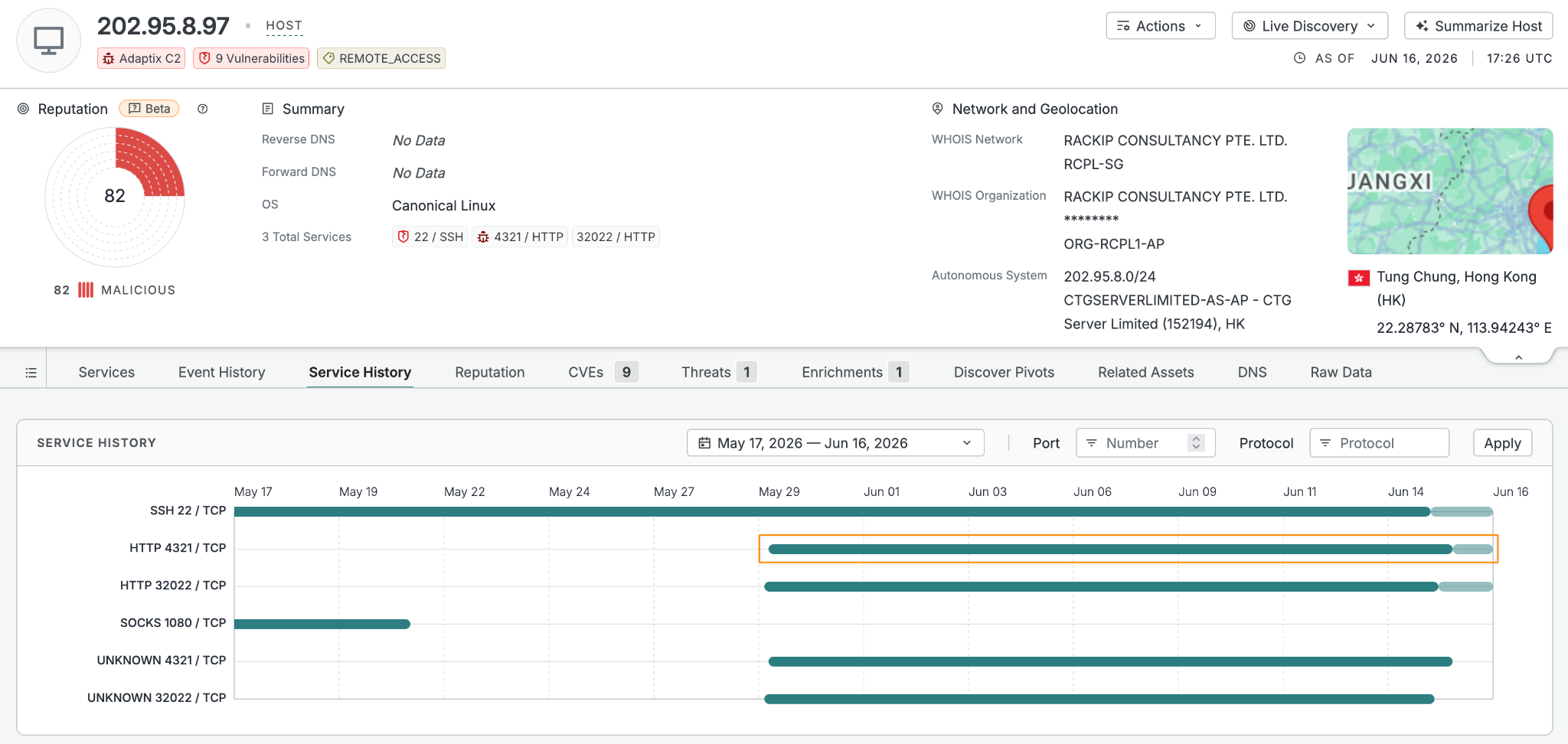
The “TestCoonection” variant is the most instructive signal in the dataset for detection purposes. Changing the Server header requires editing profile.yaml and restarting the teamserver — the operator made a deliberate choice to evade header-based detection. The Server value contains a consistent typo: “Coonection” with a double-o, present across multiple scans. Querying on the 404 body string still catches it.
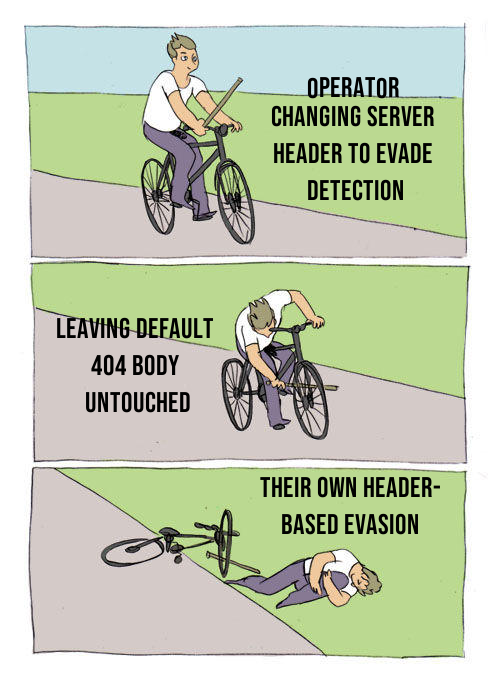
That’s the pattern across this population: operators at varying stages of OPSEC maturity, some running defaults, some making targeted changes. The ones making targeted changes tend to address one detection vector at a time and leave others intact. That’s what makes layered detection — headers and body, passive and active — worth maintaining.
IOCs
Detection Queries
Threat label (simplest — finds all detections including evasion variants):
host.services.threats.name: "Adaptix C2" or web.threats.name: "Adaptix C2"
Follow Along in Censys
Header-based (primary):
web.endpoints.http.headers: (key: "Server" and value: "AdaptixC2")
Version-specific:
web.endpoints.http.headers: (key: "Adaptix-Version" and value: "v1.2")
Body-based (catches header-modified deployments):
web.endpoints.http.body: "You need to enter the correct connection details."
DNS listener (tertiary — requires cross-reference):
host.services.dns.version: "OK" and host.services.protocol = "DNS"
Censys threat detection: THREAT-0210 (includes body hash, header, and “TestCoonection” variant)
Representative Infrastructure
Hivelocity beacon listener cluster:
| IP | Port | ASN | Notes |
23.227.203[.]205 | 43211 | HVC-AS | Default OpenSSL certificate |
46.21.153[.]146 | 43211 | HVC-AS | Same certificate; randomized high ports |
46.21.153[.]148 | 43211 | HVC-AS | Same certificate; randomized high ports |
M247 beacon listener cluster:
| IP | Port | ASN | Notes |
38.132.122[.]141 | 43211 | M247 | Default OpenSSL certificate |
38.132.122[.]145 | 43211 | M247 | Same certificate |
38.132.122[.]161 | 43211 | M247 | Same certificate |
146.70.87[.]23 | 43225 | M247 | Same certificate pattern |
146.70.87[.]64 | 43211 | M247 | Same certificate pattern |
146.70.87[.]96 | 43211 | M247 | Same certificate pattern |
146.70.87[.]218 | 42445 | M247 | Same certificate pattern |
146.70.87[.]237 | 43211 | M247 | Same certificate pattern |
PSB Hosting beacon listener cluster:
| IP | Port | ASN | Notes |
45.155.69[.]106 | 42211 | PSB Hosting | Randomized high ports |
45.155.69[.]153 | 43345 | PSB Hosting | Same pattern |
45.155.69[.]175 | 42455 | PSB Hosting | Same pattern |
185.242.245[.]4 | 44355 | PSB Hosting | Same pattern |
185.242.245[.]27 | 44875 | PSB Hosting | Same pattern |
185.242.245[.]120 | 42534 | PSB Hosting | Same pattern |
Notable individual hosts:
| IP | Port | Notes |
185.190.142[.]66 | 4321 | Contabo FR; RDP open; O=OpenClaw certificate on port 443 |
89.125.255[.]29 | 4321 | RoyaleHosting NL; C=RU, ST=as, O=as certificate |
38.147.173[.]24 | 8562 | Lucidacloud HK; port 50050 also open |
156.225.22[.]201 | 1337 | cognetcloud HK |
202.95.8[.]92 | 4321 | CTG Server HK; sequential with .97 and .98 |
167.17.47[.]121 | 443 / 4321 / 53 | TRUNKNETWORKS-AS SG; teamserver + active DNS beacon listener (dns.version: "OK") |
91.230.94[.]235 | 4321 / 53 | NETRACK-AS RU; teamserver + active DNS beacon listener (dns.version: "OK") |
Samples and Artifacts (2.26.229[.]254)
| Filename | SHA256 | Type |
install.sh | 479b7abd5df2f6ab3de8c32a36478c15012dbc8217f9fa825fd4b9cb7e9b8d13 | Linux persistence installer |
timesync.bin | fb1f4f5a4ef76960577462634f4a104fb307e161fc2791b9231a07a2c751beca | Gopher agent (ELF x64) |
svhost.exe | 06b13dfd84493b01a020eecdabff6308b5b790ed4cd4c7a96a30ae6be1ca325d | Beacon (Windows x64) |
svc_timesync.x64.exe | 7d35d687ae8d4056e394905e9f8962512e6d55ff98664ed1facee6554a565624 | Beacon (Windows x64) |
agent.x86.exe | 51fba778dae6f108f7afa800bdb7745e6a0f6d2630a37ecc84c1d4a1609f9692 | Beacon (Windows x86) |
Operator SSH public key (hardcoded in install.sh):
ssh-ed25519 AAAAC3NzaC1lZDI1NTE5AAAAIIoi/bPuWr2EOQZo2OVDqG8XsRMz5epEGqG9sjcwZGJ1 timesync-manager
Presence of this key in authorized_keys on any host links the infection to this operator.
BeaconHTTP RC4 key (extracted from Windows samples): 1baccab4cbd2b84f6bc54bf8e6551f93
Agent Watermarks
| Agent | Default Watermark |
| Beacon (C++) | be4c0149 |
| Gopher (Go) | 904e5493 |
Find AdaptixC2 Infrastructure on Censys
All hosts in this dataset are tagged under the Adaptix C2 threat label (THREAT-0210) in Censys. The threat detection covers both the default header-based detection and the body-based fallback, including the “TestCoonection” evasion variant.
host.services.threats.name: "Adaptix C2" or web.threats.name: "Adaptix C2"
Follow Along in Censys
Takeaways
- Default branding makes passive detection trivial. The
Server: AdaptixC2andAdaptix-Version: v1.2headers appear on every unauthenticated request because they’re set in the error handler, not a specific route. No credential or endpoint knowledge is needed to identify a default-configuration deployment. - Operators trying to evade headers leave the body string behind. The “TestCoonection” variant confirms that at least one operator modified the response headers to avoid detection but left the default 404 page intact. Body-based detection catches this class of evasion. Defenders should query both signals.
- Three beacon listener clusters suggest coordinated multi-server operations. The Hivelocity, M247, and PSB clusters — identifiable from sequential IPs, shared ports, and identical default OpenSSL certificates — likely represent single operators running redundant callback infrastructure. The shared cert pattern is the clustering signal.
- External visibility varies by transport. BeaconHTTP, BeaconDNS, and BeaconTCP all expose sockets that passive scanning can reach. BeaconSMB does not — the SMB extender binds no socket on the teamserver, and the named pipe lives on an already-compromised victim. Operators who pivot entirely through SMB after initial access leave nothing for internet scanners to find. The deployments counted here are necessarily those that kept at least one externally-reachable listener running.
- 412 web properties across 236 hosts is a population worth monitoring — with the caveat that passive scanning can’t separate authorized engagements from unauthorized ones. Some of these are authorized red team engagements. Passive scanning can’t distinguish them from unauthorized activity. What it can do is surface the infrastructure so analysts can make that determination themselves. The fingerprint is in production (THREAT-0210) and covers both header-based and body-based detection paths, including the evasion variant. Defenders can use the queries above to identify AdaptixC2 deployments in their threat intelligence pipelines.