



Modern security teams and AI agents need real-time visibility into the Internet – but too often, accessing that intelligence means wrestling with rigid REST APIs, fragile scripts, or outdated integrations.
The Censys MCP Server changes that. Built on the Model Context Protocol (MCP), it gives your agents and workflows secure, governed, and direct access to the entire Censys Internet Map – so you can hunt, triage, and respond at machine speed.
What is MCP?
MCP (Model Context Protocol) is an open standard designed by Anthropic to help AI agents tap into real-time, trusted external data and tools. It decouples your agents from messy schema lookups and custom wrappers – and gives you a simple, unified gateway to trusted capabilities like Censys.
Why It Matters
The Problem Today
- Rigid Access: Users must know specific REST endpoints, schemas, and fields – slowing down triage and hunts.
- No Agent Bridge: AI agents (e.g., Claude, Gemini, Copilot) cannot query Censys natively without custom engineering wrappers.
- Limited Governance: Current access patterns lack built-in prompt guards, token scoping, or per-agent usage observability – introducing risk, friction, and limited scalability.
The Censys MCP Server Solution
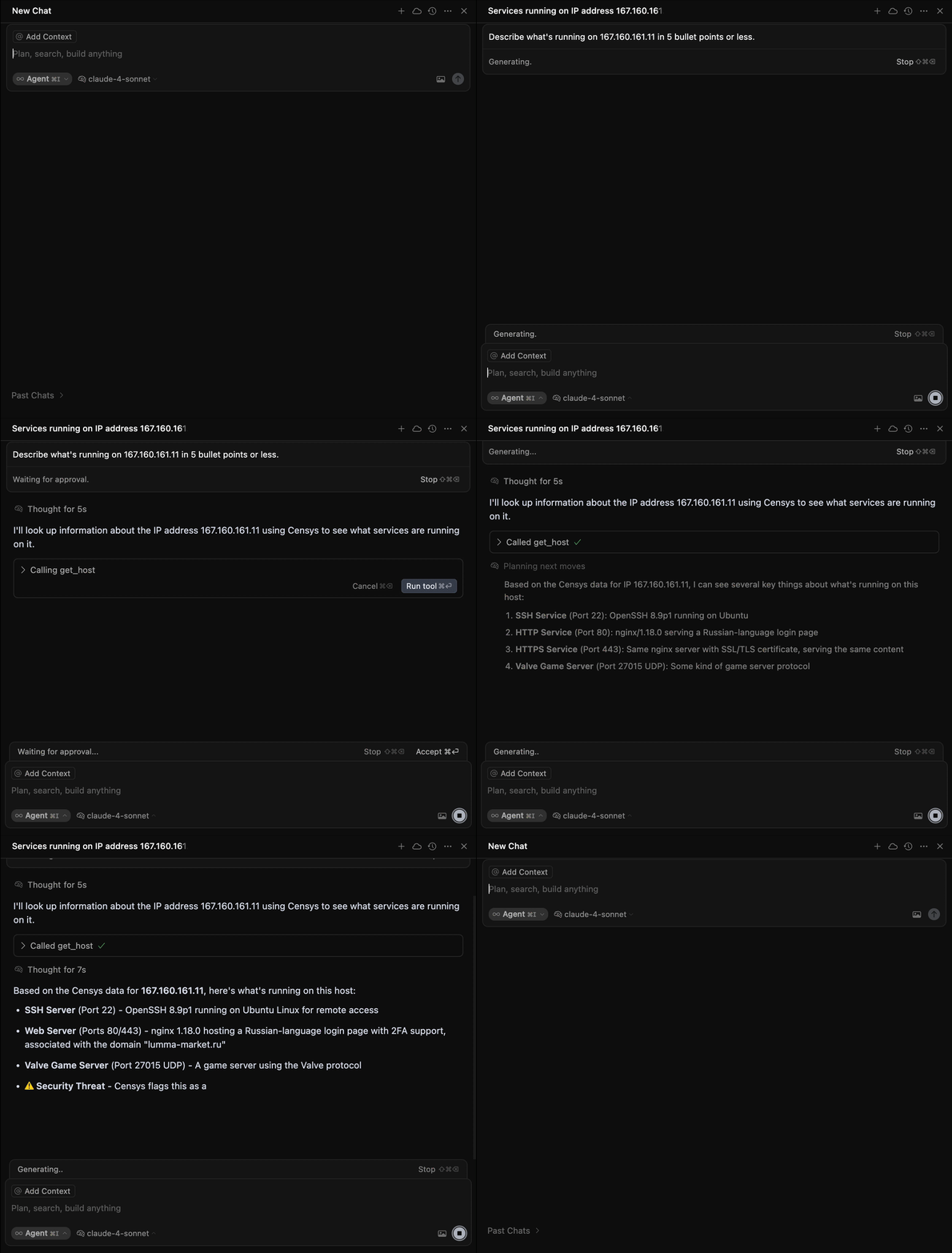
- Agent Native Trust Layer: Empowers LLMs to interact with Censys (ex. search/query, get_host, get_certificate and create_collection) securely, using only a prompt.
- Built In Security & Governance: Every request is authenticated with a Bearer Token & Personal Access Token (PAT), with scoped access, rate limits, and audit logging.
- No Code for Humans, Plug & Play for Agents: SOC analysts, incident responders and threat hunters can trigger powerful actions without writing complex queries.
- Turnkey LLM Integration: Hosted by Censys, the MCP Server works with Gemini 2.5 Flash, Claude, Cursor, and other AI-native IDEs and assistants – no local deployment required.
Real Autonomous Security Workflows
When connected to the Censys MCP Server, your agents can instantly:
Goal: “Investigate an internal host connecting to an unknown IP.”
Prompts → Use Get Host, Get Host Event History, Get Certificates, Pivot to Related Hosts, Create Collection
Goal: “Hunt for rogue remote access tools like AnyDesk or VNC.”
Prompts → Run Search Query, Aggregate Results, List Related Hosts
Goal: “Map exposure of Quantum Security Gateways or ASUS routers by region and prioritize patching.”
Prompts → Run Search Query, Aggregate by Geo, Summarize
Goal: “Find new self-signed certificates spoofing my brand and monitor them.”
Prompts → Search Certificates, Get Multiple Hosts, Create Collection
How Does It Work?
The Censys MCP Server features structured, agent-ready endpoints:
Search & Aggregate
- Run a Search Query – Execute flexible queries across hosts, certificates, or web properties.
- Aggregate Search Results – Summarize large datasets into actionable metrics.
Hosts
- Get Multiple Hosts – Retrieve metadata for multiple hosts in a single request.
- Get a Host – Inspect detailed host data, including services, metadata, and known exposures.
- Get Host Event History – Track changes and historical context for an individual host.
Certificates
- Get Multiple Certificates – Pull information for multiple certificates at once.
- Get a Certificate – Look up a single certificate’s full chain, validity, and relationships.
Web Properties
- Get Multiple Web Properties – Collect data on websites and web apps at scale.
- Get a Web Property – Drill into detailed metadata about a single web asset.
Collections
- List Collections – View all your saved asset collections.
- Create a Collection – Build new, persistent groups of assets for tracking.
- Update a Collection – Modify collection metadata or contents.
- Delete a Collection – Remove collections you no longer need.
- Get a Collection – Retrieve the full details for a specific collection.
- Get a Collection’s Events – See changes and updates within a collection over time.
- Run a Search Query Within a Collection – Search only within the scope of a saved collection.
- Aggregate Results for a Query Within a Collection – Summarize results scoped to a specific collection.
Built for Security
- Org-ID & Bearer Token Authentication – Each request is authenticated with a Personal Access Token (PAT) and an Org-ID.
- Usage Logging – Every request and response is logged for audit and compliance.
Example: A Search in Action
When your security bot or analyst triggers a run a search query request:
- The MCP Server verifies your bearer token, PAT and request parameters.
- It routes the query to the /v3/global/search/query endpoint.
- Matching results stream back to your agent or workflow, ready to enrich detections, power threat hunts, or feed dashboards.
Outcomes
With the Censys MCP Server, security teams and AI agents gain a fundamentally more intelligent and efficient way to operate. Analysts and investigators can triage threats in real time, without writing complex queries or navigating brittle APIs. Every action, whether it’s hunting for rogue remote access tools or mapping infrastructure exposure by region, is enhanced with rich, contextual intelligence that accelerates decisions and reduces manual work. Teams benefit from more automated compliance reporting, streamlined investigations, and deeply integrated governance, all powered by prompt-driven workflows. For new users, AI-native SOC operations become instantly accessible, turning onboarding into immediate value.
Ready to Get Started?
Connect once. Query everything. The Censys MCP Server isn’t just a technical integration, it’s a step-change in how security gets done. Built on the Censys Internet Map and governed by a modern trust layer, it bridges AI-native tools with the richest, most authoritative dataset on the global internet. With Censys, your security workflows evolve from reactive to real-time, from manually intensive to machine-speed.
See the Censys MCP Server in action and experience why Censys is The Authority for Internet Intelligence and Insights.
Schedule a demo or try the Censys MCP Server with your existing Bearer Token and Org ID and start building with:
- Gemini, Claude, CoPilot or any MCP ready agent
- Integrating in code to your playbooks (SOAR, Jupyter etc.)
- Creating your own Cursor/IDE integration