





The Censys platform is a treasure trove of Internet data, a place where our customers and our research team often uncover fascinating findings—from clusters of devices that look like part of a botnet to the unique fingerprints of an adversary’s toolkit.
While our data makes it possible to find these signals, the process can often be messy. An investigation often starts with a single IP and quickly evolves, leading you down a rabbit hole of browser tabs and lost context. Earlier this year, we launched CensEye, our intelligent pivoting engine. CensEye makes the investigation process much more efficient by quickly identifying asset characteristics that often constitute a high-confidence signal for related infrastructure. But we knew we could do more to help analysts keep track of their work.
That’s why we built the Investigation Manager, a new visual workspace in our Threat Hunting Module that transforms how you explore Censys data.
The Problem: Getting Lost in the Hunt
On a CTI team, you often need to build a detection for a specific cluster of adversary infrastructure. Luckily, our Threat Hunting Module comes with lots of these detections out of the box. But suppose your team is investigating something new – something specific to your organization. This requires meticulously documenting every pivot and connection to prove why a fingerprint is a high-confidence signal. Similarly, incident responders need to connect the dots to understand the full scope of an attack—was it just one IP, or was it a larger campaign? Without a clear way to visualize and save your work, these investigations become difficult and time-consuming.
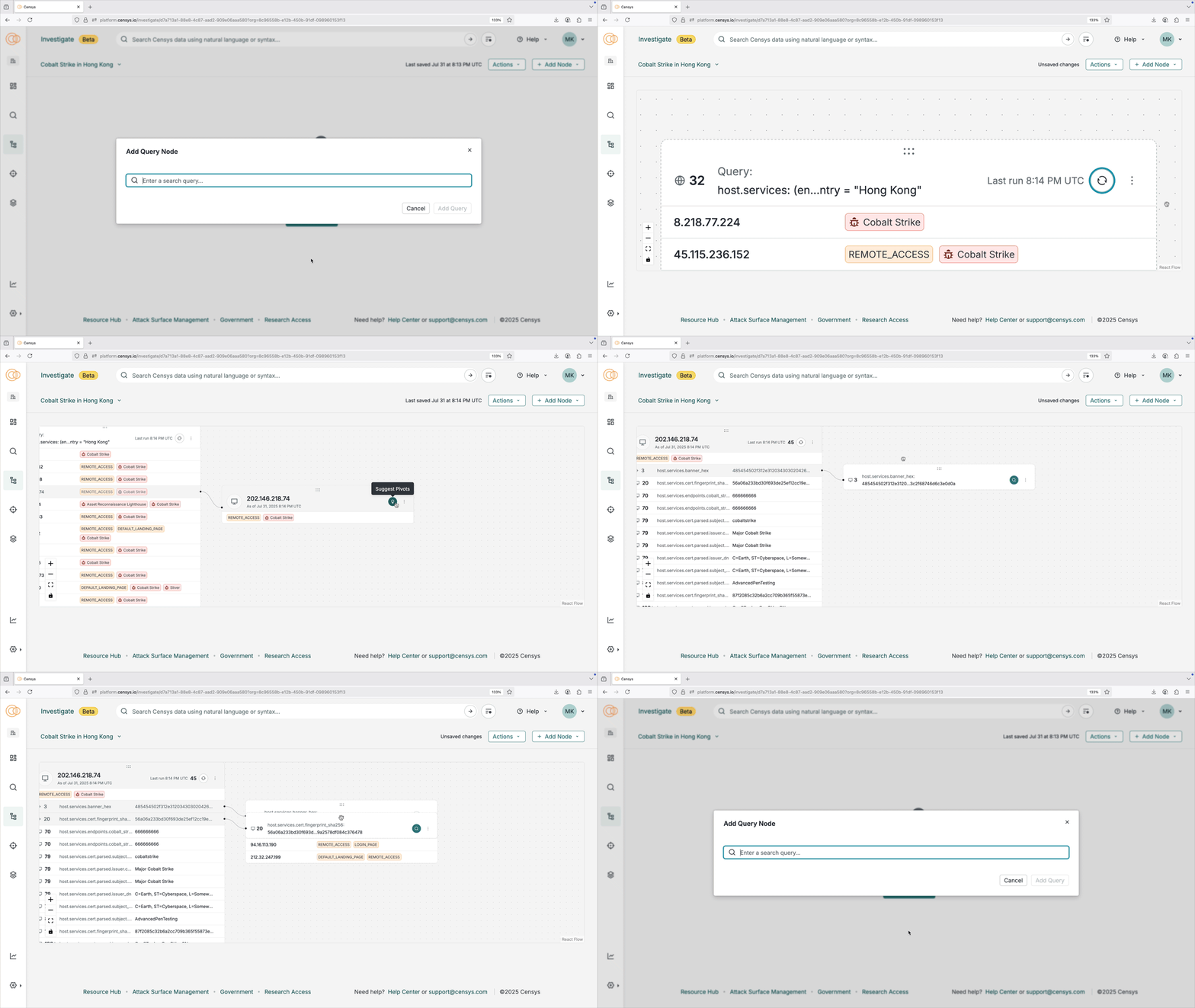
The Investigation Manager solves this problem by giving you a dynamic canvas to graphically map your journey through our Internet data.
How It Works: A Visual Approach to Threat Hunting
The Investigation Manager is a new, node-based interface that makes exploring our data more intuitive and effective. With it, you can:
- Visualize Your Investigation: Turn assets and pivots from our data into nodes on a graph. This graphical view reduces the cognitive load of a complex investigation, making it easy to see where you started and how you arrived at your conclusions.
- Track Your Steps: Each node in the graph represents an asset or a query. A contextual side panel shows the full fidelity of the data, including all relevant information about a host, certificate, or web property. The investigation manager keeps a record of every action, so you can easily show your work to a teammate or a stakeholder.
- Pivot with Confidence: CensEye is natively integrated into the Investigation Manager. When you find an asset of interest, you can instantly pivot to find all related infrastructure with a single click, allowing you to follow the connections that matter most.
- Export Results: When an investigation is complete, you can export the data, nodes, and connections into a detailed json export ready for sharing with a teammate or to be used to build a new detection.
The Investigation Manager isn’t just a new feature; it’s a new way of thinking about how we explore Censys to find threats. It’s designed to save you from getting lost in a sea of browser tabs and empowers you to focus on what you do best: finding what others can’t.
Start an Investigation Today
The Investigation Manager is available now in our Threat Hunting Module. If you are new to Censys, schedule a demo to see how we can help transform the way you explore Internet data and hunt adversary infrastructure.
Want to learn more? Read the docs or watch the video.